Meta Robots Tag Checker: The SEO Bouncer That Keeps Google Out of the VIP Area
Print / Save as PDFInsider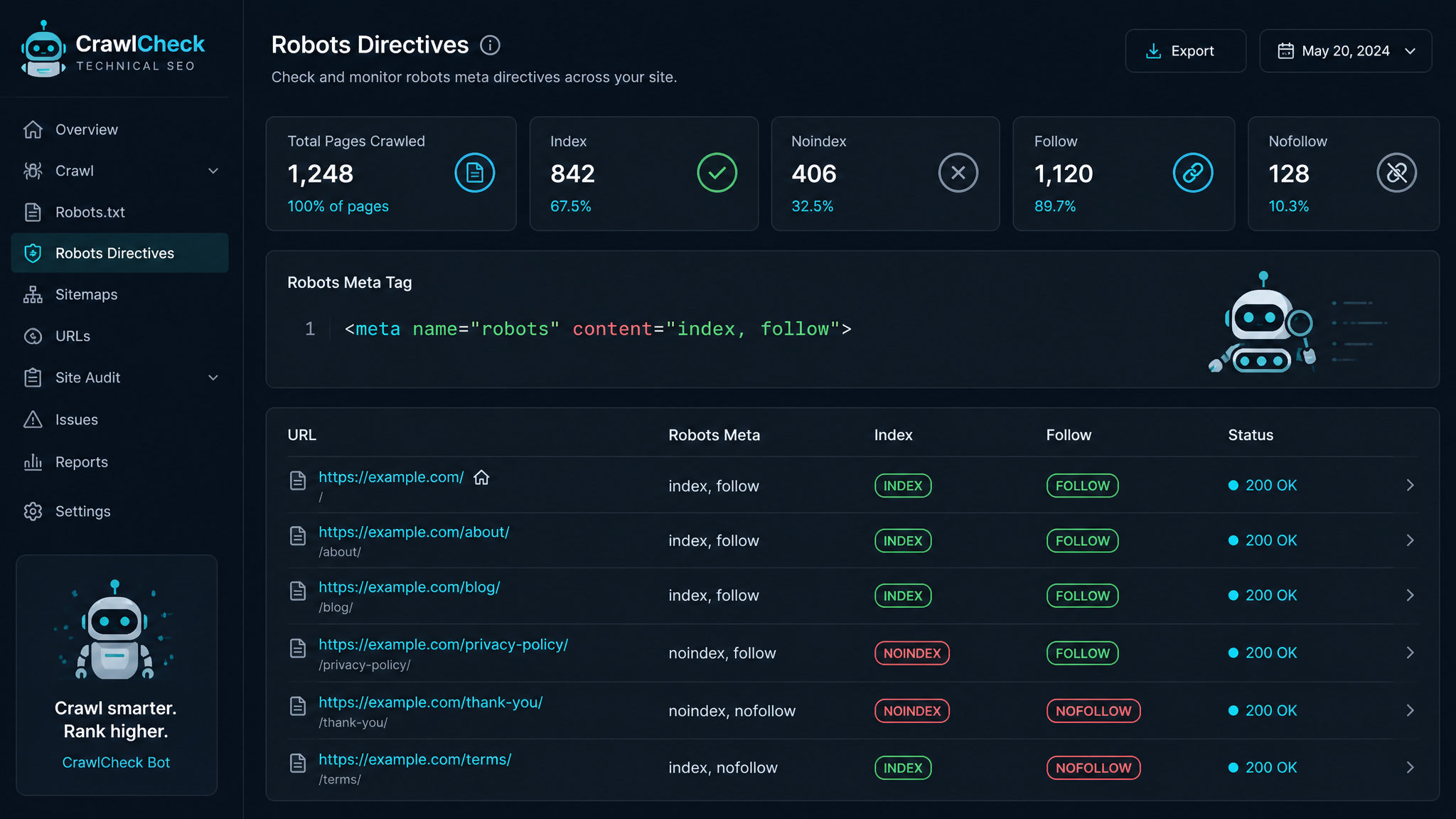
Free ebook: The Free SEO Stack
Keyword research without paying for Ahrefs — the complete guide. Read it online or download the PDF.
100% free · No spam · Unsubscribe any time
If you’ve ever worried about Google rifling through the wrong drawers on your website, chances are you’ve come across the meta robots tag. But what does this little bit of code actually do? And more importantly, are you using it the way an SEO pro—or, let’s be honest, even a moderately competent web admin—should? Grab a coffee and let’s cut through the jargon.
In this guide, you’ll see why meta robots tags are the velvet rope of your site’s search visibility, how they work, and how a free meta robots tag checker can spare you hours of Ctrl+F misery.
What is a Meta Robots Tag? (And Why Should You Care?)
Let’s not overcomplicate this: a meta robots tag is just a line of HTML in your section. Picture it as a set of instructions pinned to your shop window for the search engine bots—"Index this shelf, ignore that back room, and for heaven’s sake, don’t follow that fire exit."
You get to decide, per page, if Googlebot & friends should index, follow links, or just look the other way. Want your latest blog post on the front page of Google, but keep your admin panel under wraps? This tag is your best mate.
The Greatest Hits: Common Meta Robots Directives
Here’s the cheat sheet for what you can tell the bots:
| Directive | Translation for Humans |
|---|---|
| index | Show this page in search |
| noindex | Keep this page out of search |
| follow | Follow links from this page |
| nofollow | Don’t follow links from this page |
| noarchive | Don’t show a cached copy |
| nosnippet | Don’t show a preview snippet |
| noodp | Ignore Open Directory Project data |
Mix and match as you need—noindex, nofollow is the SEO equivalent of "nothing to see here, move along!"
Why Meta Robots Tags Can Save (or Sink) Your SEO
Here’s what most people miss: meta robots tags are like the steering wheel on your SEO car. Get it wrong, and you’ll drive into a ditch—missing out on organic traffic, accidentally leaking private pages, or letting duplicate content run riot.
A bad setting can:
Nail your settings and you’ll:
How to Check Meta Robots Tags (Without Going Cross-eyed)
Old-school method: View Source, play Where’s Wally with , repeat until your will to live fades. Perfect if you enjoy pain or only have one page. For everyone else, there’s a smarter way.
Use a Meta Robots Tag Checker—it’s the digital equivalent of bringing a sniffer dog to a lost property search. Paste your URL, hit "Check", and you’ll get a full readout of what your robots tag is telling the world (and any SEO facepalms that need fixing).
Step-by-Step: How to Use a Meta Robots Tag Checker Like a Pro
index or noindex? follow or nofollow? The tool will flag anything odd, so even if you’ve not slept in days, you’ll spot issues.Spot the Blunder: Worked Example in Action
Let’s say you run a tidy little online shop, and you’ve got this setup:
| Page URL | What You Meant to Tell Google |
|---|---|
| https://yoursite.com/ | index, follow |
| https://yoursite.com/blog | index, follow |
| https://yoursite.com/cart | noindex, nofollow |
| https://yoursite.com/login | noindex, nofollow |
You run them all through the meta robots tag checker:
index, follow – spot on.index, follow – gold star.index, follow – whoops! That’s a privacy slip-up. Update it to noindex, nofollow before Google starts inviting everyone to your checkout.noindex, nofollow – locked down as it should be.Moral of the story: a 30-second check can save you from a GDPR headache (or worse).
Size Does Matter: Page Load, Crawling, and When to Noindex
Let’s talk numbers. Suppose your product page is a photo gallery in disguise—2.5 MB (that’s 2,560 kB, or roughly 88.2 ounces if you’re measuring your website like produce at Tesco). Googlebot doesn’t have infinite patience; it’ll crawl fewer pages if each is a lumbering giant. Sometimes, it’s smart to noindex your image-heavy test pages while you trim the fat. Meta robots tags = your portion control.
Best Practices: Avoiding Meta Robots Mayhem
noindex pages like you’d check you locked the front door. One typo and your entire blog could vanish from search.nofollow sparingly—don’t cut off Google’s route unless you’re SURE you want to hoard all the link juice.Questions People Are Actually Asking
What is robots meta tag?
Think of the robots meta tag as a post-it note for search bots stuck in your page’s . It tells them what to do—index, follow, or walk on by.
What is meta robots tag?
It’s an HTML meta tag specifically for wrangling search engine bots. Use it to say things like index, noindex, follow, or nofollow—basically, “Google, do this. Not that.”
How do I check if my page has a meta robots tag?
Sure, you could trawl through source code for , but a Meta Robots Tag Checker will surface it instantly—no headaches, no missed pages.
What does noindex, nofollow mean?
It’s the digital equivalent of “Private: No Entry.” You’re telling search engines to keep this page out of the results and not to follow any links on it. Perfect for login, admin, or thank-you pages.
Can I use both robots.txt and meta robots tags?
Absolutely. Robots.txt is your "area closed for maintenance" sign—it blocks whole sections. Meta robots tags are more like "Staff Only" on a specific door. Use both for full control.
Why is my page not appearing in Google search?
Chances are, you’ve got a noindex meta robots tag lurking somewhere. Plug your page into a tag checker, and if you see noindex, swap it for index if you want the page to show up.
Do I need a meta robots tag on every page?
Nope! If you’re happy with business as usual (index, follow), you don’t need the tag at all. Only add it when you want to override what search engines would do by default.
Conclusion: Take Back Control—One Tag at a Time
Meta robots tags are the gatekeepers of search. Use them wisely and keep Google from snooping in your broom cupboard—or, worse, ignoring your best content. Mistakes can cost you dearly, so make tag checking a regular habit. The free Meta Robots Tag Checker is your best line of defence for a squeaky-clean, SEO-optimised site.
Free tools to put this into practice
Reading is all well and good—but it’s running the test that actually moves you up the rankings. Here are the free KeywordNumbers tools that’ll make you look like an on-page SEO wizard:
And yes, every free SEO tool on KeywordNumbers is genuinely free—no sign-up, no faff, no credit card lurking behind the curtain.
Free ebook: The Free SEO Stack
Keyword research without paying for Ahrefs — the complete guide. Read it online or download the PDF.
- Which free tools replace Ahrefs, SEMrush & Moz
- Step-by-step keyword research workflow
- How to find content gaps without paying a penny
- The exact stack KeywordNumbers is built on
100% free · No spam · Unsubscribe any time
Ready to research your keywords?
Try our free keyword tools — no signup required.