Meta Tag Length Checker: The Unsung Hero Stopping Google From Mutilating Your Headlines
Print / Save as PDFInsider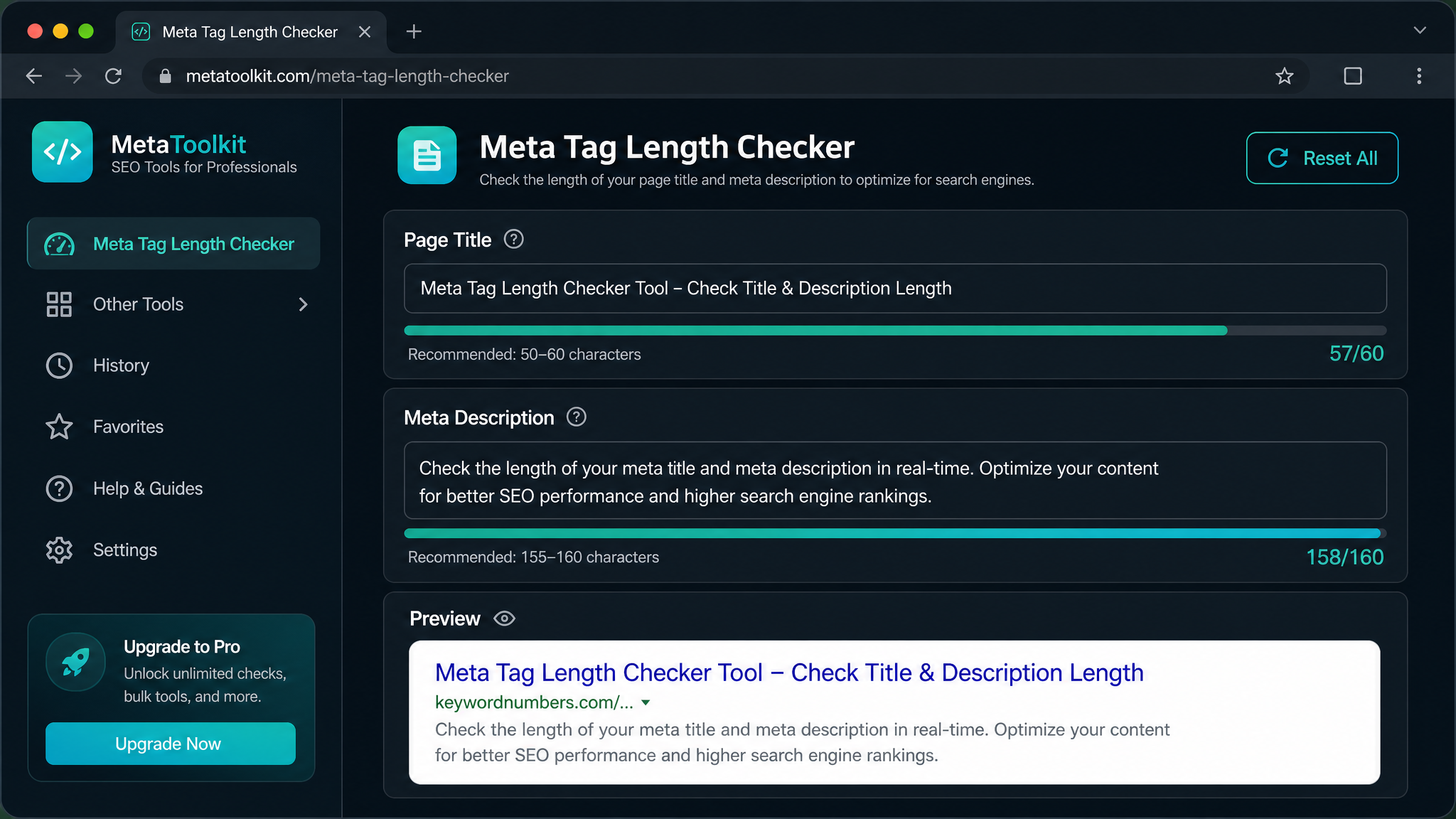
Free ebook: The Free SEO Stack
Keyword research without paying for Ahrefs — the complete guide. Read it online or download the PDF.
100% free · No spam · Unsubscribe any time
If you’ve ever watched Google unceremoniously chop your carefully crafted headline in half, you know the pain. Meta tags are your website’s introduction at the search party—and just like turning up in an ill-fitting suit, going over the line makes you memorable for all the wrong reasons. Let’s dig into why meta tag character limits aren’t just a fussy detail, how to write titles and descriptions that actually get clicked, and how a free meta tag length checker is the secret weapon you didn’t know you needed.
Meta Tags: The Name Badge and Elevator Pitch of Your Website
Quick pop quiz: What bits of your site do people see before they even click through? That’s right—the meta title and meta description. These are the neat little snippets tucked into your HTML, and they serve as the digital equivalent of a shop window and a snappy sign. The big two are:
Get these right and you’re halfway to convincing both search engines and humans that your page is worth a look. They set expectations, boost click-through rates, and help you attract the audience you actually want—not just random window-shoppers.
Why Meta Tag Character Limits Are the ‘Speed Limit Signs’ of SEO
Bet you didn’t realise Google has its own version of traffic cops. Go over the recommended lengths and your meta tags get snipped mid-sentence, trailing off like an awkward conversation. Search engines have only so much real estate on the results page. If you run long, you don’t just look messy—you risk hiding the stuff people actually care about.
Stick within the limits and your message lands as intended: clear, punchy, and complete.
Recommended Meta Tag Lengths: The Goldilocks Zone
Here’s what most people miss: search engines don’t count letters. They count pixels. Some characters are skinny little things ("i"), some are big-boned ("W"). But for mere mortals, here’s a handy cheat sheet:
| Meta Tag | Recommended Length (Characters) | Approximate Pixel Limit (Desktop) |
|---|---|---|
| Meta Title | 50–60 | ~600 pixels |
| Meta Description | 150–160 | ~920 pixels |
Meta Tag Length Checker: Your Measuring Tape for the SERPs
Ever tried counting pixels by hand? About as fun as alphabetising spaghetti. A Meta Tag Length Checker does the heavy lifting: paste your title and description in, and it’ll instantly let you know if you’re about to run off the edge.
Worked Example: The Good, The Bad, and The Truncated
Let’s get concrete. Imagine you run a baking blog:
"How to Bake the Perfect Victoria Sponge Cake in Under 60 Minutes"
"How to Bake the Perfect Victoria Sponge Cake with Strawberries and Cream for Afternoon Tea Parties in the UK and Abroad"
Option 1 nails the Goldilocks zone—visible, punchy, and fits perfectly. Option 2? It’ll get the dreaded trim, and your audience misses the best bits. Same goes for meta descriptions:
This is well within the 150–160 character corridor, so nothing gets left behind.
Best Practices: How to Write Meta Tags That Don’t Embarrass You
Meta Tag Mishaps: Rookie Errors to Dodge
Questions People Are Actually Asking
What happens if my meta title or description is too long?
Search engines will lob off the overflow and slap on an ellipsis (…). That can hide the juicy details and send your click-through rates into hiding.
How do I check the length of my meta tags?
Simple: use a free Meta Tag Length Checker. Paste your tags in and see whether they fit the bill—no need to squint at character counters or guess at pixel widths.
Does the meta description affect my rankings?
Not directly—Google’s made that clear. But a cracking description can lift your click-through rate, and that can give your rankings a gentle nudge. Worth the effort.
What’s more important: character count or pixel width?
Pixel width is the true judge, because that’s what actually gets shown in the search results. Character count is just a handy shorthand—good enough for most, but perfectionists should always check by pixels.
Can I use the same meta tags on multiple pages?
Nope. Every page is its own beast and needs a unique title and description. Otherwise, you’re just confusing both users and search engines—and nobody likes a muddled shop floor.
Should I include my brand name in the meta title?
Tuck your brand name at the end, especially for the homepage or big-ticket landing pages. But keep your primary keyword up front for maximum punch.
How often should I review my meta tags?
Aim for at least a quarterly review—or sooner if you’ve updated content or seen your rankings wobble. Always run your updates through a meta tag checker to stay sharp.
What is the meta tag character limit?
For a meta title, aim for 50–60 characters. For a meta description, 150–160 characters is the sweet spot. Strictly speaking Google measures pixel width, not letters — roughly 600 pixels for titles and 920 for descriptions — but the character counts above are the easy rule of thumb that keeps you safe.
How many characters can meta keywords have?
The meta keywords tag has no length limit that matters for SEO — Google has ignored it for ranking since 2009, so it makes no difference how many characters or keywords you cram in. Spend that effort on the meta title (50–60 characters) and meta description (150–160 characters) instead, which Google genuinely uses to build your search snippet. To see exactly which meta tags a page is running, drop it into the free Meta Tag Analyser.
What's the ideal title tag length?
Keep your title tag to around 50–60 characters (about 600 pixels on desktop). Go much longer and Google lops off the end with an ellipsis, so your most important words should sit near the front. Paste your title into the free Meta Tag Length Checker to see instantly whether it fits.
How do I use a meta description length checker?
Dead simple: open the free meta description length checker, paste your description in, and it shows your character count and pixel width straight away — plus a live preview of how the snippet will look in Google. No sign-up, no card, no catch.
What's the meta description pixel width limit?
On desktop, Google shows roughly 920 pixels of your meta description before truncating; on mobile it's a little less. Because wide letters like "W" eat more space than skinny ones like "i", two descriptions with the same character count can truncate differently — which is exactly why checking by pixel width matters, and why the checker shows both.
Are meta tag limits different on mobile?
Yes. Mobile results tend to truncate titles and descriptions a touch earlier than desktop, so if most of your traffic is on phones, err on the shorter side. The Meta Tag Length Checker previews both desktop and mobile so you can see where each one cuts off before you publish.
> Looking for a free alternative to Moz or Semrush for your meta tag checks? KeywordNumbers gives you 35+ SEO tools — including meta tag analysis — at no cost, with no sign-up. See how it compares to Moz, Ahrefs and Semrush.
Wrapping Up: Don’t Let Your Meta Tags Go Rogue
Meta tags might look small, but they punch well above their weight in SEO. Stick to the recommended lengths and you’ll look polished, trustworthy, and more clickable than the competition. Don’t leave your search appearance to chance—grab a Meta Tag Length Checker and see your site in its Sunday best.
Free tools to put this into practice
Reading is one thing — testing your own pages is what moves the needle. Here are the free KeywordNumbers tools that pair best with this guide:
Every one of our free SEO tools is genuinely free to use, with no sign-up required.
Weighing up Moz? Compare it first
Before you commit to a paid plan, it is worth seeing what else is out there. Read our full guide to the best Moz alternative tools — the free and paid options UK marketers actually use.
Free ebook: The Free SEO Stack
Keyword research without paying for Ahrefs — the complete guide. Read it online or download the PDF.
- Which free tools replace Ahrefs, SEMrush & Moz
- Step-by-step keyword research workflow
- How to find content gaps without paying a penny
- The exact stack KeywordNumbers is built on
100% free · No spam · Unsubscribe any time
Ready to research your keywords?
Try our free keyword tools — no signup required.