Title Tag Analyser: The Meta Tag Secret Weapon Google Wishes You’d Ignore
Print / Save as PDFInsider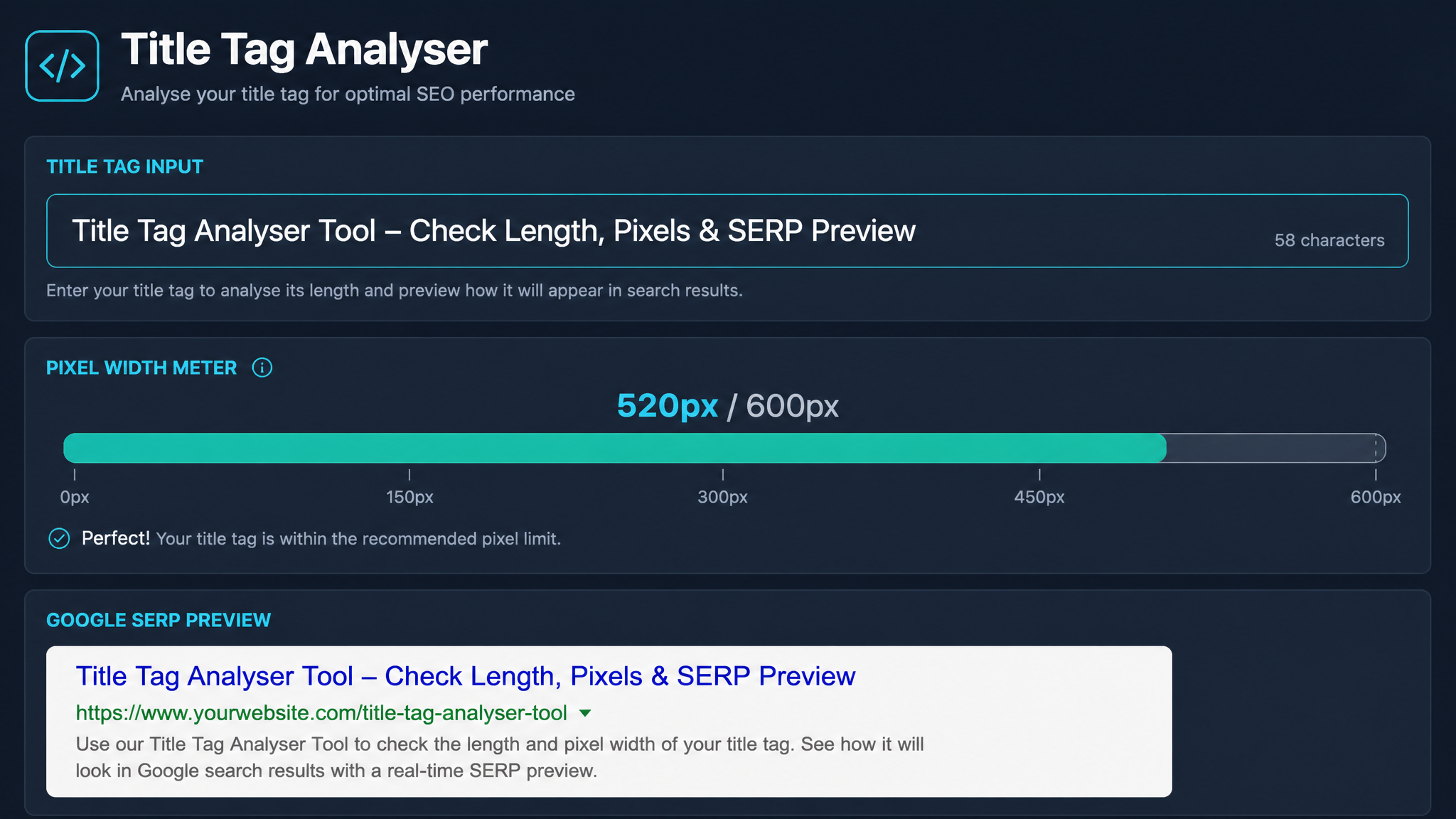
Free ebook: The Free SEO Stack
Keyword research without paying for Ahrefs — the complete guide. Read it online or download the PDF.
100% free · No spam · Unsubscribe any time
Ever written the perfect page title, pressed publish, and then seen Google slice it up like a chef with a vendetta? That’s where a title tag analyser comes in—your secret weapon for meta tag precision, not guesswork. In this guide, you’ll learn exactly what a title tag analyser is, why meta tags (especially that all-important title) matter, and how to sharpen your site’s first impression on the SERP buffet. Real numbers, real examples, and just enough wit to keep you awake.
What is a Title Tag Analyser (and Why Should You Care)?
Here’s what most people miss: your title tag isn’t just a label for your page—it’s the shopfront sign, the headline act, and the first thing most searchers will ever see. But Google doesn’t give you infinite real estate to play with. Enter the title tag analyser. Think of it as a measuring jug for your headline—no more guessing if you’re pouring too much.
A title tag analyser checks:
If you care about clicks, rankings, or not looking like an amateur, you need one. No exceptions for “but mine’s really good.”
Why Meta Tags (and Especially Title Tags) Matter for SEO
Bet you didn’t realise: Google treats your title tag like a book cover—if it’s dull, wordy, or illegible, it gets ignored. Meta tags, especially title and meta description, are your one-shot elevator pitch to the searcher.
A well-optimised title tag can:
A bad title tag? You’ll see your listing mangled, misunderstood, or just plain skipped. Like showing up to a black-tie event in your pyjamas.
Title Tag Length: Characters vs. Pixels (Yes, Size Matters)
Here’s the kicker: Google doesn’t measure title tags in characters. It measures them in pixels. That means “SEO” and “WIDE CHARACTERS” are not created equal.
Worked Example
Let’s say you’re writing a title for a blog post about pancake recipes:
| Title | Characters | Approx. Pixels (desktop) |
|---|---|---|
| Easy Pancake Recipes for Beginners | 33 | ~320 |
| Fluffy Pancake Recipes: UK & US Tips | 39 | ~540 |
| Best Pancakes – Simple, Quick, Delicious | 39 | ~580 |
Google typically displays up to 600 pixels (about 55-60 characters, if you’re lucky). But if your title is full of wide letters (“W”, “M”, “O”), it’ll get truncated faster than you can say “meta tag”.
That’s why a title tag analyser checks pixel width, not just character count. It’s like using a tape measure instead of just guessing if your sofa will fit through the door.
How to Use a Title Tag Analyser: Step-by-Step
Meta Tag Analyser vs. Title Tag Analyser: What’s the Difference?
A quick reality check: all title tags are meta tags, but not all meta tags are title tags.
If you want the full MOT for your on-page SEO, use both. But for that crucial first impression, the title tag analyser is your go-to paring knife—precise, sharp, and essential.
Common Mistakes When Writing Title Tags (And How Analysers Fix Them)
A good analyser will flag all of these, saving you from SEO embarrassment (and maybe a few sleepless nights).
Questions People Are Actually Asking
What is the title tag used for?
The title tag tells search engines and users what your page is about. It’s the clickable headline in search results and appears at the top of browser tabs. Get it right and you’ll improve your chances of ranking and attracting clicks.
What does the tag title do?
The tag title acts as your page’s first impression. It helps Google categorise your content and entices users to click. Think of it as the headline act on a festival lineup—it sets expectations for what follows.
How to calculate tag title and tax?
If you’re here for SEO, "tag title and tax" is probably a mix-up—no taxman is coming for your meta tags (unless you count Google’s algorithmic penalties as a form of taxation). But if you mean how to measure your title tag, use a title tag analyser tool to check length and pixel width.
How much for tags and title?
If you’re asking about cost, most meta and title tag analysers are free online (like the KeywordNumbers title tag analyser). If you’re wondering about value, a well-optimised title tag is priceless for SEO—no VAT required.
How much are tag and title fees?
There are no official fees for creating meta tags or title tags—SEO isn’t the DVLA, and you don’t need to renew them yearly. If you’re paying someone, it’s for their expertise, not a government charge.
What’s the ideal title tag length for Google?
Keep your title tags under 60 characters or 600 pixels. But it’s pixel width that matters most—so wide letters mean fewer characters. Always check with a title tag analyser to avoid SERP embarrassment.
Should my brand go at the start or end of my title tag?
Put your main keyword or topic first, and your brand at the end—unless you’re a household name (hello, BBC). That way, users and Google see the important stuff upfront.
Conclusion: Give Your Titles the Attention They Deserve
In the wild world of SEO, your title tag is your shopfront, your handshake, and your shot at the SERP catwalk—all rolled into one. Don’t leave it to chance. Run your next headline through a title tag analyser tool, and give your pages the best shot at standing out, not getting cut off.
Ready to see how your titles shape up? Try the analyser for yourself and wave goodbye to truncated, lacklustre headlines.
Free tools to put this into practice
Reading is one thing — testing your own pages is what moves the needle. Here are the free KeywordNumbers tools that pair best with this guide:
Every one of our free SEO tools is genuinely free to use, with no sign-up required.
Free ebook: The Free SEO Stack
Keyword research without paying for Ahrefs — the complete guide. Read it online or download the PDF.
- Which free tools replace Ahrefs, SEMrush & Moz
- Step-by-step keyword research workflow
- How to find content gaps without paying a penny
- The exact stack KeywordNumbers is built on
100% free · No spam · Unsubscribe any time
Ready to research your keywords?
Try our free keyword tools — no signup required.