Website Word Counter: Instantly Size Up Your Site’s Content Before Google Does
Print / Save as PDFInsider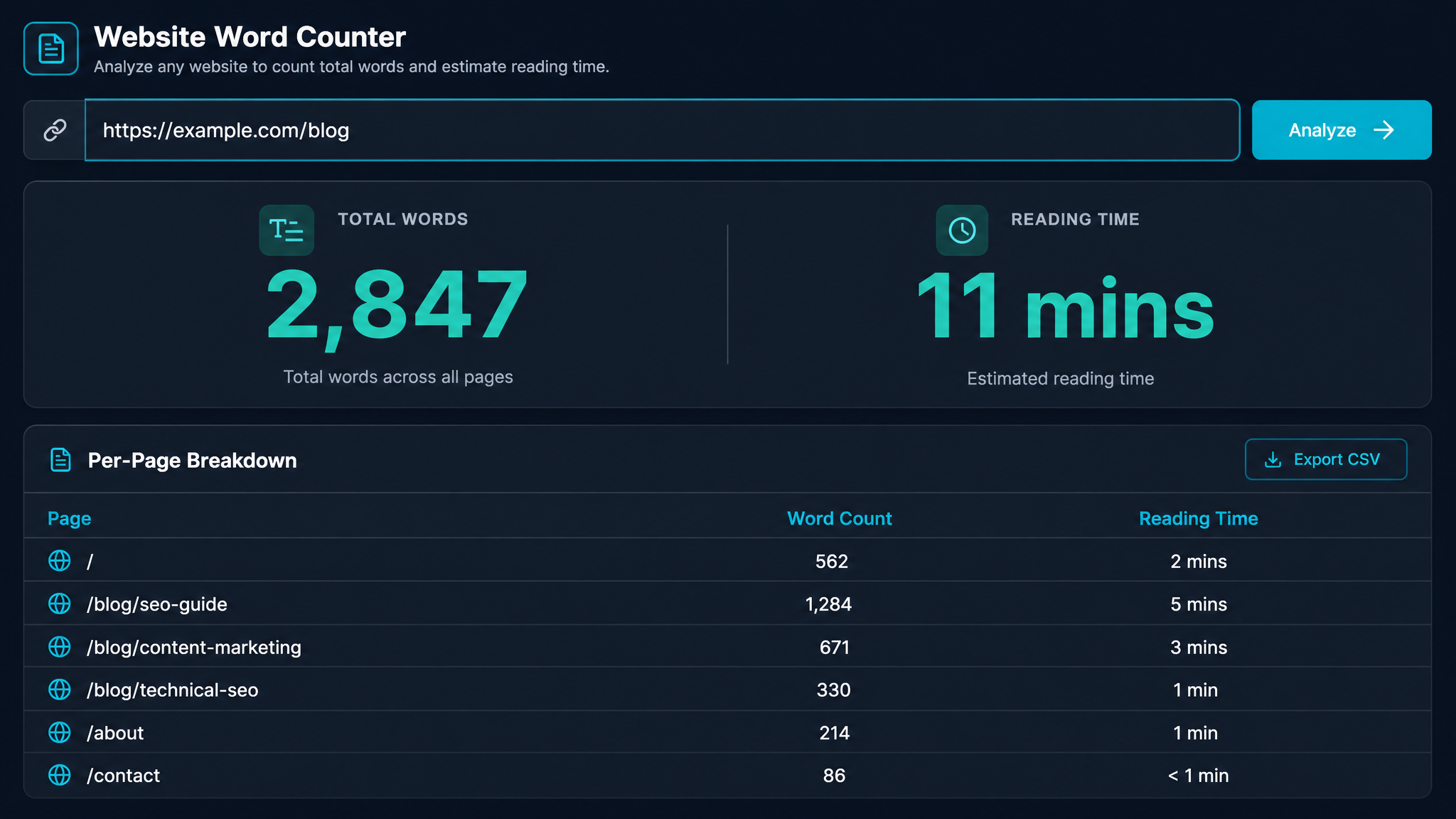
Free ebook: The Free SEO Stack
Keyword research without paying for Ahrefs — the complete guide. Read it online or download the PDF.
100% free · No spam · Unsubscribe any time
Ever wondered just how much content your website is actually packing? Not page by page, but the grand total—the whole lot, soup to nuts? If you've ever tried tallying up every word by hand, you'll know it's about as fun as counting grains of rice in a bag. Luckily, there’s a smarter way. Today, you’ll learn how to instantly analyse the total word count of any website (yours or your competitor's), why it matters for SEO, and how to do it without losing your will to live.
Why Bother Counting Words on a Website? (Isn’t SEO Hard Enough?)
Here’s what most people miss: word count isn’t just a vanity metric. It’s a rough-and-ready indicator of how deep your content runs versus the competition. Google doesn’t rank by word count, but it does love sites that answer questions thoroughly. Too thin, and you’re a snack, not a meal. Too bloated, and you risk boring readers (and Google’s crawl budget isn’t bottomless).
Think of your site’s word count like the fuel tank in a car. Too little and you stall; too much and you’re hauling dead weight. Goldilocks had a point.
How to Check Total Word Count on a Website: Three Methods
Let’s get practical. Here are the most common ways to check a website’s total word count—from dead simple to “bring a hard hat.”
1. Use an Online Website Word Counter Tool (Effort Level: Toasting Bread)
If you want speed and zero faff, try this free website word counter tool from KeywordNumbers. Paste in your URL, hit go, and it’ll scan your public pages for you.
Let's say you run www.exampleblog.com. Paste in the homepage URL. The tool crawls the site, finds 50 indexable posts and tallies up 75,000 words total (that’s about 165 pages of a paperback novel, or, for the metric fans, roughly 300,000 characters). Now you know if you’re running a novella or War and Peace.
2. Manual Copy-Paste (Effort Level: Chopping Wood)
If your site’s tiny (think, three pages and a dream), you could open each page, select all, and paste into a word counter tool. Add up the results. But for anything with more than a handful of pages, this is like mowing a football pitch with nail scissors. Use only for micro-sites and masochists.
3. Using a Site Audit or SEO Crawler (Effort Level: Power Tools Required)
SEO pros with the big toys—Screaming Frog, Sitebulb, or Sitechecker—can crawl entire sites and export word counts by URL. Sum up the totals in a spreadsheet. This is great for audits, but massive overkill for a quick check.
| Method | Speed | Setup Needed | Best For |
|---|---|---|---|
| Online Tool | Fast | None | Anyone, any site |
| Copy-Paste | Slow | None | Tiny sites, single pages |
| SEO Crawler | Fast-ish | Yes | Large sites, in-depth audit |
Why Total Word Count Matters for SEO (and When It Doesn’t)
Bet you didn’t realise: sometimes, having more words is just more waffle. Google’s John Mueller has said repeatedly—word count alone isn’t a ranking factor. But in the real world? Thin sites (less than 300 words per page or under 5,000 for the whole site) rarely outrank well-fleshed-out competitors.
A high word count can signal:
But! If you’re stuffing pages to hit an arbitrary number, Google’s not fooled. Quality wins every time. No exceptions for "but mine’s really good."
How to Check Word Count on WordPress (Fastest Methods)
Running WordPress? Checking post or page word count is like checking your petrol gauge—it’s right there, if you know where to look.
Real-World Example: How Many Words Does a Typical Website Have?
Here’s a worked example, both metric and imperial:
So, if you’re benchmarking against competitors, don’t just count your own—run their domains through the website word counter and see what you’re up against. It’s like peeking at your neighbour’s garden before the village fete.
What About Adding a Word Counter to Your Own Site?
Want visitors (or writers) to see word counts live? Add a word counter widget. For WordPress, search for 'word counter' plugins. Elsewhere, drop in a bit of JavaScript or use an iframe from a free service (just check for privacy and security). Handy for writing contests, education, or just keeping everyone honest.
Questions People Are Actually Asking
How many words online counter?
A typical online word counter can handle anything from a single tweet to entire chapters—usually up to 50,000–100,000 characters per paste. For whole websites, use a dedicated website word counter tool that crawls the URLs for you.
How to check word count on a website?
The fastest way: paste the site’s URL into a website word counter tool. It’ll fetch all public pages, add up the words, and show you the total. For small sites, you can tally manually, but spare yourself the headache.
How to check word count on WordPress?
For single posts or pages, open them in the editor—WordPress shows the word count automatically. For your whole site, use a plugin like WP Word Count, or copy your URLs into an online tool that can crawl them.
How to check website word count?
Use a website word counter tool for a full-site scan. Paste in the homepage or sitemap URL, and the tool will crawl linked pages and total up the words. This works for your site or any public website.
How to add a counter in Word?
In Microsoft Word, the word count appears in the status bar at the bottom. For a live counter in your document, insert a field: go to 'Insert' > 'Quick Parts' > 'Field', select 'NumWords', and it’ll auto-update.
Does word count affect SEO?
Not directly. Google doesn’t rank by word count, but thorough, well-structured content tends to perform better. Focus on quality first—then check if your depth matches the competition.
Can I check a competitor’s website word count?
Absolutely. As long as the site is public, paste their URL into a website word counter tool and see how much content they’re packing. Great for benchmarking.
Wrap-Up: Ready to Count Your Website’s Words?
Whether you’re an SEO, blogger, or just someone who likes to know exactly how much digital real estate you’ve built, checking your website’s total word count is as easy as making a cuppa. Skip the spreadsheets and manual slog—try the free website word counter tool from KeywordNumbers and get your answer in seconds. Go on, give it a whirl—your next content audit just got a whole lot simpler.
Free tools to put this into practice
Reading is one thing — testing your own pages is what moves the needle. Here are the free KeywordNumbers tools that pair best with this guide:
Every one of our free SEO tools is genuinely free to use, with no sign-up required.
Try the Website Word Counter
Good news — there's now a free tool for exactly this. Give our Website Word Counter a go and put this guide straight into practice.
Free ebook: The Free SEO Stack
Keyword research without paying for Ahrefs — the complete guide. Read it online or download the PDF.
- Which free tools replace Ahrefs, SEMrush & Moz
- Step-by-step keyword research workflow
- How to find content gaps without paying a penny
- The exact stack KeywordNumbers is built on
100% free · No spam · Unsubscribe any time
Ready to research your keywords?
Try our free keyword tools — no signup required.