Best Tools for Website Speed Analysis: Internet Speed Analysers That Actually Move the Needle
Print / Save as PDFInsider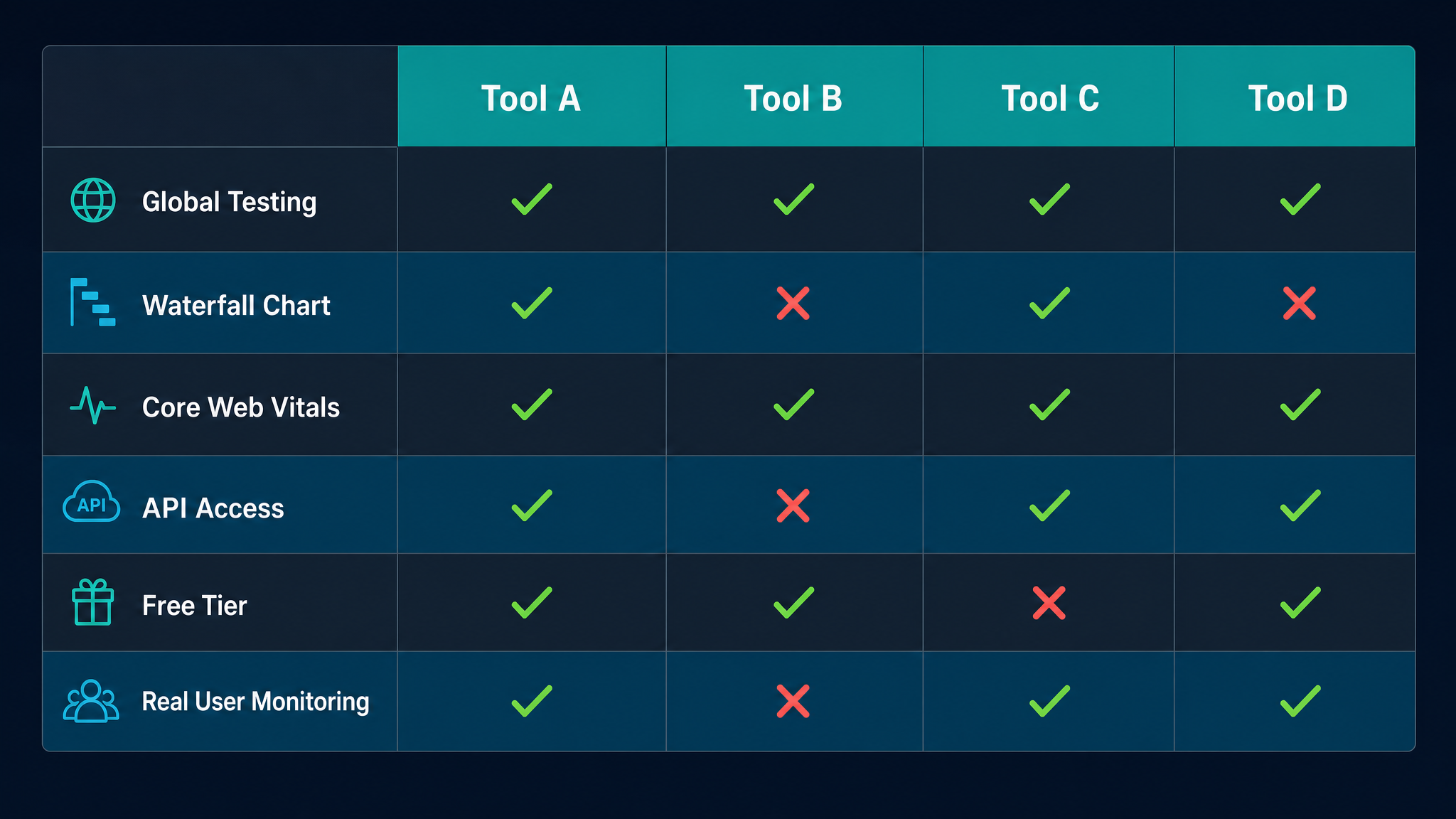
Free ebook: The Free SEO Stack
Keyword research without paying for Ahrefs — the complete guide. Read it online or download the PDF.
100% free · No spam · Unsubscribe any time
Ever waited for a website to load and thought, "I could've made a cuppa by now"? You're not alone. Site speed makes or breaks user experience—and your search rankings. In this guide, you'll get the lowdown on the best tools for website speed analysis, find out how an internet speed analyser is your secret diagnostic weapon, and get practical tips to fix what’s slowing you down.
Why Website Speed Matters (and Why Just Guessing Won’t Cut It)
Here's what most people miss: website speed isn't just about impatience or showing off your fancy hosting. Google uses speed as a ranking factor. Visitors bounce if things drag (no exceptions for "but mine’s really good").
Think of your site as a high-street shop. If the front door sticks and customers spend ages waiting to get in, they’ll just go next door. Speed analysis tools are your digital WD-40: they show you exactly where things are sticking, so you can fix them before your competition does.
What Does an Internet Speed Analyser Actually Do?
Bet you didn’t realise: a proper internet speed analyser isn’t just a stopwatch for your homepage. It’s more like a full-body scan for your website, showing how every part loads—images, scripts, third-party widgets, you name it.
A good analyser gives you:
If you want a quick, no-nonsense speed test, try the KeywordNumbers Speed Test Tool. It's designed for real-world results, not just impressing Lighthouse.
The Best Tools for Website Speed Analysis (2024 Edition)
Here’s the chef’s knife set for speed analysis. Each tool has strengths—choose the one (or combo) that fits your site and sanity:
| Tool | Free? | Key Features | Best For |
|---|---|---|---|
| KeywordNumbers Speed Test Tool | Yes | Easy, accurate, global test, clear breakdowns | Fast checks, all sites |
| Google PageSpeed Insights | Yes | Core Web Vitals, mobile/desktop, Google advice | SEO, mobile optimisation |
| GTmetrix | Yes | Waterfall, historical data, performance grades | Deep dives, history |
| Pingdom Tools | Yes | Simple interface, global test locations | Beginners, quick overviews |
| WebPageTest | Yes | Advanced scripting, multi-step, video playback | Developers, power users |
Worked Example: Analysing a Site with Real Numbers
Let’s say you run a site called BestBakes.com. You pop your homepage into an analyser and get:
Switching to imperial for a moment: 450 ms is roughly 0.00028 miles per second if you travelled that distance. (OK, that one’s a stretch, but you get the point—speed is relative, and even a few hundred milliseconds count in the digital world.)
You run the KeywordNumbers Speed Test Tool and it flags a 2 MB hero image as the main culprit. Swap it for a 200 KB version, test again, and your LCP drops to 2.1 seconds. That’s like swapping out a rusty lorry for a sports car—suddenly, you’re leading the pack.
How to Choose the Right Speed Analysis Tool for Your Needs
Not all analysers are created equal. Here’s how to pick:
Pro tip: Don’t trust just one result. Run your site through at least two tools and compare.
What Slows Down Your Website (and How to Fix It)
Ever felt like your site’s running through treacle? Common culprits:
A good analyser, like this one, will show you exactly where you’re losing time.
Quick Fixes vs. Deep Repairs: What to Do With Your Results
Think of weekly speed tests as your site’s gym workout. Slack off, and it gets flabby. Stay consistent, and you’ll stay ahead.
Questions People Are Actually Asking
What is an internet speed analyser and how is it different from a regular speed test?
An internet speed analyser tests how quickly your website loads for visitors, breaking down each element (images, scripts, etc.) rather than just measuring your personal internet connection. It’s the difference between checking your car’s top speed and inspecting every part under the bonnet.
Which website speed analysis tool is best for beginners?
For beginners, KeywordNumbers Speed Test Tool and Pingdom are ideal. Both offer clear results without jargon, so you can fix issues fast.
How often should I run a website speed test?
Test after every major website update, and at least once a month to spot issues early. If you run an e-commerce or high-traffic site, weekly tests are a smart move.
Does website speed really affect SEO rankings?
Absolutely. Google factors loading speed into its rankings, especially on mobile. A slow site can bump you down the search results, no matter how brilliant your content is.
What’s the difference between Time to First Byte and Full Load Time?
Time to First Byte measures how quickly the server responds, while Full Load Time shows when every page element is fully loaded. Both matter: one signals server performance, the other user experience.
How can I improve my website’s speed once I’ve identified a problem?
Start with image optimisation, cut unnecessary plugins, enable caching, and consider a CDN. Your analyser’s suggestions will tell you what’s slowing things down—tackle the biggest bottlenecks first.
Can I test website speed from different countries?
Yes—look for tools with test locations worldwide (like GTmetrix and WebPageTest). This shows you if, for example, your site is quick in London but sluggish in Sydney.
Conclusion: Ready to See What’s Really Slowing You Down?
Diagnosing website speed is like tuning up your car before a big road trip—ignore it, and you’ll break down halfway. Use the right internet speed analyser to spot issues, fix them, and keep your visitors (and Google) happy.
Want instant insights? Test your website now with the KeywordNumbers Speed Test Tool. It’s free, fast, and tells you what’s really going on—no sugar-coating. Give your site the tune-up it deserves.
Free tools to put this into practice
Reading is one thing — testing your own pages is what moves the needle. Here are the free KeywordNumbers tools that pair best with this guide:
Every one of our free SEO tools is genuinely free to use, with no sign-up required.
Free ebook: The Free SEO Stack
Keyword research without paying for Ahrefs — the complete guide. Read it online or download the PDF.
- Which free tools replace Ahrefs, SEMrush & Moz
- Step-by-step keyword research workflow
- How to find content gaps without paying a penny
- The exact stack KeywordNumbers is built on
100% free · No spam · Unsubscribe any time
Ready to research your keywords?
Try our free keyword tools — no signup required.