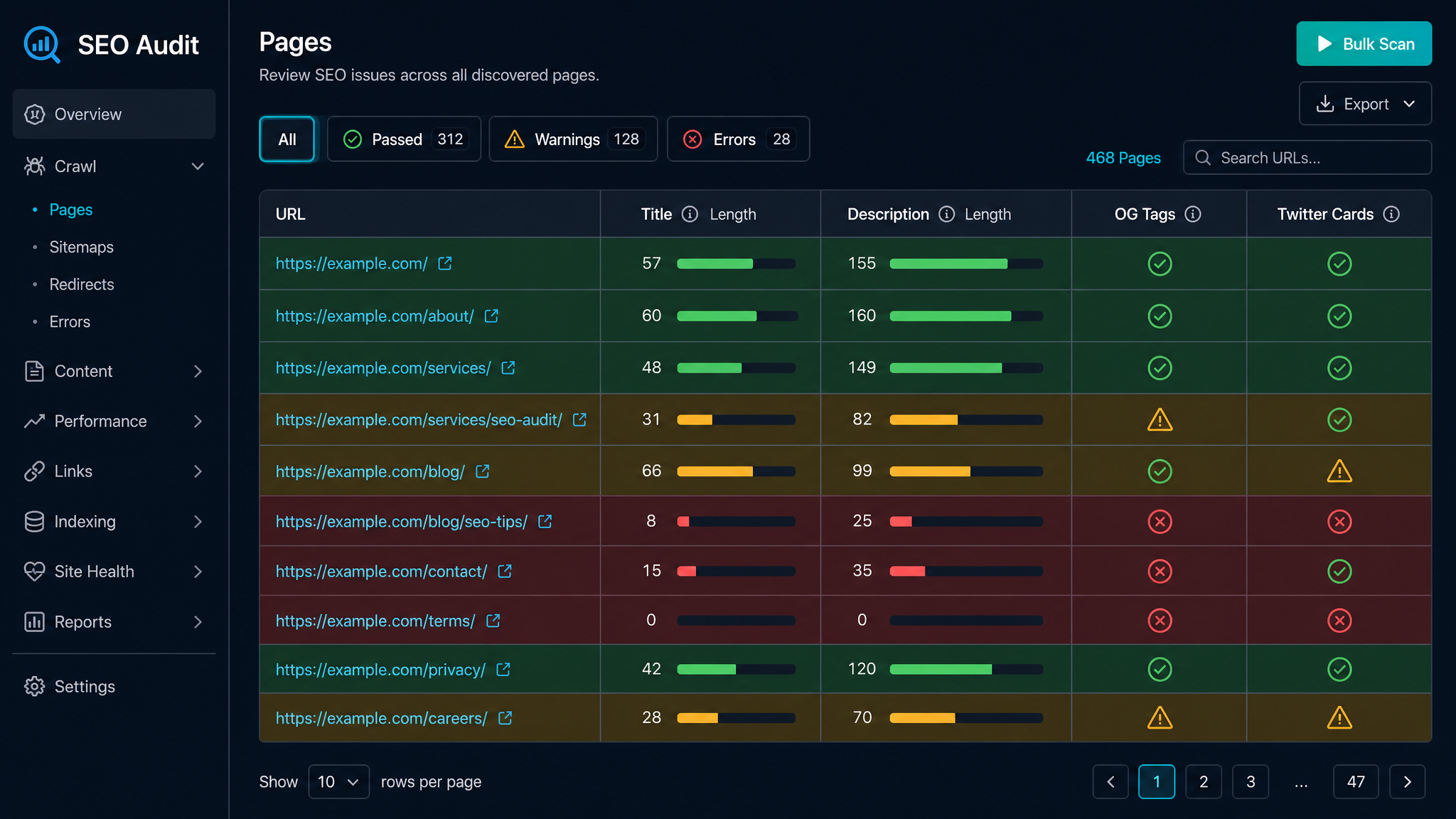
Meta tags: the quiet workhorses of SEO. Not glamorous, not headline-grabbing, but absolutely vital — a bit like the person who remembers to bring snacks to a meeting. They decide how your pages show up in search, and whether anyone actually clicks through. Trouble is, checking meta tags across a whole site can feel like sorting socks after laundry day. Unless you know how to do it in bulk.
This guide is your shortcut to bulk meta tag analysis: why it matters, how it saves your sanity, and exactly how to audit multiple URLs without losing the will to live.
Ever seen a search result that looks like its description was typed by a cat walking across the keyboard? That’s what happens when meta tags go neglected. These humble snippets — title, description, and friends — live in your website’s
Well-tuned meta tags help you:
Stand out and win more clicks in those crowded SERPsGive search engines a fighting chance at understanding your contentDodge messy duplicate content disastersLet them slide, and you’re leaving traffic, rankings, and your site’s credibility on the table. Not ideal.
Here’s the deal: bulk meta tag analysis is just checking the meta tags for a whole bunch of pages at once. Instead of opening each URL and peering into the code like a digital archaeologist, you use proper tools to fetch the goods in one big sweep. Imagine moving house with a removal van instead of a wheelbarrow — that’s the difference.
SEO types wrangling big, messy sitesMarketers launching new campaigns (and not keen on manual labour)Bloggers whose back catalogue now rivals the British LibraryAgencies doing technical SEO audits and keen to look cleverEasiest Ways to Audit Multiple URLs (Without Losing Your Mind)
Let’s size up your options, from one-click magic to hands-on tinkering:
Plenty of tools exist purely for this job. The Bulk Meta Tag Analysis Tool on KeywordNumbers is a fan favourite — paste or upload your URLs, and get a full breakdown:
Title tagsMeta descriptionsMeta robotsCanonical URLsWord counts and moreExample:*Let’s say you’ve got 50 product pages. Pop your URLs into the tool. In less time than it takes to boil a kettle, you’ll see a neat table showing missing, duplicate, or overcooked meta descriptions. Suddenly, spotting issues is as easy as finding the last biscuit in the tin.
| URL | Title Tag | Meta Description | Length (characters) |
|---|
| example.com/product-1 | Blue Widget – Shop | High quality blue widget for all uses. | 45 |
| example.com/product-2 | Red Widget – Shop | | 0 (missing) |
| example.com/product-3 | Green Widget – Shop | Buy green widget – durable, affordable. | 38 |
Product 2 is crying out for a description. No guesswork, just facts.
2. Screaming Frog SEO Spider (The Swiss Army Knife for SEOs)
If you like your tools with a bit more muscle, Screaming Frog SEO Spider crawls your whole site and exports meta data in a flash. The free version handles up to 500 URLs per go — perfect for SMEs and those not keen on splashing out just yet.
Quick steps:*Chuck your site’s URL into Screaming FrogLet it do its crawling thingExport the meta tag data as a CSV (then go wild in your spreadsheet of choice)3. Google Sheets + IMPORTXML (The DIY Tinkerer’s Option)
For small batches or spreadsheet nerds, Google Sheets with the IMPORTXML function can fetch meta tag data directly from any URL. Just beware: it can be a bit fiddly, and Google’s quotas mean it’s not built for scale.
Formula Example:*`
=IMPORTXML("https://example.com", "//meta[@name='description']/@content")
`
If it works, you’ll feel like a wizard. When it doesn’t… well, there’s always coffee.
4. Custom Scripts (For the Code-Curious)
If you’re handy with Python or Node.js, you can roll your own script using libraries like BeautifulSoup (Python) or Cheerio (Node.js). Ideal if you want total control or have a site the size of a small country.
What Metrics Should You Actually Care About?
Don’t get lost in the weeds — here’s your meta tag checklist:
Title tag length: 50–60 characters is your sweet spotMeta description length: 140–160 characters (aim for 20–25 words)Uniqueness: Duplicates? No thanksKeyword usage: Relevant, but not shoehorned in like cheap socksPresence: Missing tags are a hard noLet’s get practical. Google usually shows up to 155–160 characters (roughly 20–25 words) for meta descriptions on desktop. Go over, and you get the dreaded ellipsis: “Buy green widget – durable, affordable, ideal for…”
155 characters = about 23–25 wordsStick to that and your message lands on the SERP, not in the digital binTime-saving: Audit hundreds of pages in minutes — not daysSEO improvements: Spot gaps, errors, and duplicates before Google doesScalable: Big sites, small effortData-driven: Reporting and tracking fixes is suddenly a breezeHow to Actually Get Started (No More Excuses)
Collect your URLs: Grab them from your sitemap, Google Search Console, or run a crawlPick your tool: Online analyser, Screaming Frog, or DIY if you’re feeling braveAudit and fix: Export, prioritise what’s broken, update your site, bask in the glow of a job well doneWant zero faff? The Bulk Meta Tag Analyser on KeywordNumbers does it for free, no training montage required.
Questions People Are Actually Asking
A meta tag is a bit of HTML in your page’s head section — it quietly tells search engines (and sometimes browsers) what the page is about, how it should be indexed, and what should show up as the title and description in search results.
Meta tags won’t catapult you to #1 on their own, but they shape how your site looks in search and directly influence your click-through rates. Get them right, and both Google and your users are happier.
Add meta tags by editing the HTML in your </code>, <code class="px-1.5 py-0.5 bg-slate-100 dark:bg-slate-700/50 rounded text-teal-700 dark:text-teal-300 text-sm font-mono"><meta name="description" content="..."></code>, and <code class="px-1.5 py-0.5 bg-slate-100 dark:bg-slate-700/50 rounded text-teal-700 dark:text-teal-300 text-sm font-mono"><meta name="robots" content="..."></code> as needed. If it’s in the head, you’re in the right ballpark.</p><h3 id="how-to-write-meta-tags" class="text-xl font-semibold text-slate-900 dark:text-white mt-8 mb-3 scroll-mt-20">How to write meta tags?</h3><p class="text-slate-700 dark:text-slate-300 leading-relaxed mb-4">Write meta tags that tell the truth about the page, include keywords naturally (no stuffing!), and fit within the recommended character limits. For descriptions, 140–160 characters with a genuine call to action works wonders.</p><h3 id="what-is-meta-tag-description" class="text-xl font-semibold text-slate-900 dark:text-white mt-8 mb-3 scroll-mt-20">What is meta tag description?</h3><p class="text-slate-700 dark:text-slate-300 leading-relaxed mb-4">Your meta tag description — or meta description — is a short summary shown under your page title in search results. Make it unique, relevant, and tempting enough to make people click (without sounding like a used car ad).</p><h3 id="how-to-make-a-meta-tag" class="text-xl font-semibold text-slate-900 dark:text-white mt-8 mb-3 scroll-mt-20">How to make a meta tag?</h3><p class="text-slate-700 dark:text-slate-300 leading-relaxed mb-4">Create meta tags by adding the right HTML in your page’s head section — for example: <code class="px-1.5 py-0.5 bg-slate-100 dark:bg-slate-700/50 rounded text-teal-700 dark:text-teal-300 text-sm font-mono"><meta name="description" content="Your description here"></code>. No special tools needed, just a trusty text editor.</p><h3 id="how-much-is-a-meta" class="text-xl font-semibold text-slate-900 dark:text-white mt-8 mb-3 scroll-mt-20">How much is a meta?</h3><p class="text-slate-700 dark:text-slate-300 leading-relaxed mb-4">Meta tags themselves are free — you can add as many as you like for £0. Bulk analysis tools, though, range from free (like <a href="https://keywordnumbers.com/tools/meta-tags" class="text-teal-400 hover:text-teal-300 underline" target="_blank" rel="noopener noreferrer">KeywordNumbers</a>) to paid, depending on how many bells and whistles you want.</p><h2 id="conclusion" class="text-2xl font-bold text-slate-900 dark:text-white mt-10 mb-4 scroll-mt-20">Conclusion</h2><p class="text-slate-700 dark:text-slate-300 leading-relaxed mb-4">Bulk meta tag analysis is the secret weapon for efficient SEO audits. It helps you catch problems, polish your metadata, and put your best foot forward in Google’s search results. Ready to see what you’ve been missing? <a href="https://keywordnumbers.com/tools/meta-tags" class="text-teal-400 hover:text-teal-300 underline" target="_blank" rel="noopener noreferrer">Fire up the free Bulk Meta Tag Analyser on KeywordNumbers</a> and make your next audit a walk in the park.</p><h2 id="free-tools-to-put-this-into-practice" class="text-2xl font-bold text-slate-900 dark:text-white mt-10 mb-4 scroll-mt-20">Free tools to put this into practice</h2><p class="text-slate-700 dark:text-slate-300 leading-relaxed mb-4">Reading’s nice. But running your own pages through the tools? That’s where things actually change. Here’s the KeywordNumbers kit that pairs perfectly with this guide:</p><li class="text-slate-700 dark:text-slate-300 leading-relaxed ml-5 list-disc mb-1"><strong class="text-slate-900 dark:text-white font-semibold"><a href="https://keywordnumbers.com/tools/meta-tags" class="text-teal-400 hover:text-teal-300 underline" target="_blank" rel="noopener noreferrer">Meta Tag Analyser</a></strong> — check every meta tag on a page in seconds.</li><li class="text-slate-700 dark:text-slate-300 leading-relaxed ml-5 list-disc mb-1"><strong class="text-slate-900 dark:text-white font-semibold"><a href="https://keywordnumbers.com/tools/title-tag-analyser" class="text-teal-400 hover:text-teal-300 underline" target="_blank" rel="noopener noreferrer">Title Tag Analyzer</a></strong> — score your page title and see exactly how it’ll look in Google.</li><li class="text-slate-700 dark:text-slate-300 leading-relaxed ml-5 list-disc mb-1"><strong class="text-slate-900 dark:text-white font-semibold"><a href="https://keywordnumbers.com/tools/serp-preview" class="text-teal-400 hover:text-teal-300 underline" target="_blank" rel="noopener noreferrer">SERP Preview</a></strong> — preview your search result before you hit publish.</li><p class="text-slate-700 dark:text-slate-300 leading-relaxed mb-4">Every one of our <a href="https://keywordnumbers.com/tools" class="text-teal-400 hover:text-teal-300 underline" target="_blank" rel="noopener noreferrer">free SEO tools</a> is actually free, with no faff, no forms, and no email sign-ups.</p></div><aside class="mt-12 rounded-xl border border-white/10 bg-white/[0.03] p-5 sm:p-6"><div class="flex items-start gap-4"><div class="shrink-0 w-14 h-14 rounded-full bg-gradient-to-br from-teal-500 to-cyan-600 flex items-center justify-center text-white font-bold text-lg">GH</div><div class="min-w-0"><p class="text-xs uppercase tracking-wide text-slate-500 mb-1">Written by</p><a class="text-slate-900 dark:text-white font-semibold hover:text-teal-400 transition-colors" href="/author/graham-holmes">Graham Holmes</a><p class="text-sm text-teal-400 mb-2">Founder of KeywordNumbers</p><p class="text-sm text-slate-600 dark:text-slate-400 leading-relaxed">Graham Holmes is the founder of KeywordNumbers. He built the site's dozens of SEO tools and gives them away free — because when he first started out every penny counted, and the tools that promised to help locked the basics behind a paywall.</p><a class="inline-block mt-3 text-sm font-medium text-teal-400 hover:text-teal-300 transition-colors" href="/author/graham-holmes">More about Graham →</a></div></div></aside><div class="mt-10"><div class="rounded-lg border bg-card text-card-foreground shadow-sm bg-gradient-to-br from-[#1a1f2e] to-[#1e293b] border-white/10 overflow-hidden"><div class="p-6 sm:p-8"><div class="flex items-start gap-3 mb-4"><div class="w-11 h-11 rounded-xl bg-gradient-to-br from-teal-500/20 to-cyan-500/20 border border-teal-500/30 flex items-center justify-center shrink-0"><svg xmlns="http://www.w3.org/2000/svg" width="24" height="24" viewBox="0 0 24 24" fill="none" stroke="currentColor" stroke-width="2" stroke-linecap="round" stroke-linejoin="round" class="lucide lucide-book w-5 h-5 text-teal-400"><path d="M4 19.5v-15A2.5 2.5 0 0 1 6.5 2H19a1 1 0 0 1 1 1v18a1 1 0 0 1-1 1H6.5a1 1 0 0 1 0-5H20"></path></svg></div><div><h3 class="text-lg font-bold text-white tracking-tight">Free ebook: The Free SEO Stack</h3><p class="text-slate-400 text-sm mt-0.5">Keyword research without paying for Ahrefs — the complete guide. Read it online or download the PDF.</p></div></div><ul class="space-y-2 mb-5"><li class="flex items-start gap-2.5 text-sm text-slate-300"><svg xmlns="http://www.w3.org/2000/svg" width="24" height="24" viewBox="0 0 24 24" fill="none" stroke="currentColor" stroke-width="2" stroke-linecap="round" stroke-linejoin="round" class="lucide lucide-circle-check-big w-4 h-4 text-teal-400 shrink-0 mt-0.5"><path d="M21.801 10A10 10 0 1 1 17 3.335"></path><path d="m9 11 3 3L22 4"></path></svg>Which free tools replace Ahrefs, SEMrush & Moz</li><li class="flex items-start gap-2.5 text-sm text-slate-300"><svg xmlns="http://www.w3.org/2000/svg" width="24" height="24" viewBox="0 0 24 24" fill="none" stroke="currentColor" stroke-width="2" stroke-linecap="round" stroke-linejoin="round" class="lucide lucide-circle-check-big w-4 h-4 text-teal-400 shrink-0 mt-0.5"><path d="M21.801 10A10 10 0 1 1 17 3.335"></path><path d="m9 11 3 3L22 4"></path></svg>Step-by-step keyword research workflow</li><li class="flex items-start gap-2.5 text-sm text-slate-300"><svg xmlns="http://www.w3.org/2000/svg" width="24" height="24" viewBox="0 0 24 24" fill="none" stroke="currentColor" stroke-width="2" stroke-linecap="round" stroke-linejoin="round" class="lucide lucide-circle-check-big w-4 h-4 text-teal-400 shrink-0 mt-0.5"><path d="M21.801 10A10 10 0 1 1 17 3.335"></path><path d="m9 11 3 3L22 4"></path></svg>How to find content gaps without paying a penny</li><li class="flex items-start gap-2.5 text-sm text-slate-300"><svg xmlns="http://www.w3.org/2000/svg" width="24" height="24" viewBox="0 0 24 24" fill="none" stroke="currentColor" stroke-width="2" stroke-linecap="round" stroke-linejoin="round" class="lucide lucide-circle-check-big w-4 h-4 text-teal-400 shrink-0 mt-0.5"><path d="M21.801 10A10 10 0 1 1 17 3.335"></path><path d="m9 11 3 3L22 4"></path></svg>The exact stack KeywordNumbers is built on</li></ul><form class="space-y-3"><div class="flex flex-col sm:flex-row gap-2"><input type="text" class="flex w-full rounded-lg border text-sm transition-all duration-fast file:border-0 file:bg-transparent file:text-sm file:font-medium focus-visible:outline-none disabled:cursor-not-allowed disabled:opacity-50 hover:border-ring/50 focus-visible:border-input focus-visible:ring-2 focus-visible:ring-ring focus-visible:ring-offset-2 focus-visible:ring-offset-background px-3 py-2 bg-white/5 border-white/10 text-white placeholder:text-slate-500 h-10" placeholder="First name (optional)" value=""/><input type="email" class="flex w-full rounded-lg border text-sm transition-all duration-fast file:border-0 file:bg-transparent file:text-sm file:font-medium focus-visible:outline-none disabled:cursor-not-allowed disabled:opacity-50 hover:border-ring/50 focus-visible:border-input focus-visible:ring-2 focus-visible:ring-ring focus-visible:ring-offset-2 focus-visible:ring-offset-background px-3 py-2 bg-white/5 border-white/10 text-white placeholder:text-slate-500 h-10" placeholder="Your email address" required="" value=""/></div><button class="inline-flex items-center justify-center gap-2 whitespace-nowrap rounded-lg transition-all duration-fast focus-visible:outline-none focus-visible:ring-2 focus-visible:ring-ring focus-visible:ring-offset-2 focus-visible:ring-offset-background active:scale-[0.98] disabled:pointer-events-none disabled:opacity-50 [&_svg]:pointer-events-none [&_svg]:w-4 [&_svg]:h-4 [&_svg]:shrink-0 bg-primary shadow-sm hover:bg-primary/90 hover:shadow-md px-4 py-2 w-full bg-gradient-to-r from-teal-600 to-cyan-600 hover:from-teal-500 hover:to-cyan-500 text-white font-semibold h-11 text-sm" type="submit"><svg xmlns="http://www.w3.org/2000/svg" width="24" height="24" viewBox="0 0 24 24" fill="none" stroke="currentColor" stroke-width="2" stroke-linecap="round" stroke-linejoin="round" class="lucide lucide-mail w-4 h-4 mr-2"><rect width="20" height="16" x="2" y="4" rx="2"></rect><path d="m22 7-8.97 5.7a1.94 1.94 0 0 1-2.06 0L2 7"></path></svg> Send me the free ebook<svg xmlns="http://www.w3.org/2000/svg" width="24" height="24" viewBox="0 0 24 24" fill="none" stroke="currentColor" stroke-width="2" stroke-linecap="round" stroke-linejoin="round" class="lucide lucide-arrow-right w-4 h-4 ml-2"><path d="M5 12h14"></path><path d="m12 5 7 7-7 7"></path></svg></button></form><p class="text-slate-500 text-xs mt-3 leading-relaxed">100% free · No spam · Unsubscribe any time</p></div></div></div><div class="py-6"></div><div class="rounded-lg border text-card-foreground shadow-sm bg-[#1e293b]/80 border-white/10 p-6 mt-12 text-center"><h3 class="text-lg font-semibold text-white mb-2">Ready to research your keywords?</h3><p class="text-slate-400 text-sm mb-4">Try our free keyword tools — no signup required.</p><div class="flex gap-3 justify-center flex-wrap"><a class="px-5 py-2.5 rounded-lg bg-gradient-to-r from-teal-600 to-cyan-600 text-white text-sm font-medium hover:from-teal-500 hover:to-cyan-500 transition-colors" href="/">Keyword Search</a><a class="px-5 py-2.5 rounded-lg bg-white/5 border border-white/10 text-white text-sm font-medium hover:bg-white/10 transition-colors" href="/tools">SEO Tools</a></div></div></article></main><!--/$--><footer class="border-t border-white/5 bg-[#0a0a1a]"><div class="max-w-6xl mx-auto px-4 sm:px-6 py-5"><a class="group flex items-center justify-between gap-4 mb-5 px-4 py-3 rounded-xl bg-teal-500/10 border border-teal-500/30 hover:bg-teal-500/15 hover:border-teal-500/50 transition-colors" href="/free-seo-ebook"><div class="flex items-center gap-3"><div class="w-8 h-8 rounded-lg bg-teal-500/20 border border-teal-500/30 flex items-center justify-center shrink-0"><svg xmlns="http://www.w3.org/2000/svg" width="24" height="24" viewBox="0 0 24 24" fill="none" stroke="currentColor" stroke-width="2" stroke-linecap="round" stroke-linejoin="round" class="lucide lucide-book-open w-4 h-4 text-teal-400"><path d="M12 7v14"></path><path d="M3 18a1 1 0 0 1-1-1V4a1 1 0 0 1 1-1h5a4 4 0 0 1 4 4 4 4 0 0 1 4-4h5a1 1 0 0 1 1 1v13a1 1 0 0 1-1 1h-6a3 3 0 0 0-3 3 3 3 0 0 0-3-3z"></path></svg></div><div><p class="text-sm font-semibold text-white">Free ebook: The Free SEO Stack</p><p class="text-xs text-slate-400">Rank without paying for tools — get the free guide.</p></div></div><span class="hidden sm:flex items-center gap-1.5 text-xs font-semibold text-teal-400 whitespace-nowrap">Get it free <svg xmlns="http://www.w3.org/2000/svg" width="24" height="24" viewBox="0 0 24 24" fill="none" stroke="currentColor" stroke-width="2" stroke-linecap="round" stroke-linejoin="round" class="lucide lucide-arrow-right w-3.5 h-3.5 group-hover:translate-x-0.5 transition-transform"><path d="M5 12h14"></path><path d="m12 5 7 7-7 7"></path></svg></span></a><div class="flex flex-col lg:flex-row items-start lg:items-center gap-4 lg:gap-8"><a class="flex items-center gap-2 shrink-0" href="/"><div class="w-6 h-6 rounded-md bg-[#1a1a2e] border border-teal-500/30 flex items-center justify-center"><svg xmlns="http://www.w3.org/2000/svg" width="24" height="24" viewBox="0 0 24 24" fill="none" stroke="currentColor" stroke-width="2" stroke-linecap="round" stroke-linejoin="round" class="lucide lucide-trending-up w-3.5 h-3.5 text-teal-400"><polyline points="22 7 13.5 15.5 8.5 10.5 2 17"></polyline><polyline points="16 7 22 7 22 13"></polyline></svg></div><span class="text-sm font-bold gradient-text">KeywordNumbers</span></a><div class="flex flex-wrap items-center gap-x-5 gap-y-2"><a class="text-xs text-slate-400 hover:text-teal-400 transition-colors whitespace-nowrap" href="/">Home</a><a class="text-xs text-slate-400 hover:text-teal-400 transition-colors whitespace-nowrap" href="/tools">All Tools</a><a class="text-xs text-slate-400 hover:text-teal-400 transition-colors whitespace-nowrap" href="/compare">Compare</a><a class="text-xs text-slate-400 hover:text-teal-400 transition-colors whitespace-nowrap" href="/blog">Blog</a><a class="text-xs text-slate-400 hover:text-teal-400 transition-colors whitespace-nowrap" href="/about">About</a><a class="text-xs text-slate-400 hover:text-teal-400 transition-colors whitespace-nowrap" href="/contact">Contact</a><a class="text-xs text-slate-400 hover:text-teal-400 transition-colors whitespace-nowrap" href="/suggestions">Send Feedback</a><a class="text-xs text-slate-400 hover:text-teal-400 transition-colors whitespace-nowrap" href="/extension">Chrome Extension</a><a class="text-xs text-slate-400 hover:text-teal-400 transition-colors whitespace-nowrap" href="/support">Support Us</a><span class="hidden sm:inline text-white/10">|</span><a class="text-xs text-slate-500 hover:text-teal-400 transition-colors whitespace-nowrap" href="/tools/ai-keywords">AI Keywords</a><a class="text-xs text-slate-500 hover:text-teal-400 transition-colors whitespace-nowrap" href="/tools/pagespeed">PageSpeed</a><a class="text-xs text-slate-500 hover:text-teal-400 transition-colors whitespace-nowrap" href="/tools/meta-tags">Meta Tags</a><a class="text-xs text-slate-500 hover:text-teal-400 transition-colors whitespace-nowrap" href="/tools/dns-checker">DNS Checker</a><a class="text-xs text-slate-500 hover:text-teal-400 transition-colors whitespace-nowrap" href="/tools/ssl-checker">SSL Checker</a><a class="text-xs text-slate-500 hover:text-teal-400 transition-colors whitespace-nowrap" href="/tools/keyword-density">Keyword Density</a></div></div><div class="border-t border-white/5 mt-4 pt-3 flex flex-col sm:flex-row items-center justify-between gap-2"><p class="text-xs text-slate-500">© 2026 KeywordNumbers. All rights reserved.</p><div class="flex items-center gap-4"><a href="https://howmuchdoineed.co" target="_blank" rel="noopener" class="text-xs text-slate-500 hover:text-teal-400 transition-colors">Also from us: HowMuchDoINeed.co</a><a class="text-xs text-slate-500 hover:text-teal-400 transition-colors" href="/privacy">Privacy Policy</a><a class="text-xs text-slate-500 hover:text-teal-400 transition-colors" href="/terms">Terms & Disclaimer</a></div></div></div></footer><script src="/_next/static/chunks/webpack-3708030b.js" async=""></script><script>(self.__next_f=self.__next_f||[]).push([0]);self.__next_f.push([2,null])</script><script>self.__next_f.push([1,"1:HL[\"/_next/static/media/13971731025ec697-s.p.woff2\",\"font\",{\"crossOrigin\":\"\",\"type\":\"font/woff2\"}]\n2:HL[\"/_next/static/media/636a5ac981f94f8b-s.p.woff2\",\"font\",{\"crossOrigin\":\"\",\"type\":\"font/woff2\"}]\n3:HL[\"/_next/static/media/bb3ef058b751a6ad-s.p.woff2\",\"font\",{\"crossOrigin\":\"\",\"type\":\"font/woff2\"}]\n4:HL[\"/_next/static/css/55298ad0003d4e54.css\",\"style\"]\n5:HL[\"/_next/static/css/6d7efe108dc2d26f.css\",\"style\"]\n"])</script><script>self.__next_f.push([1,"6:I[12846,[],\"\"]\n9:I[4707,[],\"\"]\nb:I[36423,[],\"\"]\nc:I[82798,[\"2972\",\"static/chunks/2972-ef35f06a.js\",\"429\",\"static/chunks/429-fe4d4761.js\",\"4438\",\"static/chunks/4438-16d63450.js\",\"8003\",\"static/chunks/8003-8e3bb21a.js\",\"3185\",\"static/chunks/app/layout-e815e660.js\"],\"ThemeProvider\"]\nd:I[20763,[\"2972\",\"static/chunks/2972-ef35f06a.js\",\"429\",\"static/chunks/429-fe4d4761.js\",\"4438\",\"static/chunks/4438-16d63450.js\",\"8003\",\"static/chunks/8003-8e3bb21a.js\",\"3185\",\"static/chunks/app/layout-e815e660.js\"],\"Navbar\"]\ne:I[65878,[\"2972\",\"static/chunks/2972-ef35f06a.js\",\"6579\",\"static/chunks/6579-80fbb109.js\",\"4438\",\"static/chunks/4438-16d63450.js\",\"5878\",\"static/chunks/5878-5400ba22.js\",\"9773\",\"static/chunks/9773-36b97ef6.js\",\"308\",\"static/chunks/app/blog/%5Bslug%5D/page-26f9704a.js\"],\"Image\"]\nf:I[72972,[\"2972\",\"static/chunks/2972-ef35f06a.js\",\"6579\",\"static/chunks/6579-80fbb109.js\",\"4438\",\"static/chunks/4438-16d63450.js\",\"5878\",\"static/chunks/5878-5400ba22.js\",\"9773\",\"static/chunks/9773-36b97ef6.js\",\"308\",\"static/chunks/app/blog/%5Bslug%5D/page-26f9704a.js\"],\"\"]\n10:I[7701,[\"2972\",\"static/chunks/2972-ef35f06a.js\",\"429\",\"static/chunks/429-fe4d4761.js\",\"4438\",\"static/chunks/4438-16d63450.js\",\"8003\",\"static/chunks/8003-8e3bb21a.js\",\"3185\",\"static/chunks/app/layout-e815e660.js\"],\"AnimatedFavicon\"]\n11:I[12935,[\"2972\",\"static/chunks/2972-ef35f06a.js\",\"429\",\"static/chunks/429-fe4d4761.js\",\"4438\",\"static/chunks/4438-16d63450.js\",\"8003\",\"static/chunks/8003-8e3bb21a.js\",\"3185\",\"static/chunks/app/layout-e815e660.js\"],\"SupportBanner\"]\n12:I[21159,[\"2972\",\"static/chunks/2972-ef35f06a.js\",\"429\",\"static/chunks/429-fe4d4761.js\",\"4438\",\"static/chunks/4438-16d63450.js\",\"8003\",\"static/chunks/8003-8e3bb21a.js\",\"3185\",\"static/chunks/app/layout-e815e660.js\"],\"CookieConsent\"]\n13:I[33606,[\"2972\",\"static/chunks/2972-ef35f06a.js\",\"429\",\"static/chunks/429-fe4d4761.js\",\"4438\",\"static/chunks/4438-16d63450.js\",\"8003\",\"static/chunks/8003-8e3bb21a.js\",\"3185\",\"static/chunks/app/layout-e815e660.js\"],\"Toaster\"]\n14:I[64215,[\"2972\",\"static/chunks/2972-ef35f06a.js\",\""])</script><script>self.__next_f.push([1,"429\",\"static/chunks/429-fe4d4761.js\",\"4438\",\"static/chunks/4438-16d63450.js\",\"8003\",\"static/chunks/8003-8e3bb21a.js\",\"3185\",\"static/chunks/app/layout-e815e660.js\"],\"ChunkLoadErrorHandler\"]\n15:I[88003,[\"2972\",\"static/chunks/2972-ef35f06a.js\",\"429\",\"static/chunks/429-fe4d4761.js\",\"4438\",\"static/chunks/4438-16d63450.js\",\"8003\",\"static/chunks/8003-8e3bb21a.js\",\"3185\",\"static/chunks/app/layout-e815e660.js\"],\"\"]\n17:I[61060,[],\"\"]\na:[\"slug\",\"bulk-meta-tag-analysis-audit-multiple-urls\",\"d\"]\n18:[]\n"])</script><script>self.__next_f.push([1,"0:[\"$\",\"$L6\",null,{\"buildId\":\"1dHjUsLR690yak0sKdfQs\",\"assetPrefix\":\"\",\"urlParts\":[\"\",\"blog\",\"bulk-meta-tag-analysis-audit-multiple-urls\"],\"initialTree\":[\"\",{\"children\":[\"blog\",{\"children\":[[\"slug\",\"bulk-meta-tag-analysis-audit-multiple-urls\",\"d\"],{\"children\":[\"__PAGE__\",{}]}]}]},\"$undefined\",\"$undefined\",true],\"initialSeedData\":[\"\",{\"children\":[\"blog\",{\"children\":[[\"slug\",\"bulk-meta-tag-analysis-audit-multiple-urls\",\"d\"],{\"children\":[\"__PAGE__\",{},[[\"$L7\",\"$L8\",null],null],null]},[null,[\"$\",\"$L9\",null,{\"parallelRouterKey\":\"children\",\"segmentPath\":[\"children\",\"blog\",\"children\",\"$a\",\"children\"],\"error\":\"$undefined\",\"errorStyles\":\"$undefined\",\"errorScripts\":\"$undefined\",\"template\":[\"$\",\"$Lb\",null,{}],\"templateStyles\":\"$undefined\",\"templateScripts\":\"$undefined\",\"notFound\":\"$undefined\",\"notFoundStyles\":\"$undefined\"}]],null]},[null,[\"$\",\"$L9\",null,{\"parallelRouterKey\":\"children\",\"segmentPath\":[\"children\",\"blog\",\"children\"],\"error\":\"$undefined\",\"errorStyles\":\"$undefined\",\"errorScripts\":\"$undefined\",\"template\":[\"$\",\"$Lb\",null,{}],\"templateStyles\":\"$undefined\",\"templateScripts\":\"$undefined\",\"notFound\":\"$undefined\",\"notFoundStyles\":\"$undefined\"}]],null]},[[[[\"$\",\"link\",\"0\",{\"rel\":\"stylesheet\",\"href\":\"/_next/static/css/55298ad0003d4e54.css\",\"precedence\":\"next\",\"crossOrigin\":\"$undefined\"}],[\"$\",\"link\",\"1\",{\"rel\":\"stylesheet\",\"href\":\"/_next/static/css/6d7efe108dc2d26f.css\",\"precedence\":\"next\",\"crossOrigin\":\"$undefined\"}]],[\"$\",\"html\",null,{\"lang\":\"en\",\"suppressHydrationWarning\":true,\"children\":[[\"$\",\"head\",null,{\"children\":[[\"$\",\"meta\",null,{\"name\":\"viewport\",\"content\":\"width=device-width, initial-scale=1\"}],[[\"$\",\"link\",null,{\"rel\":\"preconnect\",\"href\":\"https://apps.abacus.ai\"}],[\"$\",\"link\",null,{\"rel\":\"dns-prefetch\",\"href\":\"https://apps.abacus.ai\"}],[\"$\",\"link\",null,{\"rel\":\"preconnect\",\"href\":\"https://pagead2.googlesyndication.com\"}],[\"$\",\"link\",null,{\"rel\":\"dns-prefetch\",\"href\":\"https://pagead2.googlesyndication.com\"}],[\"$\",\"script\",null,{\"src\":\"https://apps.abacus.ai/chatllm/appllm-lib.js\",\"defer\":true}]]]}],[\"$\",\"body\",null,{\"className\":\"__variable_0d7163 __variable_646807 __variable_3c557b font-sans\",\"children\":[[\"$\",\"$Lc\",null,{\"attribute\":\"class\",\"defaultTheme\":\"dark\",\"enableSystem\":false,\"disableTransitionOnChange\":true,\"children\":[[[\"$\",\"$Ld\",null,{}],[\"$\",\"div\",null,{\"className\":\"w-full max-w-[1200px] mx-auto px-4 sm:px-6 pt-4\",\"children\":[\"$\",\"div\",null,{\"className\":\"w-full min-h-[90px]\",\"children\":[\"$\",\"ins\",null,{\"className\":\"adsbygoogle\",\"style\":{\"display\":\"block\"},\"data-ad-client\":\"ca-pub-4285595085227692\",\"data-ad-slot\":\"auto\",\"data-ad-format\":\"horizontal\",\"data-full-width-responsive\":\"true\"}]}]}],[\"$\",\"$L9\",null,{\"parallelRouterKey\":\"children\",\"segmentPath\":[\"children\"],\"error\":\"$undefined\",\"errorStyles\":\"$undefined\",\"errorScripts\":\"$undefined\",\"template\":[\"$\",\"$Lb\",null,{}],\"templateStyles\":\"$undefined\",\"templateScripts\":\"$undefined\",\"notFound\":[\"$\",\"div\",null,{\"className\":\"min-h-[70vh] flex items-center justify-center px-4 py-12\",\"children\":[\"$\",\"div\",null,{\"className\":\"max-w-3xl w-full grid md:grid-cols-2 gap-8 md:gap-4 items-center\",\"children\":[[\"$\",\"div\",null,{\"className\":\"order-1 md:order-none flex justify-center\",\"children\":[\"$\",\"div\",null,{\"className\":\"relative w-[220px] h-[300px] sm:w-[280px] sm:h-[380px]\",\"children\":[\"$\",\"$Le\",null,{\"src\":\"/seolock/seolock-404.png\",\"alt\":\"Seolock Holmes, the KeywordNumbers detective, investigating a missing page with his magnifying glass\",\"fill\":true,\"priority\":true,\"className\":\"object-contain drop-shadow-2xl\"}]}]}],[\"$\",\"div\",null,{\"className\":\"text-center md:text-left\",\"children\":[[\"$\",\"p\",null,{\"className\":\"text-sm font-semibold tracking-widest text-teal-400 uppercase mb-2\",\"children\":\"Error 404\"}],[\"$\",\"h1\",null,{\"className\":\"text-3xl sm:text-4xl font-bold text-foreground mb-3\",\"children\":\"Well, this is a mystery.\"}],[\"$\",\"p\",null,{\"className\":\"text-muted-foreground mb-6 leading-relaxed\",\"children\":\"Even Seolock can’t track down this page — it’s either moved, been renamed, or never existed. No clues here. Let’s get you back on the trail.\"}],[\"$\",\"div\",null,{\"className\":\"flex flex-wrap gap-3 justify-center md:justify-start\",\"children\":[[\"$\",\"$Lf\",null,{\"href\":\"/\",\"children\":[[[\"$\",\"svg\",null,{\"xmlns\":\"http://www.w3.org/2000/svg\",\"width\":24,\"height\":24,\"viewBox\":\"0 0 24 24\",\"fill\":\"none\",\"stroke\":\"currentColor\",\"strokeWidth\":2,\"strokeLinecap\":\"round\",\"strokeLinejoin\":\"round\",\"className\":\"lucide lucide-house h-4 w-4\",\"children\":[[\"$\",\"path\",\"5wwlr5\",{\"d\":\"M15 21v-8a1 1 0 0 0-1-1h-4a1 1 0 0 0-1 1v8\"}],[\"$\",\"path\",\"1d0kgt\",{\"d\":\"M3 10a2 2 0 0 1 .709-1.528l7-5.999a2 2 0 0 1 2.582 0l7 5.999A2 2 0 0 1 21 10v9a2 2 0 0 1-2 2H5a2 2 0 0 1-2-2z\"}],\"$undefined\"]}],\" Back to home\"]],\"className\":\"inline-flex items-center justify-center gap-2 whitespace-nowrap rounded-lg text-sm font-medium transition-all duration-fast focus-visible:outline-none focus-visible:ring-2 focus-visible:ring-ring focus-visible:ring-offset-2 focus-visible:ring-offset-background active:scale-[0.98] disabled:pointer-events-none disabled:opacity-50 [\u0026_svg]:pointer-events-none [\u0026_svg]:w-4 [\u0026_svg]:h-4 [\u0026_svg]:shrink-0 bg-primary text-primary-foreground shadow-sm hover:bg-primary/90 hover:shadow-md h-10 px-4 py-2\",\"disabled\":false,\"aria-busy\":\"$undefined\"}],[\"$\",\"$Lf\",null,{\"href\":\"/tools\",\"children\":[[[\"$\",\"svg\",null,{\"xmlns\":\"http://www.w3.org/2000/svg\",\"width\":24,\"height\":24,\"viewBox\":\"0 0 24 24\",\"fill\":\"none\",\"stroke\":\"currentColor\",\"strokeWidth\":2,\"strokeLinecap\":\"round\",\"strokeLinejoin\":\"round\",\"className\":\"lucide lucide-search h-4 w-4\",\"children\":[[\"$\",\"circle\",\"4ej97u\",{\"cx\":\"11\",\"cy\":\"11\",\"r\":\"8\"}],[\"$\",\"path\",\"1qie3q\",{\"d\":\"m21 21-4.3-4.3\"}],\"$undefined\"]}],\" Browse the tools\"]],\"className\":\"inline-flex items-center justify-center gap-2 whitespace-nowrap rounded-lg text-sm font-medium transition-all duration-fast focus-visible:outline-none focus-visible:ring-2 focus-visible:ring-ring focus-visible:ring-offset-2 focus-visible:ring-offset-background active:scale-[0.98] disabled:pointer-events-none disabled:opacity-50 [\u0026_svg]:pointer-events-none [\u0026_svg]:w-4 [\u0026_svg]:h-4 [\u0026_svg]:shrink-0 border border-input bg-background shadow-sm hover:bg-accent hover:text-accent-foreground hover:border-accent hover:shadow-sm h-10 px-4 py-2\",\"disabled\":false,\"aria-busy\":\"$undefined\"}],[\"$\",\"$Lf\",null,{\"href\":\"/blog\",\"children\":[[[\"$\",\"svg\",null,{\"xmlns\":\"http://www.w3.org/2000/svg\",\"width\":24,\"height\":24,\"viewBox\":\"0 0 24 24\",\"fill\":\"none\",\"stroke\":\"currentColor\",\"strokeWidth\":2,\"strokeLinecap\":\"round\",\"strokeLinejoin\":\"round\",\"className\":\"lucide lucide-square-pen h-4 w-4\",\"children\":[[\"$\",\"path\",\"1m0v6g\",{\"d\":\"M12 3H5a2 2 0 0 0-2 2v14a2 2 0 0 0 2 2h14a2 2 0 0 0 2-2v-7\"}],[\"$\",\"path\",\"ohrbg2\",{\"d\":\"M18.375 2.625a1 1 0 0 1 3 3l-9.013 9.014a2 2 0 0 1-.853.505l-2.873.84a.5.5 0 0 1-.62-.62l.84-2.873a2 2 0 0 1 .506-.852z\"}],\"$undefined\"]}],\" Read the blog\"]],\"className\":\"inline-flex items-center justify-center gap-2 whitespace-nowrap rounded-lg text-sm font-medium transition-all duration-fast focus-visible:outline-none focus-visible:ring-2 focus-visible:ring-ring focus-visible:ring-offset-2 focus-visible:ring-offset-background active:scale-[0.98] disabled:pointer-events-none disabled:opacity-50 [\u0026_svg]:pointer-events-none [\u0026_svg]:w-4 [\u0026_svg]:h-4 [\u0026_svg]:shrink-0 hover:bg-accent hover:text-accent-foreground h-10 px-4 py-2\",\"disabled\":false,\"aria-busy\":\"$undefined\"}]]}]]}]]}]}],\"notFoundStyles\":[]}],[\"$\",\"footer\",null,{\"className\":\"border-t border-white/5 bg-[#0a0a1a]\",\"children\":[\"$\",\"div\",null,{\"className\":\"max-w-6xl mx-auto px-4 sm:px-6 py-5\",\"children\":[[\"$\",\"$Lf\",null,{\"href\":\"/free-seo-ebook\",\"className\":\"group flex items-center justify-between gap-4 mb-5 px-4 py-3 rounded-xl bg-teal-500/10 border border-teal-500/30 hover:bg-teal-500/15 hover:border-teal-500/50 transition-colors\",\"children\":[[\"$\",\"div\",null,{\"className\":\"flex items-center gap-3\",\"children\":[[\"$\",\"div\",null,{\"className\":\"w-8 h-8 rounded-lg bg-teal-500/20 border border-teal-500/30 flex items-center justify-center shrink-0\",\"children\":[\"$\",\"svg\",null,{\"xmlns\":\"http://www.w3.org/2000/svg\",\"width\":24,\"height\":24,\"viewBox\":\"0 0 24 24\",\"fill\":\"none\",\"stroke\":\"currentColor\",\"strokeWidth\":2,\"strokeLinecap\":\"round\",\"strokeLinejoin\":\"round\",\"className\":\"lucide lucide-book-open w-4 h-4 text-teal-400\",\"children\":[[\"$\",\"path\",\"1akyts\",{\"d\":\"M12 7v14\"}],[\"$\",\"path\",\"ruj8y\",{\"d\":\"M3 18a1 1 0 0 1-1-1V4a1 1 0 0 1 1-1h5a4 4 0 0 1 4 4 4 4 0 0 1 4-4h5a1 1 0 0 1 1 1v13a1 1 0 0 1-1 1h-6a3 3 0 0 0-3 3 3 3 0 0 0-3-3z\"}],\"$undefined\"]}]}],[\"$\",\"div\",null,{\"children\":[[\"$\",\"p\",null,{\"className\":\"text-sm font-semibold text-white\",\"children\":\"Free ebook: The Free SEO Stack\"}],[\"$\",\"p\",null,{\"className\":\"text-xs text-slate-400\",\"children\":\"Rank without paying for tools — get the free guide.\"}]]}]]}],[\"$\",\"span\",null,{\"className\":\"hidden sm:flex items-center gap-1.5 text-xs font-semibold text-teal-400 whitespace-nowrap\",\"children\":[\"Get it free \",[\"$\",\"svg\",null,{\"xmlns\":\"http://www.w3.org/2000/svg\",\"width\":24,\"height\":24,\"viewBox\":\"0 0 24 24\",\"fill\":\"none\",\"stroke\":\"currentColor\",\"strokeWidth\":2,\"strokeLinecap\":\"round\",\"strokeLinejoin\":\"round\",\"className\":\"lucide lucide-arrow-right w-3.5 h-3.5 group-hover:translate-x-0.5 transition-transform\",\"children\":[[\"$\",\"path\",\"1ays0h\",{\"d\":\"M5 12h14\"}],[\"$\",\"path\",\"xquz4c\",{\"d\":\"m12 5 7 7-7 7\"}],\"$undefined\"]}]]}]]}],[\"$\",\"div\",null,{\"className\":\"flex flex-col lg:flex-row items-start lg:items-center gap-4 lg:gap-8\",\"children\":[[\"$\",\"$Lf\",null,{\"href\":\"/\",\"className\":\"flex items-center gap-2 shrink-0\",\"children\":[[\"$\",\"div\",null,{\"className\":\"w-6 h-6 rounded-md bg-[#1a1a2e] border border-teal-500/30 flex items-center justify-center\",\"children\":[\"$\",\"svg\",null,{\"xmlns\":\"http://www.w3.org/2000/svg\",\"width\":24,\"height\":24,\"viewBox\":\"0 0 24 24\",\"fill\":\"none\",\"stroke\":\"currentColor\",\"strokeWidth\":2,\"strokeLinecap\":\"round\",\"strokeLinejoin\":\"round\",\"className\":\"lucide lucide-trending-up w-3.5 h-3.5 text-teal-400\",\"children\":[[\"$\",\"polyline\",\"126l90\",{\"points\":\"22 7 13.5 15.5 8.5 10.5 2 17\"}],[\"$\",\"polyline\",\"kwv8wd\",{\"points\":\"16 7 22 7 22 13\"}],\"$undefined\"]}]}],[\"$\",\"span\",null,{\"className\":\"text-sm font-bold gradient-text\",\"children\":\"KeywordNumbers\"}]]}],[\"$\",\"div\",null,{\"className\":\"flex flex-wrap items-center gap-x-5 gap-y-2\",\"children\":[[[\"$\",\"$Lf\",\"/\",{\"href\":\"/\",\"className\":\"text-xs text-slate-400 hover:text-teal-400 transition-colors whitespace-nowrap\",\"children\":\"Home\"}],[\"$\",\"$Lf\",\"/tools\",{\"href\":\"/tools\",\"className\":\"text-xs text-slate-400 hover:text-teal-400 transition-colors whitespace-nowrap\",\"children\":\"All Tools\"}],[\"$\",\"$Lf\",\"/compare\",{\"href\":\"/compare\",\"className\":\"text-xs text-slate-400 hover:text-teal-400 transition-colors whitespace-nowrap\",\"children\":\"Compare\"}],[\"$\",\"$Lf\",\"/blog\",{\"href\":\"/blog\",\"className\":\"text-xs text-slate-400 hover:text-teal-400 transition-colors whitespace-nowrap\",\"children\":\"Blog\"}],[\"$\",\"$Lf\",\"/about\",{\"href\":\"/about\",\"className\":\"text-xs text-slate-400 hover:text-teal-400 transition-colors whitespace-nowrap\",\"children\":\"About\"}],[\"$\",\"$Lf\",\"/contact\",{\"href\":\"/contact\",\"className\":\"text-xs text-slate-400 hover:text-teal-400 transition-colors whitespace-nowrap\",\"children\":\"Contact\"}],[\"$\",\"$Lf\",\"/suggestions\",{\"href\":\"/suggestions\",\"className\":\"text-xs text-slate-400 hover:text-teal-400 transition-colors whitespace-nowrap\",\"children\":\"Send Feedback\"}],[\"$\",\"$Lf\",\"/extension\",{\"href\":\"/extension\",\"className\":\"text-xs text-slate-400 hover:text-teal-400 transition-colors whitespace-nowrap\",\"children\":\"Chrome Extension\"}],[\"$\",\"$Lf\",\"/support\",{\"href\":\"/support\",\"className\":\"text-xs text-slate-400 hover:text-teal-400 transition-colors whitespace-nowrap\",\"children\":\"Support Us\"}]],[\"$\",\"span\",null,{\"className\":\"hidden sm:inline text-white/10\",\"children\":\"|\"}],[[\"$\",\"$Lf\",\"/tools/ai-keywords\",{\"href\":\"/tools/ai-keywords\",\"className\":\"text-xs text-slate-500 hover:text-teal-400 transition-colors whitespace-nowrap\",\"children\":\"AI Keywords\"}],[\"$\",\"$Lf\",\"/tools/pagespeed\",{\"href\":\"/tools/pagespeed\",\"className\":\"text-xs text-slate-500 hover:text-teal-400 transition-colors whitespace-nowrap\",\"children\":\"PageSpeed\"}],[\"$\",\"$Lf\",\"/tools/meta-tags\",{\"href\":\"/tools/meta-tags\",\"className\":\"text-xs text-slate-500 hover:text-teal-400 transition-colors whitespace-nowrap\",\"children\":\"Meta Tags\"}],[\"$\",\"$Lf\",\"/tools/dns-checker\",{\"href\":\"/tools/dns-checker\",\"className\":\"text-xs text-slate-500 hover:text-teal-400 transition-colors whitespace-nowrap\",\"children\":\"DNS Checker\"}],[\"$\",\"$Lf\",\"/tools/ssl-checker\",{\"href\":\"/tools/ssl-checker\",\"className\":\"text-xs text-slate-500 hover:text-teal-400 transition-colors whitespace-nowrap\",\"children\":\"SSL Checker\"}],[\"$\",\"$Lf\",\"/tools/keyword-density\",{\"href\":\"/tools/keyword-density\",\"className\":\"text-xs text-slate-500 hover:text-teal-400 transition-colors whitespace-nowrap\",\"children\":\"Keyword Density\"}]]]}]]}],[\"$\",\"div\",null,{\"className\":\"border-t border-white/5 mt-4 pt-3 flex flex-col sm:flex-row items-center justify-between gap-2\",\"children\":[[\"$\",\"p\",null,{\"className\":\"text-xs text-slate-500\",\"children\":\"© 2026 KeywordNumbers. All rights reserved.\"}],[\"$\",\"div\",null,{\"className\":\"flex items-center gap-4\",\"children\":[[\"$\",\"a\",null,{\"href\":\"https://howmuchdoineed.co\",\"target\":\"_blank\",\"rel\":\"noopener\",\"className\":\"text-xs text-slate-500 hover:text-teal-400 transition-colors\",\"children\":\"Also from us: HowMuchDoINeed.co\"}],[\"$\",\"$Lf\",null,{\"href\":\"/privacy\",\"className\":\"text-xs text-slate-500 hover:text-teal-400 transition-colors\",\"children\":\"Privacy Policy\"}],[\"$\",\"$Lf\",null,{\"href\":\"/terms\",\"className\":\"text-xs text-slate-500 hover:text-teal-400 transition-colors\",\"children\":\"Terms \u0026 Disclaimer\"}]]}]]}]]}]}],[\"$\",\"$L10\",null,{}],[\"$\",\"$L11\",null,{}],[\"$\",\"$L12\",null,{}]],[\"$\",\"$L13\",null,{}],[\"$\",\"$L14\",null,{}]]}],[[\"$\",\"$L15\",null,{\"src\":\"https://www.googletagmanager.com/gtag/js?id=G-670RP49WQS\",\"strategy\":\"afterInteractive\"}],[\"$\",\"$L15\",null,{\"id\":\"ga-init\",\"strategy\":\"afterInteractive\",\"children\":\"window.dataLayer=window.dataLayer||[];function gtag(){dataLayer.push(arguments);}gtag('js',new Date());gtag('config','G-670RP49WQS');\"}],[\"$\",\"$L15\",null,{\"src\":\"https://pagead2.googlesyndication.com/pagead/js/adsbygoogle.js?client=ca-pub-4285595085227692\",\"strategy\":\"lazyOnload\",\"crossOrigin\":\"anonymous\"}]]]}]]}]],null],[[\"$\",\"div\",null,{\"className\":\"min-h-[60vh] flex items-center justify-center\",\"children\":[\"$\",\"div\",null,{\"className\":\"flex flex-col items-center justify-center gap-3 \",\"children\":[[\"$\",\"div\",null,{\"className\":\"relative h-12 w-12\",\"children\":[[\"$\",\"span\",null,{\"className\":\"absolute inset-0 rounded-full bg-teal-500/10\"}],[\"$\",\"svg\",null,{\"xmlns\":\"http://www.w3.org/2000/svg\",\"width\":24,\"height\":24,\"viewBox\":\"0 0 24 24\",\"fill\":\"none\",\"stroke\":\"currentColor\",\"strokeWidth\":2.25,\"strokeLinecap\":\"round\",\"strokeLinejoin\":\"round\",\"className\":\"lucide lucide-search h-12 w-12 text-teal-400 seolock-sweep\",\"children\":[[\"$\",\"circle\",\"4ej97u\",{\"cx\":\"11\",\"cy\":\"11\",\"r\":\"8\"}],[\"$\",\"path\",\"1qie3q\",{\"d\":\"m21 21-4.3-4.3\"}],\"$undefined\"]}]]}],[\"$\",\"p\",null,{\"className\":\"text-sm text-muted-foreground\",\"children\":\"Seolock is on the case…\"}]]}]}],[],[]]],\"couldBeIntercepted\":false,\"initialHead\":[null,\"$L16\"],\"globalErrorComponent\":\"$17\",\"missingSlots\":\"$W18\"}]\n"])</script><script>self.__next_f.push([1,"1b:I[59773,[\"2972\",\"static/chunks/2972-ef35f06a.js\",\"6579\",\"static/chunks/6579-80fbb109.js\",\"4438\",\"static/chunks/4438-16d63450.js\",\"5878\",\"static/chunks/5878-5400ba22.js\",\"9773\",\"static/chunks/9773-36b97ef6.js\",\"308\",\"static/chunks/app/blog/%5Bslug%5D/page-26f9704a.js\"],\"EbookCapture\"]\n1c:I[6938,[\"2972\",\"static/chunks/2972-ef35f06a.js\",\"6579\",\"static/chunks/6579-80fbb109.js\",\"4438\",\"static/chunks/4438-16d63450.js\",\"5878\",\"static/chunks/5878-5400ba22.js\",\"9773\",\"static/chunks/9773-36b97ef6.js\",\"308\",\"static/chunks/app/blog/%5Bslug%5D/page-26f9704a.js\"],\"MemberAd\"]\n16:[[\"$\",\"meta\",\"0\",{\"name\":\"viewport\",\"content\":\"width=device-width, initial-scale=1\"}],[\"$\",\"meta\",\"1\",{\"charSet\":\"utf-8\"}],[\"$\",\"title\",\"2\",{\"children\":\"Bulk Meta Tag Analysis Made Easy\"}],[\"$\",\"meta\",\"3\",{\"name\":\"description\",\"content\":\"Discover how to perform bulk meta tag analysis, audit multiple URLs, and improve your SEO with simple, effective tools and expert tips.\"}],[\"$\",\"meta\",\"4\",{\"name\":\"keywords\",\"content\":\"SEO,keyword research,search volume,free SEO tool,keyword analysis,Google Trends,keyword search volume,SEO keyword tool,monthly search volume\"}],[\"$\",\"meta\",\"5\",{\"name\":\"robots\",\"content\":\"index, follow\"}],[\"$\",\"meta\",\"6\",{\"name\":\"googlebot\",\"content\":\"index, follow, max-video-preview:-1, max-image-preview:large, max-snippet:-1\"}],[\"$\",\"meta\",\"7\",{\"property\":\"og:title\",\"content\":\"Bulk Meta Tag Analysis Made Easy\"}],[\"$\",\"meta\",\"8\",{\"property\":\"og:description\",\"content\":\"Discover how to perform bulk meta tag analysis, audit multiple URLs, and improve your SEO with simple, effective tools and expert tips.\"}],[\"$\",\"meta\",\"9\",{\"property\":\"og:image\",\"content\":\"https://abacusai-apps-08139cc898cf015aef33dd4c-us-west-2.s3.us-west-2.amazonaws.com/54359/public/uploads/1785892895743-bulk-meta-tag-checker.png\"}],[\"$\",\"meta\",\"10\",{\"name\":\"twitter:card\",\"content\":\"summary_large_image\"}],[\"$\",\"meta\",\"11\",{\"name\":\"twitter:title\",\"content\":\"KeywordNumbers — Free SEO Keyword \u0026 Search Volume Tools\"}],[\"$\",\"meta\",\"12\",{\"name\":\"twitter:description\",\"conte"])</script><script>self.__next_f.push([1,"nt\":\"Free SEO keyword research tool. Analyze search volume trends and get estimated monthly search numbers.\"}],[\"$\",\"meta\",\"13\",{\"name\":\"twitter:image\",\"content\":\"https://keywordnumbers.com/og-image.png\"}],[\"$\",\"link\",\"14\",{\"rel\":\"shortcut icon\",\"href\":\"/favicon.svg\"}],[\"$\",\"link\",\"15\",{\"rel\":\"icon\",\"href\":\"/favicon.svg\"}],[\"$\",\"meta\",\"16\",{\"name\":\"next-size-adjust\"}]]\n7:null\n19:T448,{\"@context\":\"https://schema.org\",\"@type\":\"BlogPosting\",\"@id\":\"https://keywordnumbers.com/blog/bulk-meta-tag-analysis-audit-multiple-urls#article\",\"mainEntityOfPage\":\"https://keywordnumbers.com/blog/bulk-meta-tag-analysis-audit-multiple-urls\",\"url\":\"https://keywordnumbers.com/blog/bulk-meta-tag-analysis-audit-multiple-urls\",\"headline\":\"Bulk Meta Tag Analysis Made Easy\",\"description\":\"Discover how to perform bulk meta tag analysis, audit multiple URLs, and improve your SEO with simple, effective tools and expert tips.\",\"image\":[\"https://abacusai-apps-08139cc898cf015aef33dd4c-us-west-2.s3.us-west-2.amazonaws.com/54359/public/uploads/1785892895743-bulk-meta-tag-checker.png\"],\"datePublished\":\"2026-07-07T22:00:52.916Z\",\"dateModified\":\"2026-08-05T00:13:40.422Z\",\"author\":{\"@type\":\"Person\",\"name\":\"Graham Holmes\",\"url\":\"https://keywordnumbers.com/author/graham-holmes\"},\"publisher\":{\"@type\":\"Organization\",\"@id\":\"https://keywordnumbers.com/#organization\",\"name\":\"KeywordNumbers\",\"url\":\"https://keywordnumbers.com\",\"logo\":{\"@type\":\"ImageObject\",\"url\":\"https://keywordnumbers.com/og-image.png\"}}}1a:Tb8f,"])</script><script>self.__next_f.push([1,"{\"@context\":\"https://schema.org\",\"@type\":\"FAQPage\",\"mainEntity\":[{\"@type\":\"Question\",\"name\":\"Who Actually Needs Bulk Meta Tag Audits?\",\"acceptedAnswer\":{\"@type\":\"Answer\",\"text\":\"- SEO types wrangling big, messy sites - Marketers launching new campaigns (and not keen on manual labour) - Bloggers whose back catalogue now rivals the British Library - Agencies doing technical SEO audits and keen to look clever\"}},{\"@type\":\"Question\",\"name\":\"Worked Example: Is Your Meta Description the Right Length?\",\"acceptedAnswer\":{\"@type\":\"Answer\",\"text\":\"Let’s get practical. Google usually shows up to 155–160 characters (roughly 20–25 words) for meta descriptions on desktop. Go over, and you get the dreaded ellipsis: “Buy green widget – durable, affordable, ideal for…” - 155 characters = about 23–25 words - Stick to that and your message lands on the SERP, not in the digital bin\"}},{\"@type\":\"Question\",\"name\":\"What is a meta tag?\",\"acceptedAnswer\":{\"@type\":\"Answer\",\"text\":\"A meta tag is a bit of HTML in your page’s head section — it quietly tells search engines (and sometimes browsers) what the page is about, how it should be indexed, and what should show up as the title and description in search results.\"}},{\"@type\":\"Question\",\"name\":\"What is true about meta tags?\",\"acceptedAnswer\":{\"@type\":\"Answer\",\"text\":\"Meta tags won’t catapult you to #1 on their own, but they shape how your site looks in search and directly influence your click-through rates. Get them right, and both Google and your users are happier.\"}},{\"@type\":\"Question\",\"name\":\"How to meta tag?\",\"acceptedAnswer\":{\"@type\":\"Answer\",\"text\":\"Add meta tags by editing the HTML in your section. Use , , and as needed. If it’s in the head, you’re in the right ballpark.\"}},{\"@type\":\"Question\",\"name\":\"How to write meta tags?\",\"acceptedAnswer\":{\"@type\":\"Answer\",\"text\":\"Write meta tags that tell the truth about the page, include keywords naturally (no stuffing!), and fit within the recommended character limits. For descriptions, 140–160 characters with a genuine call to action works wonders.\"}},{\"@type\":\"Question\",\"name\":\"What is meta tag description?\",\"acceptedAnswer\":{\"@type\":\"Answer\",\"text\":\"Your meta tag description — or meta description — is a short summary shown under your page title in search results. Make it unique, relevant, and tempting enough to make people click (without sounding like a used car ad).\"}},{\"@type\":\"Question\",\"name\":\"How to make a meta tag?\",\"acceptedAnswer\":{\"@type\":\"Answer\",\"text\":\"Create meta tags by adding the right HTML in your page’s head section — for example: . No special tools needed, just a trusty text editor.\"}},{\"@type\":\"Question\",\"name\":\"How much is a meta?\",\"acceptedAnswer\":{\"@type\":\"Answer\",\"text\":\"Meta tags themselves are free — you can add as many as you like for £0. Bulk analysis tools, though, range from free (like KeywordNumbers) to paid, depending on how many bells and whistles you want.\"}}]}"])</script><script>self.__next_f.push([1,"8:[\"$\",\"main\",null,{\"className\":\"min-h-screen bg-background\",\"children\":[[\"$\",\"script\",null,{\"type\":\"application/ld+json\",\"dangerouslySetInnerHTML\":{\"__html\":\"$19\"}}],[\"$\",\"script\",null,{\"type\":\"application/ld+json\",\"dangerouslySetInnerHTML\":{\"__html\":\"$1a\"}}],[\"$\",\"article\",null,{\"className\":\"w-full max-w-3xl mx-auto px-4 pt-10 pb-16\",\"children\":[[\"$\",\"$Lf\",null,{\"href\":\"/blog\",\"className\":\"text-sm text-teal-400 hover:text-teal-300 flex items-center gap-1 mb-8\",\"children\":[[\"$\",\"svg\",null,{\"xmlns\":\"http://www.w3.org/2000/svg\",\"width\":24,\"height\":24,\"viewBox\":\"0 0 24 24\",\"fill\":\"none\",\"stroke\":\"currentColor\",\"strokeWidth\":2,\"strokeLinecap\":\"round\",\"strokeLinejoin\":\"round\",\"className\":\"lucide lucide-arrow-left w-3 h-3\",\"children\":[[\"$\",\"path\",\"1l729n\",{\"d\":\"m12 19-7-7 7-7\"}],[\"$\",\"path\",\"x3x0zl\",{\"d\":\"M19 12H5\"}],\"$undefined\"]}],\" Back to Blog\"]}],[\"$\",\"header\",null,{\"className\":\"mb-8\",\"children\":[[\"$\",\"div\",null,{\"className\":\"flex items-center gap-3 mb-4 flex-wrap\",\"children\":[\"$\",\"span\",null,{\"className\":\"px-3 py-1 rounded-full text-xs font-medium bg-purple-500/10 text-purple-400 border border-purple-500/20 flex items-center gap-1\",\"children\":[[\"$\",\"svg\",null,{\"xmlns\":\"http://www.w3.org/2000/svg\",\"width\":24,\"height\":24,\"viewBox\":\"0 0 24 24\",\"fill\":\"none\",\"stroke\":\"currentColor\",\"strokeWidth\":2,\"strokeLinecap\":\"round\",\"strokeLinejoin\":\"round\",\"className\":\"lucide lucide-tag w-3 h-3\",\"children\":[[\"$\",\"path\",\"vktsd0\",{\"d\":\"M12.586 2.586A2 2 0 0 0 11.172 2H4a2 2 0 0 0-2 2v7.172a2 2 0 0 0 .586 1.414l8.704 8.704a2.426 2.426 0 0 0 3.42 0l6.58-6.58a2.426 2.426 0 0 0 0-3.42z\"}],[\"$\",\"circle\",\"kqv944\",{\"cx\":\"7.5\",\"cy\":\"7.5\",\"r\":\".5\",\"fill\":\"currentColor\"}],\"$undefined\"]}],\" \",\"SERP \u0026 Meta\"]}]}],[\"$\",\"h1\",null,{\"className\":\"text-3xl sm:text-4xl font-bold text-slate-900 dark:text-white leading-tight mb-4\",\"children\":\"Bulk Meta Tag Analysis: Like Herding Cats, But for Your SEO Metadata\"}],[\"$\",\"div\",null,{\"className\":\"flex items-center gap-4 text-sm text-slate-600 dark:text-slate-500\",\"children\":[[\"$\",\"$Lf\",null,{\"href\":\"/author/graham-holmes\",\"className\":\"flex items-center gap-1 hover:text-teal-400 transition-colors\",\"children\":[[\"$\",\"svg\",null,{\"xmlns\":\"http://www.w3.org/2000/svg\",\"width\":24,\"height\":24,\"viewBox\":\"0 0 24 24\",\"fill\":\"none\",\"stroke\":\"currentColor\",\"strokeWidth\":2,\"strokeLinecap\":\"round\",\"strokeLinejoin\":\"round\",\"className\":\"lucide lucide-user w-3.5 h-3.5\",\"children\":[[\"$\",\"path\",\"975kel\",{\"d\":\"M19 21v-2a4 4 0 0 0-4-4H9a4 4 0 0 0-4 4v2\"}],[\"$\",\"circle\",\"17ys0d\",{\"cx\":\"12\",\"cy\":\"7\",\"r\":\"4\"}],\"$undefined\"]}],\" \",\"Graham Holmes\"]}],[\"$\",\"span\",null,{\"className\":\"flex items-center gap-1\",\"children\":[[\"$\",\"svg\",null,{\"xmlns\":\"http://www.w3.org/2000/svg\",\"width\":24,\"height\":24,\"viewBox\":\"0 0 24 24\",\"fill\":\"none\",\"stroke\":\"currentColor\",\"strokeWidth\":2,\"strokeLinecap\":\"round\",\"strokeLinejoin\":\"round\",\"className\":\"lucide lucide-calendar w-3.5 h-3.5\",\"children\":[[\"$\",\"path\",\"1cmpym\",{\"d\":\"M8 2v4\"}],[\"$\",\"path\",\"4m81vk\",{\"d\":\"M16 2v4\"}],[\"$\",\"rect\",\"1hopcy\",{\"width\":\"18\",\"height\":\"18\",\"x\":\"3\",\"y\":\"4\",\"rx\":\"2\"}],[\"$\",\"path\",\"8toen8\",{\"d\":\"M3 10h18\"}],\"$undefined\"]}],\"July 7, 2026\"]}],[\"$\",\"span\",null,{\"className\":\"text-slate-500 dark:text-slate-600\",\"children\":[8,\" min read\"]}]]}],[\"$\",\"$Lf\",null,{\"href\":\"/blog/bulk-meta-tag-analysis-audit-multiple-urls/print\",\"className\":\"inline-flex items-center gap-2 mt-5 px-3.5 py-2 rounded-lg bg-black/5 dark:bg-white/5 border border-black/10 dark:border-white/10 text-slate-700 dark:text-slate-300 text-sm font-medium hover:bg-black/10 dark:hover:bg-white/10 hover:text-slate-900 dark:hover:text-white transition-colors group\",\"children\":[[\"$\",\"svg\",null,{\"xmlns\":\"http://www.w3.org/2000/svg\",\"width\":24,\"height\":24,\"viewBox\":\"0 0 24 24\",\"fill\":\"none\",\"stroke\":\"currentColor\",\"strokeWidth\":2,\"strokeLinecap\":\"round\",\"strokeLinejoin\":\"round\",\"className\":\"lucide lucide-printer w-4 h-4 text-teal-400\",\"children\":[[\"$\",\"path\",\"143wyd\",{\"d\":\"M6 18H4a2 2 0 0 1-2-2v-5a2 2 0 0 1 2-2h16a2 2 0 0 1 2 2v5a2 2 0 0 1-2 2h-2\"}],[\"$\",\"path\",\"1itne7\",{\"d\":\"M6 9V3a1 1 0 0 1 1-1h10a1 1 0 0 1 1 1v6\"}],[\"$\",\"rect\",\"1ue0tg\",{\"x\":\"6\",\"y\":\"14\",\"width\":\"12\",\"height\":\"8\",\"rx\":\"1\"}],\"$undefined\"]}],\"Print / Save as PDF\",[\"$\",\"span\",null,{\"className\":\"px-2 py-0.5 rounded-full text-[10px] font-semibold uppercase tracking-wide bg-amber-500/10 text-amber-400 border border-amber-500/20\",\"children\":\"Insider\"}]]}]]}],[\"$\",\"div\",null,{\"className\":\"aspect-video relative rounded-xl overflow-hidden mb-10 bg-slate-800\",\"children\":[\"$\",\"$Le\",null,{\"src\":\"https://abacusai-apps-08139cc898cf015aef33dd4c-us-west-2.s3.us-west-2.amazonaws.com/54359/public/uploads/1785892895743-bulk-meta-tag-checker.png\",\"alt\":\"Bulk Meta Tag Analysis: Like Herding Cats, But for Your SEO Metadata\",\"fill\":true,\"className\":\"object-cover\",\"sizes\":\"(max-width: 768px) 100vw, 768px\",\"priority\":true}]}],[\"$\",\"div\",null,{\"className\":\"mb-10\",\"children\":[\"$\",\"$L1b\",null,{\"compact\":true}]}],[\"$\",\"div\",null,{\"className\":\"prose-custom\",\"children\":[[\"$\",\"p\",\"0\",{\"className\":\"text-slate-700 dark:text-slate-300 leading-relaxed mb-4\",\"dangerouslySetInnerHTML\":{\"__html\":\"Meta tags: the quiet workhorses of SEO. Not glamorous, not headline-grabbing, but absolutely vital — a bit like the person who remembers to bring snacks to a meeting. They decide how your pages show up in search, and whether anyone actually clicks through. Trouble is, checking meta tags across a whole site can feel like sorting socks after laundry day. Unless you know how to do it in bulk.\"}}],[\"$\",\"p\",\"2\",{\"className\":\"text-slate-700 dark:text-slate-300 leading-relaxed mb-4\",\"dangerouslySetInnerHTML\":{\"__html\":\"This guide is your shortcut to bulk meta tag analysis: why it matters, how it saves your sanity, and exactly how to audit multiple URLs without losing the will to live.\"}}],[\"$\",\"h2\",\"4\",{\"id\":\"why-meta-tags-matter-and-what-happens-when-they-don-t\",\"className\":\"text-2xl font-bold text-slate-900 dark:text-white mt-10 mb-4 scroll-mt-20\",\"dangerouslySetInnerHTML\":{\"__html\":\"Why Meta Tags Matter (and What Happens When They Don’t)\"}}],[\"$\",\"p\",\"6\",{\"className\":\"text-slate-700 dark:text-slate-300 leading-relaxed mb-4\",\"dangerouslySetInnerHTML\":{\"__html\":\"Ever seen a search result that looks like its description was typed by a cat walking across the keyboard? That’s what happens when meta tags go neglected. These humble snippets — title, description, and friends — live in your website’s \u003ccode class=\\\"px-1.5 py-0.5 bg-slate-100 dark:bg-slate-700/50 rounded text-teal-700 dark:text-teal-300 text-sm font-mono\\\"\u003e\u003chead\u003e\u003c/code\u003e section, whispering sweet nothings to Google about what each page is actually about.\"}}],[\"$\",\"p\",\"8\",{\"className\":\"text-slate-700 dark:text-slate-300 leading-relaxed mb-4\",\"dangerouslySetInnerHTML\":{\"__html\":\"Well-tuned meta tags help you:\"}}],[\"$\",\"li\",\"9\",{\"className\":\"text-slate-700 dark:text-slate-300 leading-relaxed ml-5 list-disc mb-1\",\"dangerouslySetInnerHTML\":{\"__html\":\"Stand out and win more clicks in those crowded SERPs\"}}],[\"$\",\"li\",\"10\",{\"className\":\"text-slate-700 dark:text-slate-300 leading-relaxed ml-5 list-disc mb-1\",\"dangerouslySetInnerHTML\":{\"__html\":\"Give search engines a fighting chance at understanding your content\"}}],[\"$\",\"li\",\"11\",{\"className\":\"text-slate-700 dark:text-slate-300 leading-relaxed ml-5 list-disc mb-1\",\"dangerouslySetInnerHTML\":{\"__html\":\"Dodge messy duplicate content disasters\"}}],[\"$\",\"p\",\"13\",{\"className\":\"text-slate-700 dark:text-slate-300 leading-relaxed mb-4\",\"dangerouslySetInnerHTML\":{\"__html\":\"Let them slide, and you’re leaving traffic, rankings, and your site’s credibility on the table. Not ideal.\"}}],[\"$\",\"h2\",\"15\",{\"id\":\"what-is-bulk-meta-tag-analysis-the-lazy-genius-approach\",\"className\":\"text-2xl font-bold text-slate-900 dark:text-white mt-10 mb-4 scroll-mt-20\",\"dangerouslySetInnerHTML\":{\"__html\":\"What Is Bulk Meta Tag Analysis? (The Lazy Genius Approach)\"}}],[\"$\",\"p\",\"17\",{\"className\":\"text-slate-700 dark:text-slate-300 leading-relaxed mb-4\",\"dangerouslySetInnerHTML\":{\"__html\":\"Here’s the deal: bulk meta tag analysis is just checking the meta tags for a whole bunch of pages at once. Instead of opening each URL and peering into the code like a digital archaeologist, you use proper tools to fetch the goods in one big sweep. Imagine moving house with a removal van instead of a wheelbarrow — that’s the difference.\"}}],[\"$\",\"h3\",\"19\",{\"id\":\"who-actually-needs-bulk-meta-tag-audits\",\"className\":\"text-xl font-semibold text-slate-900 dark:text-white mt-8 mb-3 scroll-mt-20\",\"dangerouslySetInnerHTML\":{\"__html\":\"Who Actually Needs Bulk Meta Tag Audits?\"}}],[\"$\",\"li\",\"20\",{\"className\":\"text-slate-700 dark:text-slate-300 leading-relaxed ml-5 list-disc mb-1\",\"dangerouslySetInnerHTML\":{\"__html\":\"SEO types wrangling big, messy sites\"}}],[\"$\",\"li\",\"21\",{\"className\":\"text-slate-700 dark:text-slate-300 leading-relaxed ml-5 list-disc mb-1\",\"dangerouslySetInnerHTML\":{\"__html\":\"Marketers launching new campaigns (and not keen on manual labour)\"}}],[\"$\",\"li\",\"22\",{\"className\":\"text-slate-700 dark:text-slate-300 leading-relaxed ml-5 list-disc mb-1\",\"dangerouslySetInnerHTML\":{\"__html\":\"Bloggers whose back catalogue now rivals the British Library\"}}],[\"$\",\"li\",\"23\",{\"className\":\"text-slate-700 dark:text-slate-300 leading-relaxed ml-5 list-disc mb-1\",\"dangerouslySetInnerHTML\":{\"__html\":\"Agencies doing technical SEO audits and keen to look clever\"}}],[\"$\",\"h2\",\"25\",{\"id\":\"easiest-ways-to-audit-multiple-urls-without-losing-your-mind\",\"className\":\"text-2xl font-bold text-slate-900 dark:text-white mt-10 mb-4 scroll-mt-20\",\"dangerouslySetInnerHTML\":{\"__html\":\"Easiest Ways to Audit Multiple URLs (Without Losing Your Mind)\"}}],[\"$\",\"p\",\"27\",{\"className\":\"text-slate-700 dark:text-slate-300 leading-relaxed mb-4\",\"dangerouslySetInnerHTML\":{\"__html\":\"Let’s size up your options, from one-click magic to hands-on tinkering:\"}}],[\"$\",\"h3\",\"29\",{\"id\":\"1-online-bulk-meta-tag-analyser-tools-the-instant-coffee-of-audits\",\"className\":\"text-xl font-semibold text-slate-900 dark:text-white mt-8 mb-3 scroll-mt-20\",\"dangerouslySetInnerHTML\":{\"__html\":\"1. Online Bulk Meta Tag Analyser Tools (The Instant Coffee of Audits)\"}}],[\"$\",\"p\",\"31\",{\"className\":\"text-slate-700 dark:text-slate-300 leading-relaxed mb-4\",\"dangerouslySetInnerHTML\":{\"__html\":\"Plenty of tools exist purely for this job. The \u003ca href=\\\"https://keywordnumbers.com/tools/meta-tags\\\" class=\\\"text-teal-400 hover:text-teal-300 underline\\\" target=\\\"_blank\\\" rel=\\\"noopener noreferrer\\\"\u003eBulk Meta Tag Analysis Tool on KeywordNumbers\u003c/a\u003e is a fan favourite — paste or upload your URLs, and get a full breakdown:\"}}],[\"$\",\"li\",\"32\",{\"className\":\"text-slate-700 dark:text-slate-300 leading-relaxed ml-5 list-disc mb-1\",\"dangerouslySetInnerHTML\":{\"__html\":\"Title tags\"}}],[\"$\",\"li\",\"33\",{\"className\":\"text-slate-700 dark:text-slate-300 leading-relaxed ml-5 list-disc mb-1\",\"dangerouslySetInnerHTML\":{\"__html\":\"Meta descriptions\"}}],[\"$\",\"li\",\"34\",{\"className\":\"text-slate-700 dark:text-slate-300 leading-relaxed ml-5 list-disc mb-1\",\"dangerouslySetInnerHTML\":{\"__html\":\"Meta robots\"}}],[\"$\",\"li\",\"35\",{\"className\":\"text-slate-700 dark:text-slate-300 leading-relaxed ml-5 list-disc mb-1\",\"dangerouslySetInnerHTML\":{\"__html\":\"Canonical URLs\"}}],[\"$\",\"li\",\"36\",{\"className\":\"text-slate-700 dark:text-slate-300 leading-relaxed ml-5 list-disc mb-1\",\"dangerouslySetInnerHTML\":{\"__html\":\"Word counts and more\"}}],[\"$\",\"li\",\"38\",{\"className\":\"text-slate-700 dark:text-slate-300 leading-relaxed ml-5 list-disc mb-1\",\"dangerouslySetInnerHTML\":{\"__html\":\"\u003cem class=\\\"text-slate-700 dark:text-slate-300\\\"\u003eExample:\u003c/em\u003e*\"}}],[\"$\",\"p\",\"39\",{\"className\":\"text-slate-700 dark:text-slate-300 leading-relaxed mb-4\",\"dangerouslySetInnerHTML\":{\"__html\":\"Let’s say you’ve got 50 product pages. Pop your URLs into the tool. In less time than it takes to boil a kettle, you’ll see a neat table showing missing, duplicate, or overcooked meta descriptions. Suddenly, spotting issues is as easy as finding the last biscuit in the tin.\"}}],[\"$\",\"div\",\"table-46\",{\"className\":\"overflow-x-auto my-4\",\"children\":[\"$\",\"table\",null,{\"className\":\"w-full text-sm border-collapse\",\"children\":[[\"$\",\"thead\",null,{\"children\":[\"$\",\"tr\",null,{\"className\":\"border-b border-white/10\",\"children\":[[\"$\",\"th\",\"0\",{\"className\":\"text-left p-3 text-slate-600 dark:text-slate-400 font-medium\",\"dangerouslySetInnerHTML\":{\"__html\":\"URL\"}}],[\"$\",\"th\",\"1\",{\"className\":\"text-left p-3 text-slate-600 dark:text-slate-400 font-medium\",\"dangerouslySetInnerHTML\":{\"__html\":\"Title Tag\"}}],[\"$\",\"th\",\"2\",{\"className\":\"text-left p-3 text-slate-600 dark:text-slate-400 font-medium\",\"dangerouslySetInnerHTML\":{\"__html\":\"Meta Description\"}}],[\"$\",\"th\",\"3\",{\"className\":\"text-left p-3 text-slate-600 dark:text-slate-400 font-medium\",\"dangerouslySetInnerHTML\":{\"__html\":\"Length (characters)\"}}]]}]}],[\"$\",\"tbody\",null,{\"children\":[[\"$\",\"tr\",\"0\",{\"className\":\"border-b border-white/5\",\"children\":[[\"$\",\"td\",\"0\",{\"className\":\"p-3 text-slate-700 dark:text-slate-300\",\"dangerouslySetInnerHTML\":{\"__html\":\"example.com/product-1\"}}],[\"$\",\"td\",\"1\",{\"className\":\"p-3 text-slate-700 dark:text-slate-300\",\"dangerouslySetInnerHTML\":{\"__html\":\"Blue Widget – Shop\"}}],[\"$\",\"td\",\"2\",{\"className\":\"p-3 text-slate-700 dark:text-slate-300\",\"dangerouslySetInnerHTML\":{\"__html\":\"High quality blue widget for all uses.\"}}],[\"$\",\"td\",\"3\",{\"className\":\"p-3 text-slate-700 dark:text-slate-300\",\"dangerouslySetInnerHTML\":{\"__html\":\"45\"}}]]}],[\"$\",\"tr\",\"1\",{\"className\":\"border-b border-white/5\",\"children\":[[\"$\",\"td\",\"0\",{\"className\":\"p-3 text-slate-700 dark:text-slate-300\",\"dangerouslySetInnerHTML\":{\"__html\":\"example.com/product-2\"}}],[\"$\",\"td\",\"1\",{\"className\":\"p-3 text-slate-700 dark:text-slate-300\",\"dangerouslySetInnerHTML\":{\"__html\":\"Red Widget – Shop\"}}],[\"$\",\"td\",\"2\",{\"className\":\"p-3 text-slate-700 dark:text-slate-300\",\"dangerouslySetInnerHTML\":{\"__html\":\"\"}}],[\"$\",\"td\",\"3\",{\"className\":\"p-3 text-slate-700 dark:text-slate-300\",\"dangerouslySetInnerHTML\":{\"__html\":\"0 (missing)\"}}]]}],[\"$\",\"tr\",\"2\",{\"className\":\"border-b border-white/5\",\"children\":[[\"$\",\"td\",\"0\",{\"className\":\"p-3 text-slate-700 dark:text-slate-300\",\"dangerouslySetInnerHTML\":{\"__html\":\"example.com/product-3\"}}],[\"$\",\"td\",\"1\",{\"className\":\"p-3 text-slate-700 dark:text-slate-300\",\"dangerouslySetInnerHTML\":{\"__html\":\"Green Widget – Shop\"}}],[\"$\",\"td\",\"2\",{\"className\":\"p-3 text-slate-700 dark:text-slate-300\",\"dangerouslySetInnerHTML\":{\"__html\":\"Buy green widget – durable, affordable.\"}}],[\"$\",\"td\",\"3\",{\"className\":\"p-3 text-slate-700 dark:text-slate-300\",\"dangerouslySetInnerHTML\":{\"__html\":\"38\"}}]]}]]}]]}]}],[\"$\",\"p\",\"47\",{\"className\":\"text-slate-700 dark:text-slate-300 leading-relaxed mb-4\",\"dangerouslySetInnerHTML\":{\"__html\":\"Product 2 is crying out for a description. No guesswork, just facts.\"}}],[\"$\",\"h3\",\"49\",{\"id\":\"2-screaming-frog-seo-spider-the-swiss-army-knife-for-seos\",\"className\":\"text-xl font-semibold text-slate-900 dark:text-white mt-8 mb-3 scroll-mt-20\",\"dangerouslySetInnerHTML\":{\"__html\":\"2. Screaming Frog SEO Spider (The Swiss Army Knife for SEOs)\"}}],[\"$\",\"p\",\"51\",{\"className\":\"text-slate-700 dark:text-slate-300 leading-relaxed mb-4\",\"dangerouslySetInnerHTML\":{\"__html\":\"If you like your tools with a bit more muscle, \u003ca href=\\\"https://www.screamingfrog.co.uk/seo-spider/\\\" class=\\\"text-teal-400 hover:text-teal-300 underline\\\" target=\\\"_blank\\\" rel=\\\"noopener noreferrer\\\"\u003eScreaming Frog SEO Spider\u003c/a\u003e crawls your whole site and exports meta data in a flash. The free version handles up to 500 URLs per go — perfect for SMEs and those not keen on splashing out just yet.\"}}],[\"$\",\"li\",\"53\",{\"className\":\"text-slate-700 dark:text-slate-300 leading-relaxed ml-5 list-disc mb-1\",\"dangerouslySetInnerHTML\":{\"__html\":\"\u003cem class=\\\"text-slate-700 dark:text-slate-300\\\"\u003eQuick steps:\u003c/em\u003e*\"}}],[\"$\",\"li\",\"54\",{\"className\":\"text-slate-700 dark:text-slate-300 leading-relaxed ml-5 list-decimal mb-1\",\"dangerouslySetInnerHTML\":{\"__html\":\"Chuck your site’s URL into Screaming Frog\"}}],[\"$\",\"li\",\"55\",{\"className\":\"text-slate-700 dark:text-slate-300 leading-relaxed ml-5 list-decimal mb-1\",\"dangerouslySetInnerHTML\":{\"__html\":\"Let it do its crawling thing\"}}],[\"$\",\"li\",\"56\",{\"className\":\"text-slate-700 dark:text-slate-300 leading-relaxed ml-5 list-decimal mb-1\",\"dangerouslySetInnerHTML\":{\"__html\":\"Export the meta tag data as a CSV (then go wild in your spreadsheet of choice)\"}}],[\"$\",\"h3\",\"58\",{\"id\":\"3-google-sheets-importxml-the-diy-tinkerer-s-option\",\"className\":\"text-xl font-semibold text-slate-900 dark:text-white mt-8 mb-3 scroll-mt-20\",\"dangerouslySetInnerHTML\":{\"__html\":\"3. Google Sheets + IMPORTXML (The DIY Tinkerer’s Option)\"}}],[\"$\",\"p\",\"60\",{\"className\":\"text-slate-700 dark:text-slate-300 leading-relaxed mb-4\",\"dangerouslySetInnerHTML\":{\"__html\":\"For small batches or spreadsheet nerds, Google Sheets with the \u003ccode class=\\\"px-1.5 py-0.5 bg-slate-100 dark:bg-slate-700/50 rounded text-teal-700 dark:text-teal-300 text-sm font-mono\\\"\u003eIMPORTXML\u003c/code\u003e function can fetch meta tag data directly from any URL. Just beware: it can be a bit fiddly, and Google’s quotas mean it’s not built for scale.\"}}],[\"$\",\"li\",\"62\",{\"className\":\"text-slate-700 dark:text-slate-300 leading-relaxed ml-5 list-disc mb-1\",\"dangerouslySetInnerHTML\":{\"__html\":\"\u003cem class=\\\"text-slate-700 dark:text-slate-300\\\"\u003eFormula Example:\u003c/em\u003e*\"}}],[\"$\",\"p\",\"63\",{\"className\":\"text-slate-700 dark:text-slate-300 leading-relaxed mb-4\",\"dangerouslySetInnerHTML\":{\"__html\":\"\u003ccode class=\\\"px-1.5 py-0.5 bg-slate-100 dark:bg-slate-700/50 rounded text-teal-700 dark:text-teal-300 text-sm font-mono\\\"\u003e`\u003c/code\u003e\"}}],[\"$\",\"p\",\"64\",{\"className\":\"text-slate-700 dark:text-slate-300 leading-relaxed mb-4\",\"dangerouslySetInnerHTML\":{\"__html\":\"=IMPORTXML(\\\"https://example.com\\\", \\\"//meta[@name='description']/@content\\\")\"}}],[\"$\",\"p\",\"65\",{\"className\":\"text-slate-700 dark:text-slate-300 leading-relaxed mb-4\",\"dangerouslySetInnerHTML\":{\"__html\":\"\u003ccode class=\\\"px-1.5 py-0.5 bg-slate-100 dark:bg-slate-700/50 rounded text-teal-700 dark:text-teal-300 text-sm font-mono\\\"\u003e`\u003c/code\u003e\"}}],[\"$\",\"p\",\"66\",{\"className\":\"text-slate-700 dark:text-slate-300 leading-relaxed mb-4\",\"dangerouslySetInnerHTML\":{\"__html\":\"If it works, you’ll feel like a wizard. When it doesn’t… well, there’s always coffee.\"}}],[\"$\",\"h3\",\"68\",{\"id\":\"4-custom-scripts-for-the-code-curious\",\"className\":\"text-xl font-semibold text-slate-900 dark:text-white mt-8 mb-3 scroll-mt-20\",\"dangerouslySetInnerHTML\":{\"__html\":\"4. Custom Scripts (For the Code-Curious)\"}}],[\"$\",\"p\",\"70\",{\"className\":\"text-slate-700 dark:text-slate-300 leading-relaxed mb-4\",\"dangerouslySetInnerHTML\":{\"__html\":\"If you’re handy with Python or Node.js, you can roll your own script using libraries like BeautifulSoup (Python) or Cheerio (Node.js). Ideal if you want total control or have a site the size of a small country.\"}}],[\"$\",\"h2\",\"72\",{\"id\":\"what-metrics-should-you-actually-care-about\",\"className\":\"text-2xl font-bold text-slate-900 dark:text-white mt-10 mb-4 scroll-mt-20\",\"dangerouslySetInnerHTML\":{\"__html\":\"What Metrics Should You Actually Care About?\"}}],[\"$\",\"p\",\"74\",{\"className\":\"text-slate-700 dark:text-slate-300 leading-relaxed mb-4\",\"dangerouslySetInnerHTML\":{\"__html\":\"Don’t get lost in the weeds — here’s your meta tag checklist:\"}}],[\"$\",\"li\",\"75\",{\"className\":\"text-slate-700 dark:text-slate-300 leading-relaxed ml-5 list-disc mb-1\",\"dangerouslySetInnerHTML\":{\"__html\":\"\u003cstrong class=\\\"text-slate-900 dark:text-white font-semibold\\\"\u003eTitle tag length:\u003c/strong\u003e 50–60 characters is your sweet spot\"}}],[\"$\",\"li\",\"76\",{\"className\":\"text-slate-700 dark:text-slate-300 leading-relaxed ml-5 list-disc mb-1\",\"dangerouslySetInnerHTML\":{\"__html\":\"\u003cstrong class=\\\"text-slate-900 dark:text-white font-semibold\\\"\u003eMeta description length:\u003c/strong\u003e 140–160 characters (aim for 20–25 words)\"}}],[\"$\",\"li\",\"77\",{\"className\":\"text-slate-700 dark:text-slate-300 leading-relaxed ml-5 list-disc mb-1\",\"dangerouslySetInnerHTML\":{\"__html\":\"\u003cstrong class=\\\"text-slate-900 dark:text-white font-semibold\\\"\u003eUniqueness:\u003c/strong\u003e Duplicates? No thanks\"}}],[\"$\",\"li\",\"78\",{\"className\":\"text-slate-700 dark:text-slate-300 leading-relaxed ml-5 list-disc mb-1\",\"dangerouslySetInnerHTML\":{\"__html\":\"\u003cstrong class=\\\"text-slate-900 dark:text-white font-semibold\\\"\u003eKeyword usage:\u003c/strong\u003e Relevant, but not shoehorned in like cheap socks\"}}],[\"$\",\"li\",\"79\",{\"className\":\"text-slate-700 dark:text-slate-300 leading-relaxed ml-5 list-disc mb-1\",\"dangerouslySetInnerHTML\":{\"__html\":\"\u003cstrong class=\\\"text-slate-900 dark:text-white font-semibold\\\"\u003ePresence:\u003c/strong\u003e Missing tags are a hard no\"}}],[\"$\",\"h3\",\"81\",{\"id\":\"worked-example-is-your-meta-description-the-right-length\",\"className\":\"text-xl font-semibold text-slate-900 dark:text-white mt-8 mb-3 scroll-mt-20\",\"dangerouslySetInnerHTML\":{\"__html\":\"Worked Example: Is Your Meta Description the Right Length?\"}}],[\"$\",\"p\",\"83\",{\"className\":\"text-slate-700 dark:text-slate-300 leading-relaxed mb-4\",\"dangerouslySetInnerHTML\":{\"__html\":\"Let’s get practical. Google usually shows up to 155–160 characters (roughly 20–25 words) for meta descriptions on desktop. Go over, and you get the dreaded ellipsis: “Buy green widget – durable, affordable, ideal for…”\"}}],[\"$\",\"li\",\"85\",{\"className\":\"text-slate-700 dark:text-slate-300 leading-relaxed ml-5 list-disc mb-1\",\"dangerouslySetInnerHTML\":{\"__html\":\"155 characters = about 23–25 words\"}}],[\"$\",\"li\",\"86\",{\"className\":\"text-slate-700 dark:text-slate-300 leading-relaxed ml-5 list-disc mb-1\",\"dangerouslySetInnerHTML\":{\"__html\":\"Stick to that and your message lands on the SERP, not in the digital bin\"}}],[\"$\",\"h2\",\"88\",{\"id\":\"benefits-of-bulk-meta-tag-analysis-why-bother\",\"className\":\"text-2xl font-bold text-slate-900 dark:text-white mt-10 mb-4 scroll-mt-20\",\"dangerouslySetInnerHTML\":{\"__html\":\"Benefits of Bulk Meta Tag Analysis (Why Bother?)\"}}],[\"$\",\"li\",\"90\",{\"className\":\"text-slate-700 dark:text-slate-300 leading-relaxed ml-5 list-disc mb-1\",\"dangerouslySetInnerHTML\":{\"__html\":\"\u003cstrong class=\\\"text-slate-900 dark:text-white font-semibold\\\"\u003eTime-saving:\u003c/strong\u003e Audit hundreds of pages in minutes — not days\"}}],[\"$\",\"li\",\"91\",{\"className\":\"text-slate-700 dark:text-slate-300 leading-relaxed ml-5 list-disc mb-1\",\"dangerouslySetInnerHTML\":{\"__html\":\"\u003cstrong class=\\\"text-slate-900 dark:text-white font-semibold\\\"\u003eSEO improvements:\u003c/strong\u003e Spot gaps, errors, and duplicates before Google does\"}}],[\"$\",\"li\",\"92\",{\"className\":\"text-slate-700 dark:text-slate-300 leading-relaxed ml-5 list-disc mb-1\",\"dangerouslySetInnerHTML\":{\"__html\":\"\u003cstrong class=\\\"text-slate-900 dark:text-white font-semibold\\\"\u003eScalable:\u003c/strong\u003e Big sites, small effort\"}}],[\"$\",\"li\",\"93\",{\"className\":\"text-slate-700 dark:text-slate-300 leading-relaxed ml-5 list-disc mb-1\",\"dangerouslySetInnerHTML\":{\"__html\":\"\u003cstrong class=\\\"text-slate-900 dark:text-white font-semibold\\\"\u003eData-driven:\u003c/strong\u003e Reporting and tracking fixes is suddenly a breeze\"}}],[\"$\",\"h2\",\"95\",{\"id\":\"how-to-actually-get-started-no-more-excuses\",\"className\":\"text-2xl font-bold text-slate-900 dark:text-white mt-10 mb-4 scroll-mt-20\",\"dangerouslySetInnerHTML\":{\"__html\":\"How to Actually Get Started (No More Excuses)\"}}],[\"$\",\"li\",\"97\",{\"className\":\"text-slate-700 dark:text-slate-300 leading-relaxed ml-5 list-decimal mb-1\",\"dangerouslySetInnerHTML\":{\"__html\":\"\u003cstrong class=\\\"text-slate-900 dark:text-white font-semibold\\\"\u003eCollect your URLs:\u003c/strong\u003e Grab them from your sitemap, Google Search Console, or run a crawl\"}}],[\"$\",\"li\",\"98\",{\"className\":\"text-slate-700 dark:text-slate-300 leading-relaxed ml-5 list-decimal mb-1\",\"dangerouslySetInnerHTML\":{\"__html\":\"\u003cstrong class=\\\"text-slate-900 dark:text-white font-semibold\\\"\u003ePick your tool:\u003c/strong\u003e Online analyser, Screaming Frog, or DIY if you’re feeling brave\"}}],[\"$\",\"li\",\"99\",{\"className\":\"text-slate-700 dark:text-slate-300 leading-relaxed ml-5 list-decimal mb-1\",\"dangerouslySetInnerHTML\":{\"__html\":\"\u003cstrong class=\\\"text-slate-900 dark:text-white font-semibold\\\"\u003eAudit and fix:\u003c/strong\u003e Export, prioritise what’s broken, update your site, bask in the glow of a job well done\"}}],[\"$\",\"p\",\"101\",{\"className\":\"text-slate-700 dark:text-slate-300 leading-relaxed mb-4\",\"dangerouslySetInnerHTML\":{\"__html\":\"Want zero faff? The \u003ca href=\\\"https://keywordnumbers.com/tools/meta-tags\\\" class=\\\"text-teal-400 hover:text-teal-300 underline\\\" target=\\\"_blank\\\" rel=\\\"noopener noreferrer\\\"\u003eBulk Meta Tag Analyser on KeywordNumbers\u003c/a\u003e does it for free, no training montage required.\"}}],[\"$\",\"h2\",\"103\",{\"id\":\"questions-people-are-actually-asking\",\"className\":\"text-2xl font-bold text-slate-900 dark:text-white mt-10 mb-4 scroll-mt-20\",\"dangerouslySetInnerHTML\":{\"__html\":\"Questions People Are Actually Asking\"}}],[\"$\",\"h3\",\"105\",{\"id\":\"what-is-a-meta-tag\",\"className\":\"text-xl font-semibold text-slate-900 dark:text-white mt-8 mb-3 scroll-mt-20\",\"dangerouslySetInnerHTML\":{\"__html\":\"What is a meta tag?\"}}],[\"$\",\"p\",\"106\",{\"className\":\"text-slate-700 dark:text-slate-300 leading-relaxed mb-4\",\"dangerouslySetInnerHTML\":{\"__html\":\"A meta tag is a bit of HTML in your page’s head section — it quietly tells search engines (and sometimes browsers) what the page is about, how it should be indexed, and what should show up as the title and description in search results.\"}}],[\"$\",\"h3\",\"108\",{\"id\":\"what-is-true-about-meta-tags\",\"className\":\"text-xl font-semibold text-slate-900 dark:text-white mt-8 mb-3 scroll-mt-20\",\"dangerouslySetInnerHTML\":{\"__html\":\"What is true about meta tags?\"}}],[\"$\",\"p\",\"109\",{\"className\":\"text-slate-700 dark:text-slate-300 leading-relaxed mb-4\",\"dangerouslySetInnerHTML\":{\"__html\":\"Meta tags won’t catapult you to #1 on their own, but they shape how your site looks in search and directly influence your click-through rates. Get them right, and both Google and your users are happier.\"}}],[\"$\",\"h3\",\"111\",{\"id\":\"how-to-meta-tag\",\"className\":\"text-xl font-semibold text-slate-900 dark:text-white mt-8 mb-3 scroll-mt-20\",\"dangerouslySetInnerHTML\":{\"__html\":\"How to meta tag?\"}}],[\"$\",\"p\",\"112\",{\"className\":\"text-slate-700 dark:text-slate-300 leading-relaxed mb-4\",\"dangerouslySetInnerHTML\":{\"__html\":\"Add meta tags by editing the HTML in your \u003ccode class=\\\"px-1.5 py-0.5 bg-slate-100 dark:bg-slate-700/50 rounded text-teal-700 dark:text-teal-300 text-sm font-mono\\\"\u003e\u003chead\u003e\u003c/code\u003e section. Use \u003ccode class=\\\"px-1.5 py-0.5 bg-slate-100 dark:bg-slate-700/50 rounded text-teal-700 dark:text-teal-300 text-sm font-mono\\\"\u003e\u003ctitle\u003e\u003c/code\u003e, \u003ccode class=\\\"px-1.5 py-0.5 bg-slate-100 dark:bg-slate-700/50 rounded text-teal-700 dark:text-teal-300 text-sm font-mono\\\"\u003e\u003cmeta name=\\\"description\\\" content=\\\"...\\\"\u003e\u003c/code\u003e, and \u003ccode class=\\\"px-1.5 py-0.5 bg-slate-100 dark:bg-slate-700/50 rounded text-teal-700 dark:text-teal-300 text-sm font-mono\\\"\u003e\u003cmeta name=\\\"robots\\\" content=\\\"...\\\"\u003e\u003c/code\u003e as needed. If it’s in the head, you’re in the right ballpark.\"}}],[\"$\",\"h3\",\"114\",{\"id\":\"how-to-write-meta-tags\",\"className\":\"text-xl font-semibold text-slate-900 dark:text-white mt-8 mb-3 scroll-mt-20\",\"dangerouslySetInnerHTML\":{\"__html\":\"How to write meta tags?\"}}],[\"$\",\"p\",\"115\",{\"className\":\"text-slate-700 dark:text-slate-300 leading-relaxed mb-4\",\"dangerouslySetInnerHTML\":{\"__html\":\"Write meta tags that tell the truth about the page, include keywords naturally (no stuffing!), and fit within the recommended character limits. For descriptions, 140–160 characters with a genuine call to action works wonders.\"}}],[\"$\",\"h3\",\"117\",{\"id\":\"what-is-meta-tag-description\",\"className\":\"text-xl font-semibold text-slate-900 dark:text-white mt-8 mb-3 scroll-mt-20\",\"dangerouslySetInnerHTML\":{\"__html\":\"What is meta tag description?\"}}],[\"$\",\"p\",\"118\",{\"className\":\"text-slate-700 dark:text-slate-300 leading-relaxed mb-4\",\"dangerouslySetInnerHTML\":{\"__html\":\"Your meta tag description — or meta description — is a short summary shown under your page title in search results. Make it unique, relevant, and tempting enough to make people click (without sounding like a used car ad).\"}}],[\"$\",\"h3\",\"120\",{\"id\":\"how-to-make-a-meta-tag\",\"className\":\"text-xl font-semibold text-slate-900 dark:text-white mt-8 mb-3 scroll-mt-20\",\"dangerouslySetInnerHTML\":{\"__html\":\"How to make a meta tag?\"}}],[\"$\",\"p\",\"121\",{\"className\":\"text-slate-700 dark:text-slate-300 leading-relaxed mb-4\",\"dangerouslySetInnerHTML\":{\"__html\":\"Create meta tags by adding the right HTML in your page’s head section — for example: \u003ccode class=\\\"px-1.5 py-0.5 bg-slate-100 dark:bg-slate-700/50 rounded text-teal-700 dark:text-teal-300 text-sm font-mono\\\"\u003e\u003cmeta name=\\\"description\\\" content=\\\"Your description here\\\"\u003e\u003c/code\u003e. No special tools needed, just a trusty text editor.\"}}],[\"$\",\"h3\",\"123\",{\"id\":\"how-much-is-a-meta\",\"className\":\"text-xl font-semibold text-slate-900 dark:text-white mt-8 mb-3 scroll-mt-20\",\"dangerouslySetInnerHTML\":{\"__html\":\"How much is a meta?\"}}],[\"$\",\"p\",\"124\",{\"className\":\"text-slate-700 dark:text-slate-300 leading-relaxed mb-4\",\"dangerouslySetInnerHTML\":{\"__html\":\"Meta tags themselves are free — you can add as many as you like for £0. Bulk analysis tools, though, range from free (like \u003ca href=\\\"https://keywordnumbers.com/tools/meta-tags\\\" class=\\\"text-teal-400 hover:text-teal-300 underline\\\" target=\\\"_blank\\\" rel=\\\"noopener noreferrer\\\"\u003eKeywordNumbers\u003c/a\u003e) to paid, depending on how many bells and whistles you want.\"}}],[\"$\",\"h2\",\"126\",{\"id\":\"conclusion\",\"className\":\"text-2xl font-bold text-slate-900 dark:text-white mt-10 mb-4 scroll-mt-20\",\"dangerouslySetInnerHTML\":{\"__html\":\"Conclusion\"}}],[\"$\",\"p\",\"128\",{\"className\":\"text-slate-700 dark:text-slate-300 leading-relaxed mb-4\",\"dangerouslySetInnerHTML\":{\"__html\":\"Bulk meta tag analysis is the secret weapon for efficient SEO audits. It helps you catch problems, polish your metadata, and put your best foot forward in Google’s search results. Ready to see what you’ve been missing? \u003ca href=\\\"https://keywordnumbers.com/tools/meta-tags\\\" class=\\\"text-teal-400 hover:text-teal-300 underline\\\" target=\\\"_blank\\\" rel=\\\"noopener noreferrer\\\"\u003eFire up the free Bulk Meta Tag Analyser on KeywordNumbers\u003c/a\u003e and make your next audit a walk in the park.\"}}],[\"$\",\"h2\",\"130\",{\"id\":\"free-tools-to-put-this-into-practice\",\"className\":\"text-2xl font-bold text-slate-900 dark:text-white mt-10 mb-4 scroll-mt-20\",\"dangerouslySetInnerHTML\":{\"__html\":\"Free tools to put this into practice\"}}],[\"$\",\"p\",\"132\",{\"className\":\"text-slate-700 dark:text-slate-300 leading-relaxed mb-4\",\"dangerouslySetInnerHTML\":{\"__html\":\"Reading’s nice. But running your own pages through the tools? That’s where things actually change. Here’s the KeywordNumbers kit that pairs perfectly with this guide:\"}}],[\"$\",\"li\",\"134\",{\"className\":\"text-slate-700 dark:text-slate-300 leading-relaxed ml-5 list-disc mb-1\",\"dangerouslySetInnerHTML\":{\"__html\":\"\u003cstrong class=\\\"text-slate-900 dark:text-white font-semibold\\\"\u003e\u003ca href=\\\"https://keywordnumbers.com/tools/meta-tags\\\" class=\\\"text-teal-400 hover:text-teal-300 underline\\\" target=\\\"_blank\\\" rel=\\\"noopener noreferrer\\\"\u003eMeta Tag Analyser\u003c/a\u003e\u003c/strong\u003e — check every meta tag on a page in seconds.\"}}],[\"$\",\"li\",\"135\",{\"className\":\"text-slate-700 dark:text-slate-300 leading-relaxed ml-5 list-disc mb-1\",\"dangerouslySetInnerHTML\":{\"__html\":\"\u003cstrong class=\\\"text-slate-900 dark:text-white font-semibold\\\"\u003e\u003ca href=\\\"https://keywordnumbers.com/tools/title-tag-analyser\\\" class=\\\"text-teal-400 hover:text-teal-300 underline\\\" target=\\\"_blank\\\" rel=\\\"noopener noreferrer\\\"\u003eTitle Tag Analyzer\u003c/a\u003e\u003c/strong\u003e — score your page title and see exactly how it’ll look in Google.\"}}],[\"$\",\"li\",\"136\",{\"className\":\"text-slate-700 dark:text-slate-300 leading-relaxed ml-5 list-disc mb-1\",\"dangerouslySetInnerHTML\":{\"__html\":\"\u003cstrong class=\\\"text-slate-900 dark:text-white font-semibold\\\"\u003e\u003ca href=\\\"https://keywordnumbers.com/tools/serp-preview\\\" class=\\\"text-teal-400 hover:text-teal-300 underline\\\" target=\\\"_blank\\\" rel=\\\"noopener noreferrer\\\"\u003eSERP Preview\u003c/a\u003e\u003c/strong\u003e — preview your search result before you hit publish.\"}}],[\"$\",\"p\",\"138\",{\"className\":\"text-slate-700 dark:text-slate-300 leading-relaxed mb-4\",\"dangerouslySetInnerHTML\":{\"__html\":\"Every one of our \u003ca href=\\\"https://keywordnumbers.com/tools\\\" class=\\\"text-teal-400 hover:text-teal-300 underline\\\" target=\\\"_blank\\\" rel=\\\"noopener noreferrer\\\"\u003efree SEO tools\u003c/a\u003e is actually free, with no faff, no forms, and no email sign-ups.\"}}]]}],[\"$\",\"aside\",null,{\"className\":\"mt-12 rounded-xl border border-white/10 bg-white/[0.03] p-5 sm:p-6\",\"children\":[\"$\",\"div\",null,{\"className\":\"flex items-start gap-4\",\"children\":[[\"$\",\"div\",null,{\"className\":\"shrink-0 w-14 h-14 rounded-full bg-gradient-to-br from-teal-500 to-cyan-600 flex items-center justify-center text-white font-bold text-lg\",\"children\":\"GH\"}],[\"$\",\"div\",null,{\"className\":\"min-w-0\",\"children\":[[\"$\",\"p\",null,{\"className\":\"text-xs uppercase tracking-wide text-slate-500 mb-1\",\"children\":\"Written by\"}],[\"$\",\"$Lf\",null,{\"href\":\"/author/graham-holmes\",\"className\":\"text-slate-900 dark:text-white font-semibold hover:text-teal-400 transition-colors\",\"children\":\"Graham Holmes\"}],[\"$\",\"p\",null,{\"className\":\"text-sm text-teal-400 mb-2\",\"children\":\"Founder of KeywordNumbers\"}],[\"$\",\"p\",null,{\"className\":\"text-sm text-slate-600 dark:text-slate-400 leading-relaxed\",\"children\":\"Graham Holmes is the founder of KeywordNumbers. He built the site's dozens of SEO tools and gives them away free — because when he first started out every penny counted, and the tools that promised to help locked the basics behind a paywall.\"}],[\"$\",\"$Lf\",null,{\"href\":\"/author/graham-holmes\",\"className\":\"inline-block mt-3 text-sm font-medium text-teal-400 hover:text-teal-300 transition-colors\",\"children\":\"More about Graham →\"}]]}]]}]}],[\"$\",\"div\",null,{\"className\":\"mt-10\",\"children\":[\"$\",\"$L1b\",null,{}]}],[\"$\",\"div\",null,{\"className\":\"py-6\",\"children\":[\"$\",\"$L1c\",null,{\"format\":\"auto\",\"slot\":\"auto\"}]}],[\"$\",\"div\",null,{\"className\":\"rounded-lg border text-card-foreground shadow-sm bg-[#1e293b]/80 border-white/10 p-6 mt-12 text-center\",\"children\":[[\"$\",\"h3\",null,{\"className\":\"text-lg font-semibold text-white mb-2\",\"children\":\"Ready to research your keywords?\"}],[\"$\",\"p\",null,{\"className\":\"text-slate-400 text-sm mb-4\",\"children\":\"Try our free keyword tools — no signup required.\"}],[\"$\",\"div\",null,{\"className\":\"flex gap-3 justify-center flex-wrap\",\"children\":[[\"$\",\"$Lf\",null,{\"href\":\"/\",\"className\":\"px-5 py-2.5 rounded-lg bg-gradient-to-r from-teal-600 to-cyan-600 text-white text-sm font-medium hover:from-teal-500 hover:to-cyan-500 transition-colors\",\"children\":\"Keyword Search\"}],[\"$\",\"$Lf\",null,{\"href\":\"/tools\",\"className\":\"px-5 py-2.5 rounded-lg bg-white/5 border border-white/10 text-white text-sm font-medium hover:bg-white/10 transition-colors\",\"children\":\"SEO Tools\"}]]}]]}]]}]]}]\n"])</script></body></html>