Best Chrome Extension for Search Volume: Stop Guessing, Start Ranking Smarter
Print / Save as PDFInsider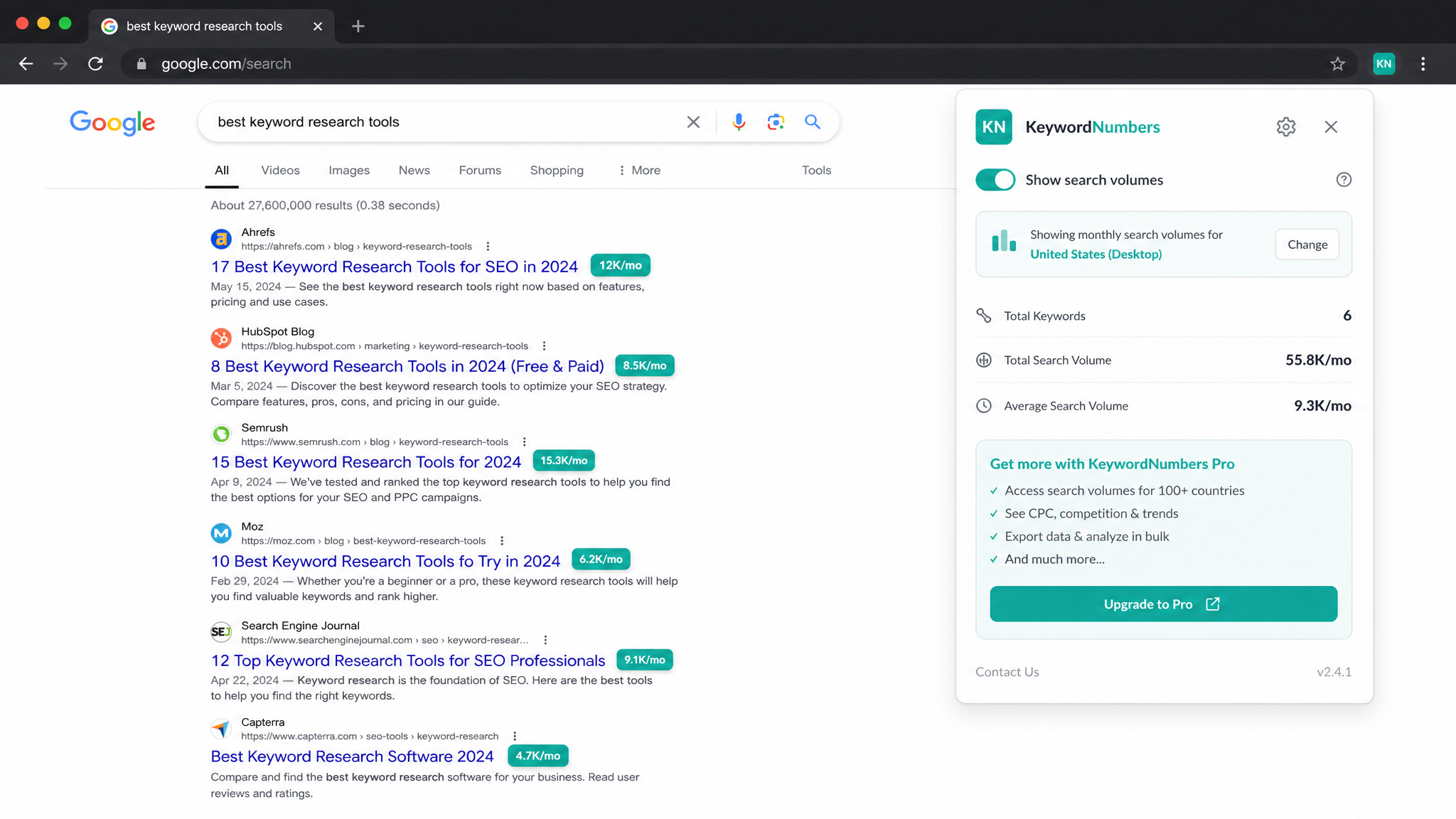
Free ebook: The Free SEO Stack
Keyword research without paying for Ahrefs — the complete guide. Read it online or download the PDF.
100% free · No spam · Unsubscribe any time
Ever found yourself wondering just how many people are actually searching for your chosen keywords—or are you just shouting into the void? If you’re serious about SEO, content planning, or digital marketing, knowing real search volume is like switching on the lights in a dark room. In this guide, you’ll see why search volume is the unsung hero of keyword research, why a Chrome extension is like having a pocket-sized data analyst, and how you can get instant, dead-simple numbers with the KeywordNumbers Chrome Extension as you roam the web.
Why Search Volume is SEO’s Secret Sauce
Here’s what most people miss: search volume isn’t just a random stat to stick in a report. It’s your compass. It tells you—every month—how many real humans go looking for a keyword. Think of it as the queue outside a café: long queue, high search volume, plenty of hungry customers. Here’s why you need it:
When you base your strategy on real numbers, your content stops being wishful thinking and starts being a traffic magnet.
The Annoyance: Getting Reliable Search Volume Data
Let’s be honest: most free keyword tools are about as precise as a weather forecast from 1950. They’ll give you a ballpark, but don’t expect to build an empire on estimates alone. Manual research? That’s fine if you like copying and pasting between fifteen tabs and slowly losing your will to live.
But here’s the pattern interrupt: a Chrome extension for search volume gives you live data right in your browser. No tab juggling, no switching tools—just instant numbers as you search Google or spy on competitors. It’s like having a speedometer for your keyword research.
Meet the KeywordNumbers Chrome Extension (Your New Shortcut)
Say hello to the KeywordNumbers Search Volume Chrome Extension:
Ready to save yourself the hassle? Grab it free from the Chrome Web Store.
Here’s How It Works (A Worked Example)
Still sceptical? Let’s see it in action. Imagine you run a DIY blog — wherever in the world your readers are — and want to size up the keyword “garden shed.”
| Keyword | Monthly Search Volume |
|---|---|
| garden shed | 12,100 |
| Keyword | Monthly Search Volume |
|---|---|
| wooden garden shed | 3,600 |
| Keyword | Monthly Volume |
|---|---|
| 6x4 garden shed | 2,400 |
| 1.8x1.2m shed | 250 |
Now you know whether your readers prefer feet or metres—and which terms are most likely to fill up your garden shed blog with visitors.
How to Install and Use the Extension (It’s Ridiculously Easy)
No IT degree required. Just:
If you fancy more in-depth analysis or want to export lists like a proper data nerd, check out the free Keyword Search Volume Tool on KeywordNumbers.com. Yes, that means CSVs for your spreadsheets.
Chrome Extension vs Other Search Volume Tools: The Showdown
Let’s be practical. Here’s how the KeywordNumbers extension stacks up against the usual suspects:
| Method | Ease of Use | Cost | Data Display |
|---|---|---|---|
| KeywordNumbers Chrome Extension | Very easy | Free | Inline in Google |
| Online Keyword Tools (e.g. KeywordNumbers.com) | Moderate | Free | Website dashboard |
| Google Keyword Planner | Moderate | Free | Requires AdWords |
| Bulk CSV Exports (via tools) | Moderate | Varies | Spreadsheet |
If you want lightning-fast, in-context data, the extension wins by a country mile. For serious deep dives—filters, exports, trends—jump over to the KeywordNumbers free tool and go wild.
Questions People Are Actually Asking
How accurate is the KeywordNumbers Chrome extension?
The KeywordNumbers extension is built on up-to-date, reliable data sources, with regular updates to match what’s actually happening in the search world. No tool is perfect (unless you’ve got a crystal ball), but for practical SEO and planning, it’s impressively spot-on.
Can I see search volume for different countries?
Absolutely. The extension lets you switch between global and local data—just tweak the settings to zero in on your target country or region. Handy if you’re writing for Brits, Aussies, or anyone in between.
Is the KeywordNumbers extension free to use?
It is! No subscriptions, no secret invoices, no “free trial” shenanigans. The core search volume feature is genuinely free.
Will it work on any keyword in Google Search?
You bet. Whatever you type into Google, the extension jumps in with the numbers. It even picks up volumes for related searches and autocomplete suggestions. No keyword left behind.
How does it compare to tools like Google Keyword Planner?
Google Keyword Planner is okay if you don’t mind broad ranges and setting up an AdWords account. The KeywordNumbers extension, on the other hand, serves you precise numbers right in your browser—no extra accounts, no hoop-jumping required.
Does it support other search engines like Bing or DuckDuckGo?
Right now, it’s all about Google Search (where most SEO action happens). Wider search engine support is on the roadmap, so keep an eye out for updates.
Can I export the keyword data?
While the extension itself is for instant, inline data, you can hop over to the KeywordNumbers online tool for list analysis, filtering, and good old CSV exporting.
Is this the best Chrome extension for keyword research?
For pure search-volume-at-a-glance, it is hard to beat — it puts real monthly numbers directly inside Google results, free, with no account. Most "best Chrome extension for keyword research" round-ups favour tools that are either paid or bolt on features you rarely use. If your priority is fast, reliable volume data as you browse, the KeywordNumbers extension covers the job without the price tag.
Is there a free keyword extension for Chrome with no sign-up?
Yes. The KeywordNumbers Search Volume extension is genuinely free and needs no account, no credit card and no trial. Install it from the Chrome Web Store, search as normal, and the numbers appear straight away.
Conclusion: Give Your SEO Strategy a Shot of Search Volume
If you want to build content that actually gets found (and not just admired by your mum), you need keyword search volume front and centre. The KeywordNumbers Chrome Extension puts those numbers under your nose, right as you need them. For bulk research or next-level slicing and dicing, don’t forget the free Search Volume Tool on KeywordNumbers.com.
Free tools to put this into practice
Reading’s grand, but taking action is where the magic happens. Here are the free KeywordNumbers tools that’ll actually move the SEO needle:
Every one of our free SEO tools is actually free—no sign-up, no catches, just results.
Related searches this guide covers
Looking for a search volume extension for Google Chrome? Every tool covered above is exactly that. If you want to see search volume chrome extension results without paying, the free KeywordNumbers extension shows estimated monthly volume directly on Google and YouTube with no sign-up — the simplest search volume extension google chrome option available today.
Compare all the options in our best free search volume Chrome extensions guide.
Free ebook: The Free SEO Stack
Keyword research without paying for Ahrefs — the complete guide. Read it online or download the PDF.
- Which free tools replace Ahrefs, SEMrush & Moz
- Step-by-step keyword research workflow
- How to find content gaps without paying a penny
- The exact stack KeywordNumbers is built on
100% free · No spam · Unsubscribe any time
Ready to research your keywords?
Try our free keyword tools — no signup required.