Internet Speed Analyser: Unmask the Sneaky Files Slowing Down Your Website
Print / Save as PDFInsider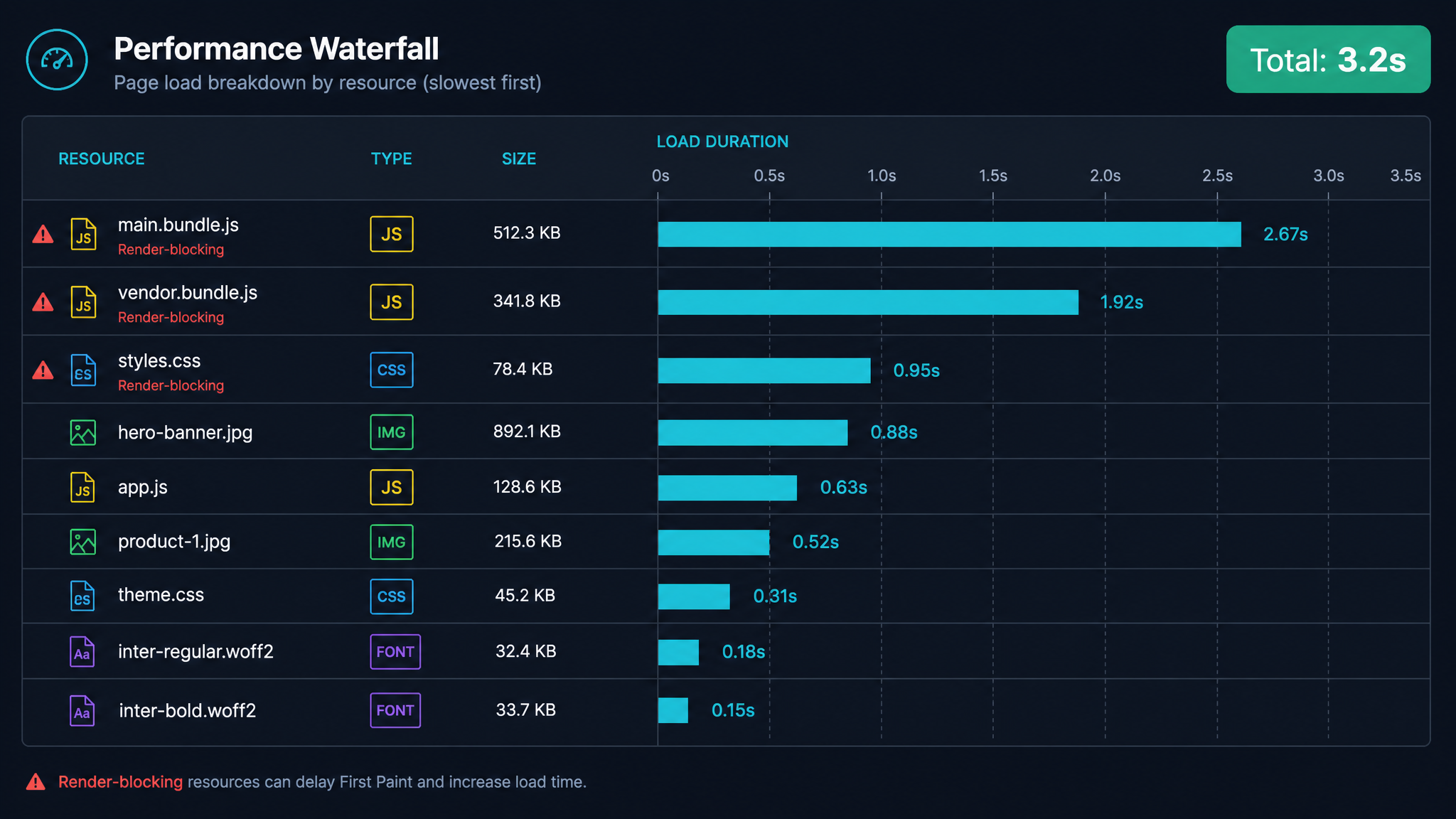
Free ebook: The Free SEO Stack
Keyword research without paying for Ahrefs — the complete guide. Read it online or download the PDF.
100% free · No spam · Unsubscribe any time
If your website feels like it's trudging through treacle—or if your users bounce because your pages take longer to load than a Sunday roast—you're definitely not alone. In this guide, I'll show you exactly how to sniff out which resources are making your site drag using an internet speed analyser, how to read those results (without a computer science degree), and what practical steps you can take to pick up the pace.
Why Website Speed Matters (Hint: Nobody Likes Waiting)
Let’s cut to the chase: people hate waiting around for websites. It's like being stuck at the supermarket behind someone counting out coppers. A slow site frustrates visitors, tanks your SEO, and can even put a dent in your sales or sign-ups. Just a one-second lag can mean fewer conversions—no exaggeration. That’s why keeping tabs on your website’s speed and resource loading times is a must for anyone with even a toe in the web game.
Resource Loading: The Digital Baggage Claim
Ever notice how a web page pulls in loads of files—images, scripts, fonts, all that jazz—before it lets you in? That’s resource loading: your browser basically running around like a bellhop, fetching every asset a site needs to look and work right. The heavier or more awkward the luggage (read: files), the longer you’re left waiting at the carousel.
How to Identify Slow Loading Resources (Without Losing Your Mind)
Here’s what most people miss: it’s rarely your whole site that’s slow. It’s a handful of problem children—one bloated image, a sluggish third-party script—that turn a quick load into a crawl. Here’s how you track them down:
1. Fire Up an Internet Speed Analyser
Forget decoding waterfall charts like you’re Alan Turing. The KeywordNumbers Slow Resources Tool does the legwork: it scans your page, lists every resource, and shows how long each takes to load. It's like an X-ray for your website’s arteries—revealing the cholesterol-clogged files.
2. Spot the Slowpokes
What are you looking for? Anything with a load time over 1 second is worth a raised eyebrow. Keep a special eye on:
| Resource | Size | Load Time |
|---|---|---|
| /images/hero-banner.jpg | 1.2 MB | 2.4 sec |
| /scripts/app.js | 350 KB | 0.9 sec |
| https://fonts.googleapis.com/font | 50 KB | 1.1 sec |
| /css/styles.css | 75 KB | 0.3 sec |
| /images/logo.png | 18 KB | 0.1 sec |
In this case, the hero image and Google font are the digital equivalent of wearing ankle weights—prime targets for trimming down.
3. Compare Performance (Metric, Imperial, and Just Plain Weird)
Let’s put numbers into something a bit more tangible. Let’s say your page tips the scales at 2.5 MB:
On a 20 Mbps (megabits per second) connection, in theory, that should load in about 1 second. But life’s rarely that neat—especially if you’re browsing from a countryside cottage, a regional Aussie shack, or anywhere the cows outnumber the fibre cables.
How to Fix Slow Loading (And Actually See Results)
Once you’ve fingered the culprits with the slow resources analyser, here’s the plan of attack:
Real-World Example: From Sluggish to Slick
Here’s a scenario you might recognise. Your homepage takes 6 seconds to load. You run the KeywordNumbers Slow Resources Tool and spot:
Questions People Are Actually Asking
How to fix slow loading?
Start by spotting which resources are moving like molasses (big images, clunky scripts, or laggy fonts) with a speed analyser. Then, compress images, trim down your code, ditch unnecessary plugins, and use browser caching. Simple, but mighty.
Why is loading so slow?
Usually, it’s a cocktail of oversized files, a lazy server, a pile-up of third-party scripts, or just a dodgy connection. Analysing resource load times shows you exactly which bouncer is holding up the queue.
What is resource loading?
It’s how your browser fetches every file a webpage needs—images, scripts, stylesheets, the works. If any one of them drags its feet, your whole page gets held up.
How to fix slow website loading?
Spin up the KeywordNumbers Slow Resources Tool, flag the troublemakers, and then get ruthless: optimise images, minify scripts, enable caching, and trim the external fluff.
Why is Reddit loading so slow?
Could be a perfect storm: surging traffic, overloaded servers, chunky media files, or maybe even a browser extension misbehaving. Checking resource load times with an analyser helps you get to the bottom of it.
Why do some websites load slow?
It’s often down to the usual suspects: oversized images, spaghetti-code scripts, ad-laden pages, or servers halfway around the globe. Track down and fix these, and you’ll notice the difference.
Why is everything loading slow?
If it’s not just one site, your own internet connection could be the villain—think Wi-Fi interference, network congestion, or just plain old slow broadband.
Conclusion: Faster Sites, Happier Visitors
Finding and fixing slow loading resources is the closest thing to a website speed cheat code. Use an internet speed analyser like the KeywordNumbers Slow Resources Tool to see exactly what’s slowing you down, sort out the slowest offenders, and watch your site go from sluggish to slick—whether your visitors are in London, Lincoln, or Laos.
Free tools to put this into practice
Reading is one thing — testing your own pages is what moves the needle. Here are the free KeywordNumbers tools that pair best with this guide:
Every one of our free SEO tools is genuinely free to use, with no sign-up required.
Free ebook: The Free SEO Stack
Keyword research without paying for Ahrefs — the complete guide. Read it online or download the PDF.
- Which free tools replace Ahrefs, SEMrush & Moz
- Step-by-step keyword research workflow
- How to find content gaps without paying a penny
- The exact stack KeywordNumbers is built on
100% free · No spam · Unsubscribe any time
Ready to research your keywords?
Try our free keyword tools — no signup required.