Meta Tag Analyser: The X-Ray Specs Every SEO Needs to See What Google Sees
Print / Save as PDFInsider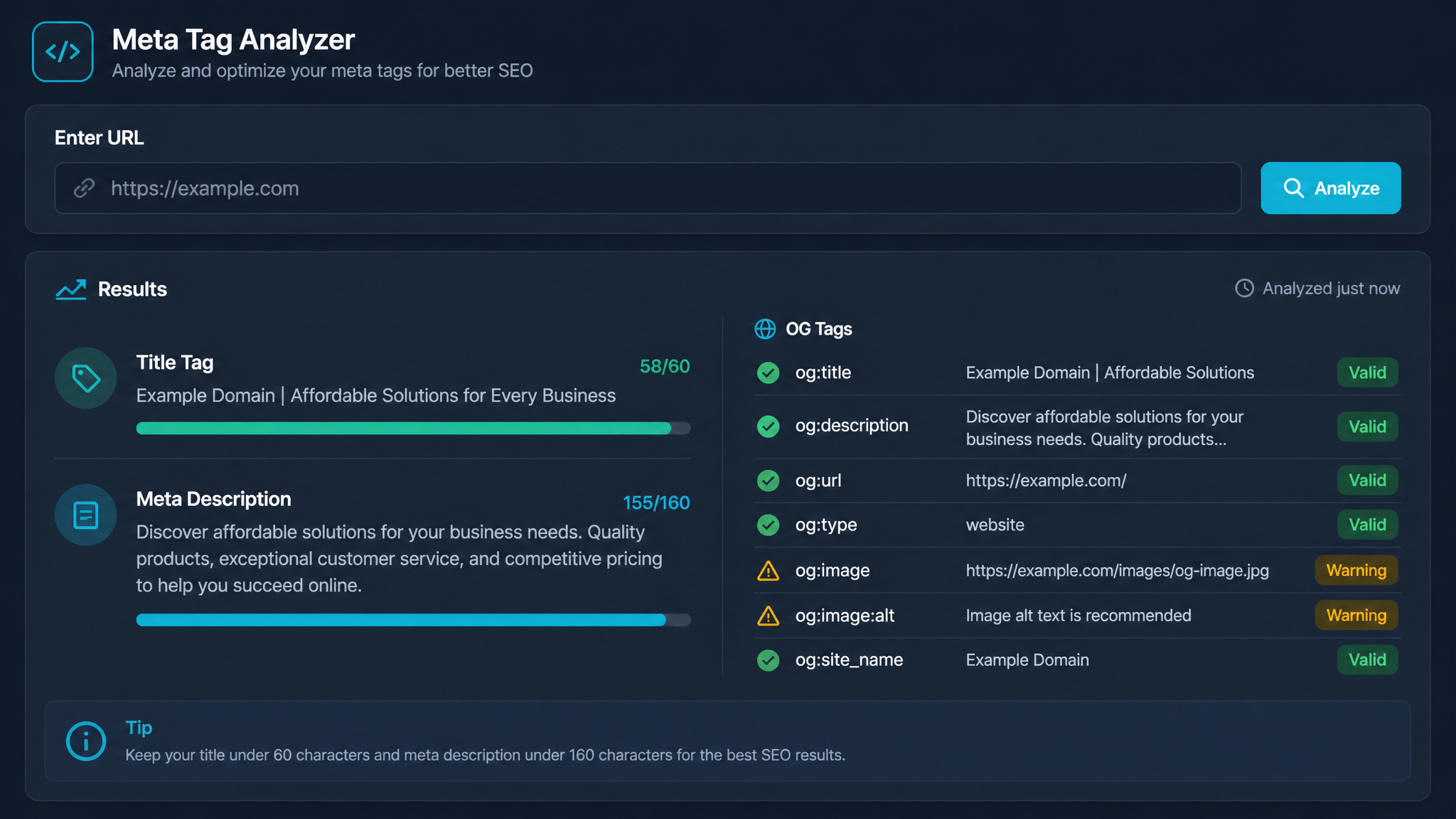
Free ebook: The Free SEO Stack
Keyword research without paying for Ahrefs — the complete guide. Read it online or download the PDF.
100% free · No spam · Unsubscribe any time
Ever wondered why your beautifully crafted page title gets hacked off halfway in Google’s search results? Or why your meta description reads like a Tesco receipt after Google’s had its way with it? You’re in the right place. Today, you’ll learn what a meta tag analyser is, how it works, and exactly how it can save your SEO bacon—complete with punchy examples, practical tips, and a dash of dry wit.
What Is a Meta Tag Analyser, Really?
Let’s cut to the chase: a meta tag analyser is like a mechanic’s diagnostic tool for your website’s search engine bits. Pop your URL in, and it tells you what’s squeaking, missing, or leaking oil in your meta tags (title, description, robots, and more). It’s not magic. It’s just a brutally honest checklist that saves you from SEO embarrassment.
Think of it as taking your site for an MOT before Google’s search bots come along for a joyride. No more guesswork, no more “Why am I not ranking?” existential crises.
Why Meta Tags Are the Unsung Heroes of SEO
Here’s what most people miss: meta tags aren’t just digital window dressing. They’re the shop window, the sandwich board, and the bouncer deciding who gets in. Get them right, and you’ll catch more eyeballs (and clicks) in the SERPs. Get them wrong, and Google will rewrite them faster than you can say “algorithm update.”
Your meta title is basically your page’s headline in the search results—if it’s too long, Google will snip it. Your meta description? Think of it as your 30-second sales pitch. Miss the mark, and you might as well be selling ice to penguins.
How a Meta Tag Analyser Works (And Why It’s Not Optional)
Bet you didn’t realise: most meta tag analysers do more than just count characters. They check for:
For a hands-on look, try the KeywordNumbers Meta Tag Analyser tool—it’ll scan your page and spit out exactly what’s there (or missing), with zero fluff.
Worked Example: See a Meta Tag Analyser in Action
Imagine you’ve got a page with this meta title:
> "The Ultimate Guide to Picking SEO Tools – Free Tips for 2024 Across UK, US, and Beyond"
Google’s cut-off is around 580-600px (about 23-24 inches), so you’re nearly there, but if you waffle on, you’ll lose the punchline. A good meta tag analyser flags this instantly—no more copy-paste into a word counter, squinting at the screen like you’re defusing a bomb.
When You Should Use a Meta Tag Analyser
Not sure when to break out the tool? Here’s your cheat sheet:
In short: if you’re touching meta tags, run them through an analyser. No exceptions for “but mine’s really good.”
What to Look For: A Quick Table
| Meta Tag | What to Check | Why It Matters |
|---|---|---|
| Title | Length, keywords, uniqueness | SERP visibility & CTR |
| Description | Length, clarity, keywords | More clicks, better messaging |
| Robots | Indexed/followed? | Don’t accidentally block pages |
| Canonical | Correct canonicalised URL | Avoid duplicate content penalties |
| Open Graph/Twitter | Present/accurate? | Social shares look sharp |
How to Use a Meta Tag Analyser (Without Going Cross-Eyed)
Questions People Are Actually Asking
What is meta tag?
A meta tag is a snippet of code in your website’s header that tells search engines and browsers essential info about the page—things like the title, description, and whether to index or follow links. Think of it as your site’s business card, but for Google.
What is meta tagging?
Meta tagging is the process of adding and optimising meta tags (like title, description, robots) in your web pages. It’s about making sure your pages introduce themselves properly to search engines.
How do meta tags work?
Meta tags work by sitting invisibly in your page’s HTML, quietly feeding info to search engines. Google scans these tags to decide how your page appears in search results—and whether it should show up at all. They don’t guarantee rankings, but they do help you look your best in the SERPs.
Why does Google sometimes ignore my meta tags?
Even if you’ve written the perfect title and description, Google sometimes rewrites them if it thinks it can do better for the user’s query. Usually, this happens if your tags are too long, stuffed with keywords, or not relevant enough to the page content.
Can I have duplicate meta tags on different pages?
You can, but you really shouldn’t. Duplicate meta tags confuse search engines, dilute your relevance, and can hurt your rankings. Every page deserves its own tailor-made meta title and description.
What’s the ideal length for meta titles and descriptions?
Aim for meta titles under 60 characters (or 580 pixels), and meta descriptions under 155-160 characters (about 920 pixels). It’s not just about numbers; it’s about making every word earn its keep.
Do meta tags affect social media shares?
Yes! Open Graph and Twitter Card meta tags control how your page looks when shared on Facebook, Twitter, and LinkedIn. Without them, your shares might look like a plain biscuit next to your competitors’ fancy cupcakes.
Conclusion: Get Your Meta House in Order
If you want to stop Google (and everyone else) misrepresenting your pages, a meta tag analyser is your secret weapon. It’s the difference between a tidy front garden and a jungle of weeds—one gets you visitors, the other gets you ignored.
Ready to see what search engines see—and fix what’s holding you back? Run your site through the KeywordNumbers Meta Tag Analyser and start cleaning up your meta game today.
Free tools to put this into practice
Reading is one thing — testing your own pages is what moves the needle. Here are the free KeywordNumbers tools that pair best with this guide:
Every one of our free SEO tools is genuinely free to use, with no sign-up required.
Free ebook: The Free SEO Stack
Keyword research without paying for Ahrefs — the complete guide. Read it online or download the PDF.
- Which free tools replace Ahrefs, SEMrush & Moz
- Step-by-step keyword research workflow
- How to find content gaps without paying a penny
- The exact stack KeywordNumbers is built on
100% free · No spam · Unsubscribe any time
Ready to research your keywords?
Try our free keyword tools — no signup required.