How to Analyse Website Metatags: The Unsung SEO Sidekick No One Talks About
Print / Save as PDFInsider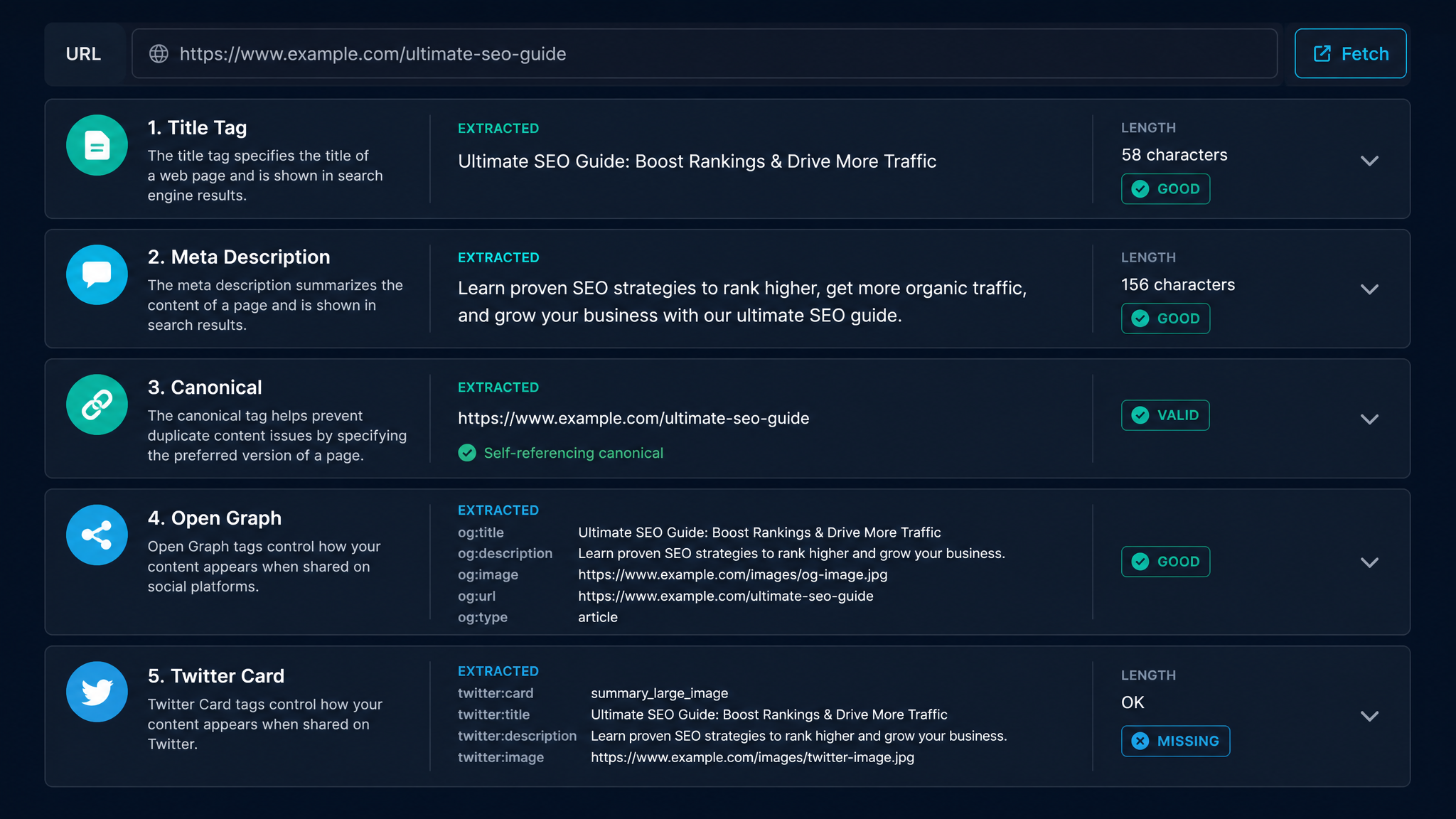
Free ebook: The Free SEO Stack
Keyword research without paying for Ahrefs — the complete guide. Read it online or download the PDF.
100% free · No spam · Unsubscribe any time
Ever had that sneaking suspicion your site’s SEO is missing something obvious? Spoiler: it’s usually your meta tags. In this no-fluff guide, I’ll show you exactly how to check, analyse, and polish up your meta tags, step-by-step, using free tools. Plus, we’ll clear up the age-old confusion between meta tags, meta descriptions, and those mysterious meta ads everyone asks about.
Meta Tags: The Invisible Hand of Website SEO
Let’s start with the basics. Meta tags are like the little post-it notes you leave for Google and Facebook, hidden in your site’s HTML. You don’t see them, but search engines and social platforms do—and they actually read them (unlike your last WhatsApp apology). The classics include:
| Meta Tag | What It’s For |
|---|---|
| Title | Search result headline & browser tab name |
| Description | Search snippet & social preview |
| Robots | Indexing/crawling instructions for search engines |
Why Bother With Meta Tags? (Hint: They’re Your SEO Wingman)
Here’s what most folks miss: meta tags are your site’s first impression in Google’s singles bar. Get them right, and you’ll:
They also help screen readers and accessibility tools. Basically, meta tags are the business cards for your web pages—crumpled or blank ones don’t land you meetings.
How to Check Meta Tags: Three Ways (All Free, None Involve a Degree in Coding)
1. The Manual Way: Like Peeking Behind the Curtain
Ever wanted to see your website’s backstage? Here’s how:
Ctrl+U on Windows / Cmd+Option+U on Mac).`html
`
Don’t worry, you don’t need to actually read code—just spot the relevant lines.
2. The Lazy (Ahem, Efficient) Way: Free Online Tools
Why squint at code when a tool can do it for you? Use the Metatag Checker on KeywordNumbers.com—pop in your URL, and it instantly spills all your meta secrets: titles, descriptions, the lot.
3. The One-Click Way: Browser Extensions
If you’re a serial tab-opener, try SEO browser extensions like MozBar, SEOquake, or Detailed. These give you meta tag info at a glance as you browse—think of them as your SEO x-ray specs.
How to Analyse Website Meta Tags (And Not Bore Yourself Rigid)
When you’re eyeing up your meta tags, ask yourself:
Let’s say you’re sprucing up a page about “Best Running Shoes”.
Notice how it covers both UK and US sizing (metric and imperial—no one left behind), and actually entices you to click.
How to Add or Edit Meta Tags Without Breaking Stuff
Adding meta tags is easier than assembling IKEA furniture—and with fewer leftover screws:
Meta Tag Facepalms: Common Mistakes to Dodge
Questions People Are Actually Asking
What are meta tags on a website?
Meta tags are snippets of HTML in your page’s section. They whisper important details to search engines and browsers about your page’s title, description, and whether it should be indexed.
How to check meta tags on a website?
Open the page’s source code, or—if you’d rather not play with HTML—use a free tool like the Metatag Checker on KeywordNumbers.com to see every meta tag with zero fuss.
How to do meta tags?
Add meta tags inside the of your HTML, like so:
`html
`
Alternatively, if you’re using a CMS or SEO plugin, just fill in the fields they provide—no code needed.
How to add meta tags to website?
On WordPress and friends, SEO plugins let you add meta tags with a few clicks. On static sites, add them directly in the HTML’s section. Always check your changes with a tool to make sure you haven’t missed anything.
What do meta tags do?
Meta tags help search engines get what your content’s about, shape how your site shows up in search results, and can boost click-through rates. Some even tell Google what not to show, or help your site look sharp when shared on social media.
What is a meta description tag?
A meta description tag is a short summary of your page, slotted into the HTML’s . It’s what often appears as the snippet in search results, tempting users to click through.
How much do meta ads cost? (And related questions)
"Meta ads" usually means ads on Facebook/Instagram (the company formerly known as Facebook). Prices jump around depending on your audience, targeting, and competition—no fixed price tags. If you’re talking SEO meta tags: they’re free, unless you’re paying someone else to write them.
Conclusion: Meta Tags—Small Changes, Big Gains
Meta tags aren’t glamorous, but they’re the bedrock of good SEO. Nail your meta titles and descriptions, and you’ll boost visibility and clicks with minimal effort. Want a quick, free look under your site’s bonnet? Visit the Metatag Checker on KeywordNumbers.com and get the lowdown in seconds.
Free tools to put this into practice
Reading’s fine, but taking action is where the magic happens. Test your own pages with these free KeywordNumbers tools:
Every one of our free SEO tools is genuinely free to use, with no sign-up and no strings attached.
Weighing up Moz? Compare it first
Before you commit to a paid plan, it is worth seeing what else is out there. Read our full guide to the best Moz alternative tools — the free and paid options UK marketers actually use.
Free ebook: The Free SEO Stack
Keyword research without paying for Ahrefs — the complete guide. Read it online or download the PDF.
- Which free tools replace Ahrefs, SEMrush & Moz
- Step-by-step keyword research workflow
- How to find content gaps without paying a penny
- The exact stack KeywordNumbers is built on
100% free · No spam · Unsubscribe any time
Ready to research your keywords?
Try our free keyword tools — no signup required.