SERP Analysis Tools Comparison: Which One Actually Spies on Google’s First Page Best?
Print / Save as PDFInsider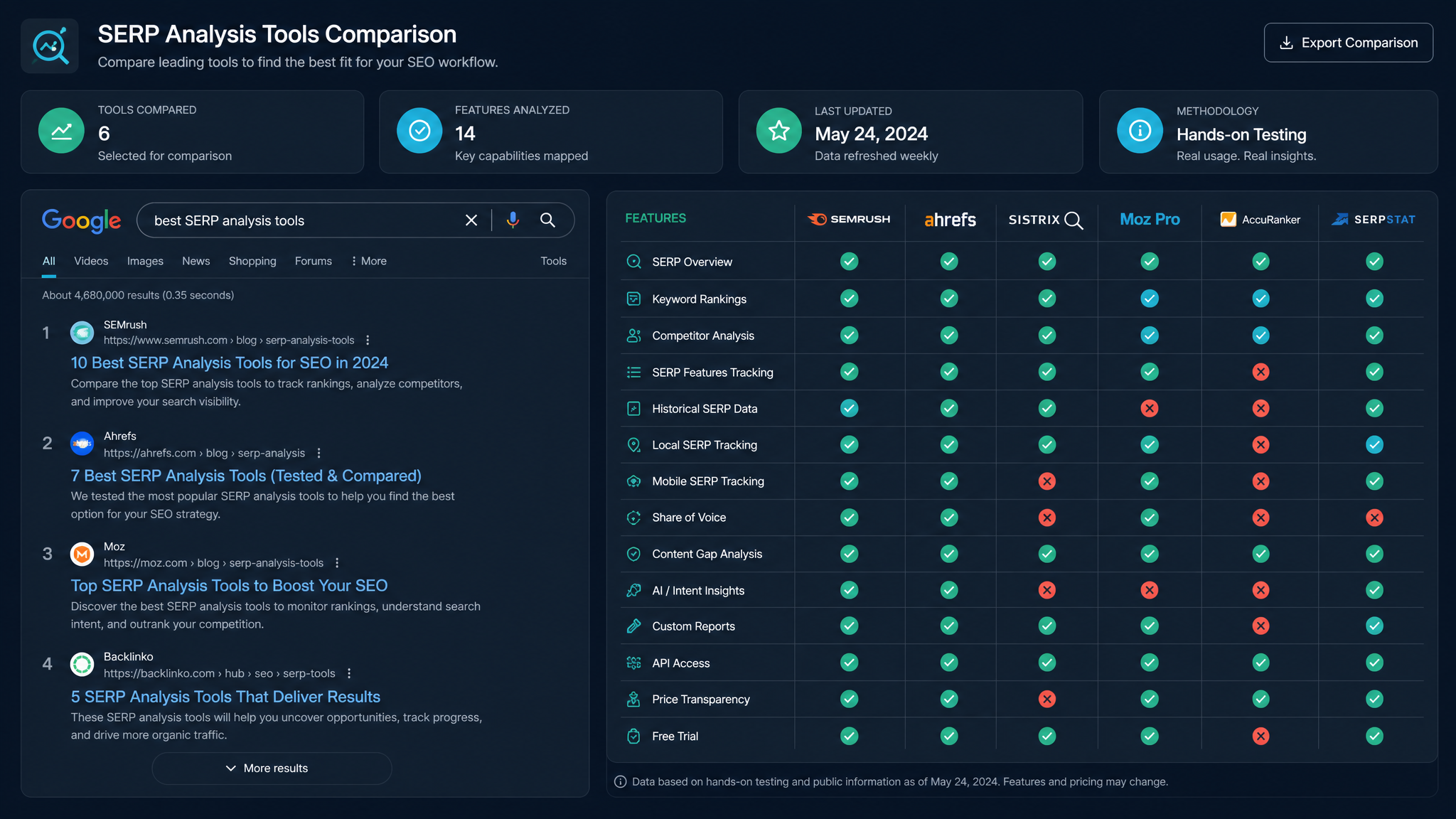
Free ebook: The Free SEO Stack
Keyword research without paying for Ahrefs — the complete guide. Read it online or download the PDF.
100% free · No spam · Unsubscribe any time
Ever tried to figure out why your page is stuck on page two, like a forgotten cheese in the back of the fridge? You need SERP analysis tools. In this guide, we’ll break down what SERP analysis is, why it matters, and—most importantly—how the top SERP analysis tools compare, feature by feature. We’ll even throw in a worked example with real numbers. No fluff, just the real deal (and a few dry jokes to keep the caffeine flowing).
What Actually Is SERP Analysis (and Why Should You Care)?
Here’s what most people miss: ranking on Google isn’t about stuffing in more keywords and praying to the Algorithm Gods. You need to know what’s already working for your target keyword. Enter: SERP analysis.
Think of SERP analysis as reading Google’s tea leaves. You’re not just checking who’s ranking—you’re looking at what types of pages, which features (like featured snippets, People Also Ask, videos), and what it takes to break into that top 10. It’s like scoping out a party before deciding if you’ll be the star guest, or just another awkward plus-one.
Why Use SERP Analysis Tools (Instead of Doing It the Hard Way)?
Could you open 10 incognito tabs, Google your keyword, and scribble down every result? Sure. That’s the SEO equivalent of mowing a football pitch with nail scissors. SERP analysis tools automate the grunt work, revealing:
If you want to see how your page really stacks up—pixel by pixel—try a SERP preview tool to get a real-world look at your meta tags before Google decides to rewrite them.
The Main Contenders: SERP Analysis Tools Side by Side
Let’s get concrete. Here’s a table comparing four popular SERP analysis tools, plus the free SERP Preview Tool by KeywordNumbers (because sometimes simple wins):
| Tool | Free? | SERP Features Detection | Pixel-perfect Preview | Competitor Metrics | Notes |
|---|---|---|---|---|---|
| Ahrefs SERP Checker | No | Yes | No | Yes | Paid, deep competitor data |
| SEMrush SERP Analysis | No | Yes | Yes | Yes | Paid, great SERP feature detail |
| Moz Keyword Explorer | Limited | Yes | No | Yes | Free limited, paid full; clean UI |
| SERP Preview Tool (KeywordNumbers) | Yes | No | Yes | No | 100% free, perfect for meta previews |
| Mangools SERPChecker | Limited | Yes | No | Yes | Free limited, paid for depth |
No tool does it all. Want to see exactly what your title and meta will look like in the wild? Check them in a live Google preview. Need full competitor and SERP feature data? You’ll want a paid suite.
Worked Example: Analysing a SERP Like a Pro (With Real Numbers)
Let’s say you’re targeting the keyword “best running shoes for flat feet”. Here’s how you’d use SERP analysis tools:
How to Choose the Right SERP Analysis Tool (Without Losing Your Mind)
Bet you didn’t realise how many options were out there, right? Here’s how to pick:
Think of it like your SEO toolkit. Sometimes you need a Swiss Army knife; sometimes, just a screwdriver. (No, not the cocktail. Unless it’s Friday.)
Questions People Are Actually Asking
What is a SERP analysis?
SERP analysis is the process of examining the Search Engine Results Page (SERP) for a given keyword. You’re looking at who’s ranking, what types of content show up, which SERP features appear (like featured snippets or videos), and what you need to do to compete.
What is a SERP feature?
A SERP feature is any special result on the Google results page that isn’t a standard blue-link listing. Think featured snippets, People Also Ask, shopping packs, videos, star ratings, and more. They gobble up clicks, so spotting them is vital for SEO.
What is a SERP?
SERP stands for Search Engine Results Page—the list of results you see after typing a query into Google, Bing, etc. It’s where the SEO battle is fought.
How does a SERP work?
When you search, Google (or another engine) runs your query through its algorithm, matches it to indexed content, and displays what it thinks are the most relevant results. SERP features are added based on intent, freshness, and other factors.
What are SERP features?
SERP features are those eye-catching extras—like featured snippets, local packs, and videos—that appear alongside or instead of regular listings. They help users get answers faster (and can steal your clicks if you’re not optimising for them).
What is SERP data?
SERP data is what you get when you analyse a results page: rankings, URLs, featured snippets, title/meta info, and more. Tools scrape this data so you can see what’s working for your keyword.
Is SERP calculated using supplemental rates?
No, in SEO, SERP rankings aren’t calculated using “supplemental rates”. That phrase is more common in pension jargon (a totally different world). For SEO, ranking is all about relevance, authority, and intent—no supplemental tax required.
Conclusion: Ready to See Where You Stand?
You now know what SERP analysis is, why it’s crucial, and how the top tools stack up. Whether you’re auditing your meta tags or planning a full competitive teardown, pick the right tool for the job—and preview your SERP appearance before Google does it for you.
Ready to see how your title and meta actually appear in real Google results? Give the KeywordNumbers SERP Preview Tool a spin—before your next launch gets chopped.
Free tools to put this into practice
Reading is one thing — testing your own pages is what moves the needle. Here are the free KeywordNumbers tools that pair best with this guide:
Every one of our free SEO tools is genuinely free to use, with no sign-up required.
Try the Keyword Gap Analysis Tool
Good news — there's now a free tool for exactly this. Give our Keyword Gap Analysis Tool a go and put this guide straight into practice.
Weighing up Moz? Compare it first
Before you commit to a paid plan, it is worth seeing what else is out there. Read our full guide to the best Moz alternative tools — the free and paid options UK marketers actually use.
Free ebook: The Free SEO Stack
Keyword research without paying for Ahrefs — the complete guide. Read it online or download the PDF.
- Which free tools replace Ahrefs, SEMrush & Moz
- Step-by-step keyword research workflow
- How to find content gaps without paying a penny
- The exact stack KeywordNumbers is built on
100% free · No spam · Unsubscribe any time
Ready to research your keywords?
Try our free keyword tools — no signup required.