Website Speed Test: The Internet Speed Analyzer Every Site Owner Needs (No Tech Degree Required)
Print / Save as PDFInsider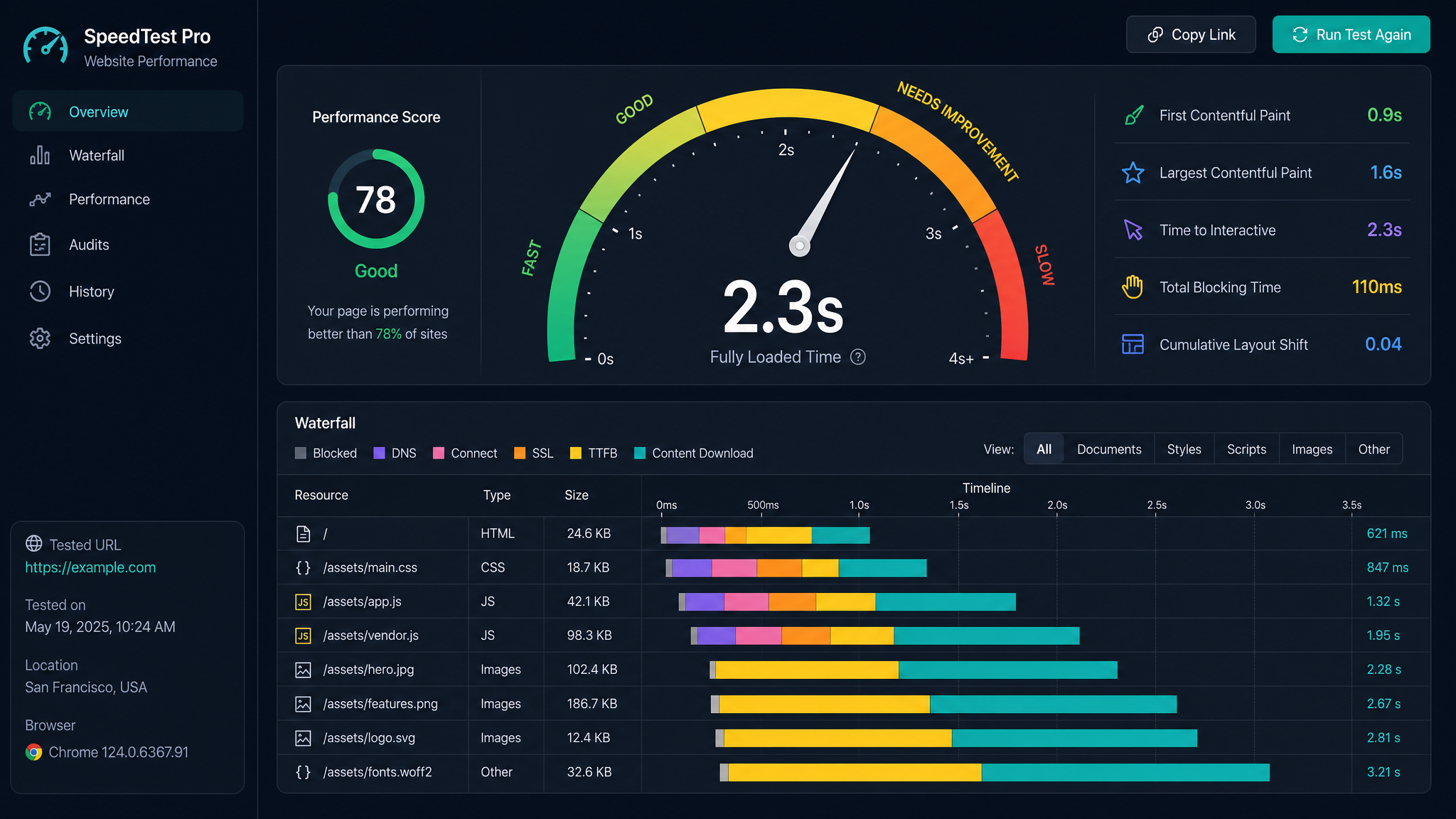
Free ebook: The Free SEO Stack
Keyword research without paying for Ahrefs — the complete guide. Read it online or download the PDF.
100% free · No spam · Unsubscribe any time
Ever wondered if your website loads at lightning speed or plods along like a pensioner with a limp? In this guide, you’ll learn how to run a website speed test, why your online reputation depends on it, and how to use an internet speed analyzer (with zero need for a computer science degree).
Why Website Speed Is a Big Deal (and Not Just for Impatient Millennials)
Let’s get this out of the way: slow websites lose visitors faster than a dodgy pub loses customers. If your pages take forever to load, people bounce. Google notices. Rankings slip. Revenue, well, let’s not talk about that. Site speed is the digital equivalent of a handshake — if it’s limp, people remember.
Here’s what’s at stake:
How to Test Website Speed (Without Breaking a Sweat)
Testing your site’s speed shouldn’t feel like assembling flatpack furniture. Here’s the quick and painless way:
What is an Internet Speed Analyzer (and Why Should You Care)?
Think of an internet speed analyzer as the MOT for your website. It checks how quickly your site loads for real people, on real connections — not just in your developer’s basement with gigabit fibre.
A good analyzer will measure:
It’s like having a personal trainer for your website, pointing out what’s working and what desperately needs a workout.
Worked Example: Analysing Website Speed (Real Numbers, Real Lessons)
Let’s say you run KeywordNumbers’ speed test tool on your homepage. Here’s what you might get:
| Metric | Result (Metric) | Result (Imperial) |
|---|---|---|
| Page Load Time | 2.4 seconds | 2.4 seconds |
| Total Page Size | 1.2 MB | 1,228 KB |
| Number of Requests | 37 | 37 |
| Performance Score | 85/100 | 85/100 |
What Slows Down a Website? (And How to Fix It)
Bet you didn’t realise your fancy theme or that widget you installed in 2017 could be weighing your site down. Here’s what commonly drags performance:
How to Use a Website Speed Test Tool (Step-by-Step)
Here’s what most people miss: speed tests are only useful if you know how to interpret the results — and what to do next. So, after you’ve got your numbers from a tool like the KeywordNumbers Speed Test, here’s what to do:
Questions People Are Actually Asking
How to test website speed?
Easy: use a reputable website speed test tool. Paste in your site’s URL, hit test, and review the results. For a fuss-free option, try the KeywordNumbers Website Speed Test.
How to check website speed test?
After running the test, check the main metrics: page load time (in seconds), page size (MB/KB), and number of requests. Compare these to best-practice benchmarks (under 3 seconds load time is your goal).
How to run a website speed test?
Pick your tool, enter your website address, and start the test. Tools like the KeywordNumbers Speed Test will give you detailed results and clear next steps. No coding needed.
How to test website speed for free?
Most online speed test tools are free to use. Just make sure you’re using a reputable analyser (avoid anything plastered with pop-ups or sign-up walls). KeywordNumbers’ tool is completely free.
How to test website speed performance?
Beyond just load time, look at specific elements: time to first byte, first contentful paint, and total blocking time. Good tools break these down for you so you can see exactly where delays creep in.
How to perform the page speed test?
Visit a speed test website, enter your page URL, and run the analysis. Don’t just test your homepage — check key landing pages and blog posts too. Performance can vary across your site.
How to test my website speed?
If you own the site, you can test both the public version and any staging environments. Run tests before and after major updates to catch any accidental slowdowns.
Conclusion: Don’t Let a Slow Site Drag You Down
Website speed isn’t just for the techy crowd — it’s your online first impression, SEO ranking, and bottom line all rolled into one. Grab a free website speed test, see where you stand, and start trimming the digital fat today. Your visitors (and Google) will thank you.
Free tools to put this into practice
Reading is one thing — testing your own pages is what moves the needle. Here are the free KeywordNumbers tools that pair best with this guide:
Every one of our free SEO tools is genuinely free to use, with no sign-up required.
Free ebook: The Free SEO Stack
Keyword research without paying for Ahrefs — the complete guide. Read it online or download the PDF.
- Which free tools replace Ahrefs, SEMrush & Moz
- Step-by-step keyword research workflow
- How to find content gaps without paying a penny
- The exact stack KeywordNumbers is built on
100% free · No spam · Unsubscribe any time
Ready to research your keywords?
Try our free keyword tools — no signup required.