Free tools to boost your SEO strategy
Keyword Cannibalisation Checker
Find pages on your site that compete for the same keyword. Enter your website address and we'll scan your pages to flag overlapping keywords that could be splitting your rankings.
We scan up to 30 pages from your sitemap (or homepage links). Large sites may take up to a minute.
What is keyword cannibalisation and why does it matter?
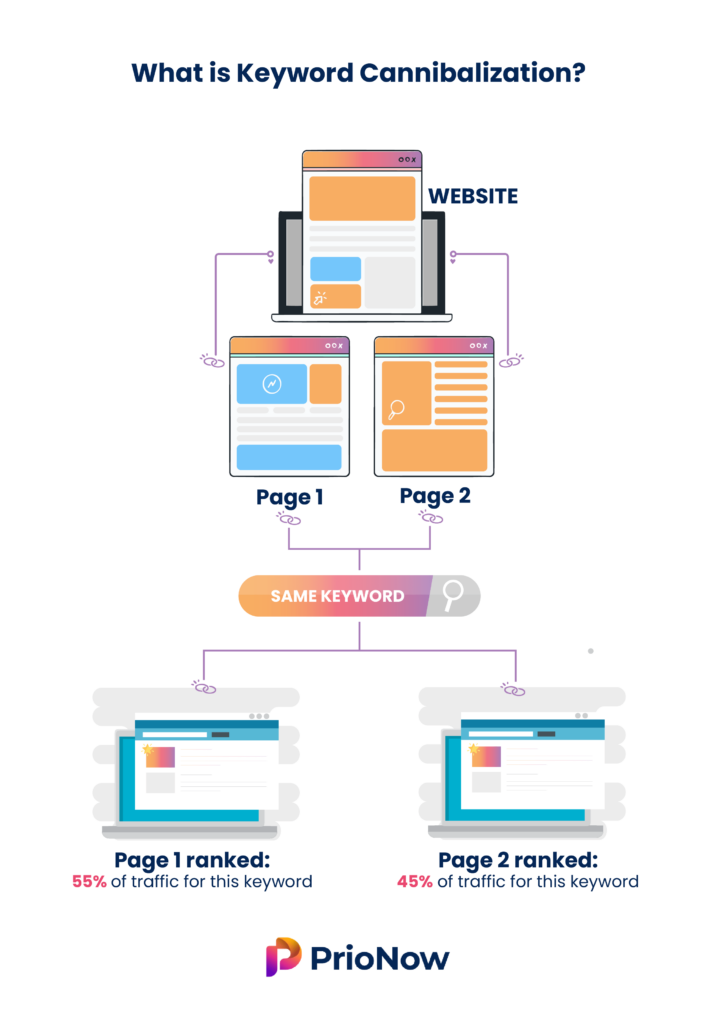
Keyword cannibalisation happens when two or more pages on your website target the same keyword or search intent. Instead of one strong page ranking well, you end up with several weaker pages competing against each other — which splits your click-through rate, backlinks and authority, and can confuse search engines about which page to show.
This free checker scans your site's pages, reads each page's title and headings, and flags phrases that multiple pages appear to target. For every overlap it shows the affected URLs and a practical recommendation — merge the pages, add a canonical tag, or differentiate the content so each page targets a distinct keyword.
How to fix it: decide which page you want to rank, then consolidate the weaker pages into it (with a 301 redirect), point canonicals at the primary page, or rewrite the overlapping pages to focus on clearly different keywords and search intents.
Free ebook: The Free SEO Stack
Keyword research without paying for Ahrefs — the complete guide. Read it online or download the PDF.
100% free · No spam · Unsubscribe any time
What is the Keyword Cannibalisation Checker?
Keyword cannibalisation can seriously harm your site's SEO by causing multiple pages to compete for the same keyword, diluting your ranking potential. Our Keyword Cannibalisation Checker scans your website, reads the meta titles and headings on each page, and flags keyword phrases that more than one page appears to target — so you can resolve the conflicts and improve your search performance.
Example: discovering two blog posts fighting for the same keyword
You check “best running shoes” and the tool finds two of your pages ranking for it: a 2023 review at position 14 and a 2024 update at position 18. Neither ranks well because Google can’t decide which to show. After merging them into one definitive post and 301-redirecting the old URL, the consolidated page climbs to position 6.
Both targeting “best running shoes”
Neither ranking well
One strong page, 301 redirect
Key Features
On-Site Crawl
Enter your website address and the tool discovers your pages via your sitemap (or homepage links) and reads the meta title and headings on each one — no setup or sign-up needed.
Overlap Detection
We extract the keyword phrases each page targets and highlight the ones claimed by two or more pages, which are the phrases most likely to be cannibalising your rankings.
Affected URLs at a Glance
For every overlapping keyword you get the exact list of competing URLs, so you know precisely which pages are pulling against each other.
Actionable Recommendations
Each issue comes with a clear next step — merge the pages, add a canonical, redirect, or differentiate the content — so you know how to fix it, not just that it exists.
How to Use This Tool
Enter your website URL
Type or paste your site address (for example https://www.example.com). The tool will find and scan up to 30 of your pages.
Add a target keyword (optional)
If you want to check a specific phrase — say “best running shoes” — enter it and we'll show every page that appears to target it.
Review the overlaps
Examine each flagged keyword, the competing URLs, and the recommended action, then merge, canonicalise or differentiate the pages to consolidate your rankings.
Why This Matters for SEO
When two or more pages target the same keyword, they split their link equity, relevance signals and click-through rate, and search engines can struggle to decide which one to rank. The usual result is that all the affected pages rank lower than a single strong page would. Spotting and fixing cannibalisation lets you consolidate that authority into one page, which typically lifts rankings, tidies up your site structure and gives visitors a clearer path to the most relevant content.
Frequently Asked Questions
Related Tools
Each of these does a distinct job — use them together for a complete check.